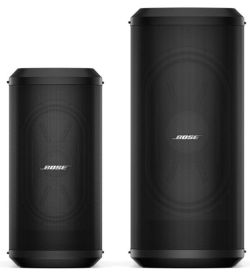
Bose Sub1 and Sub2

Documentation

Sub1/Sub2 Owners Guide

Sub1/Sub2 Quick Start Guide

Training

Comparisons Sub1/Sub2

SpecificationB1B2Sub1Sub2F1 Subwoofer
dB SPL at 1 meter
Continous/Peak
n/a 115 dB/121 dB 117 dB/123 dB 122 dB/128 dB 124 dB/130 dB
Watts RMS
Active/Passive
125
Passive
250
Passive
480
Active
1000
Active
1000
Active
Weight pounds 28 45 35.5 51.7 55
Drivers Two 5.25" Two 10" One 7"x10" race track One 10"x18" race track Two 10"
Cardioid Mode n/a n/a Yes Yes n/a
Compatibility L1 Legacy L1 Legacy L1 Pro, L1 Legacy, S1 Pro L1 Pro, L1 Legacy, S1 Pro L1 Pro, L1 Legacy, S1 Pro

Preferred Method

Connections with Sub1 or Sub2 and the S1 Pro system

For best results, the signal flow should go from

  1.  
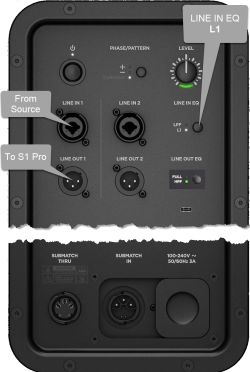
    Sub io panel
    The signal source (e.g., ToneMatch Mixer[1], mixer, DJ console) output to
  2. The Sub1 or Sub2 subwoofer LINE IN 1 ()
  3. The Sub1 or Sub2 subwoofer LINE OUT 1 to
  4. The S1 Pro system with channel volume set to 10 o'clock.
Note these settings on the Sub1 or Sub2
👉 Set LINE IN EQ to L1
👉 Set LINE OUT EQ to S1 (Press and hold LINE OUT EQ button for 4 seconds)

Set up this way,

  1. The Sub1 or Sub2 handles frequencies from 40 Hz (Sub1) 37 Hz (Sub2) to 150 Hz
  2. The S1 Pro system handles frequencies above 150 Hz
Mono - Example with a T4S as the audio source
  • Start with the Volume on S1 Pro and Sub, as shown. Adjust as necessary from there.


The picture shows a stereo setup. The signal flow is from left to right.


Recommended cable

Use an XLR to 1/4 inch (6.3 mm) Tip-Ring-Sleeve cable for best results.


If you use an XLR to XLR cable, the signal may be too hot for the S1 Pro system.

Alternative Connection

Can I connect the S1 Pro Line Out to the Sub?

The method described above is preferred, but you can use the S1 Pro system as the sound source (e.g., microphone and guitar and backing tracks via Bluetooth) Note the following:

  1. The S1 Pro system will sound the same as without the subwoofer (62 Hz - 17 kHz)
  2. The Sub1 or Sub2 will cover from 40 Hz (Sub1) 37 Hz (Sub2) to 150 Hz
  3. You will be able to push S1 Pro system harder (louder) if you route the signal as described at the top of this article

Cooling

Question

How are the Sub1/Sub2 cooled?

Answer

Sub1 and Sub2 have extruded aluminum heat sinks mounted to the backside of the I/O panel. This pulls heat out of the electronics and transfers some to the air moving through the acoustic volume of the sub and helps to cool.[2]