Mixer to Two L1 Model II
Introduction

If you have questions about this article, please post a reply in the community discussion about connecting a mixer to two L1 systems
Connect a third party mixer to two L1 Model IIs.
Most modern mixers have balanced outputs.
These will be XLR 
or
1/4 inch (6.3 mm) Tip-Ring-Sleeve
If your mixer has both kinds of outputs, use whichever is most convenient for you. There is no advantage to one over the other.
Connect a Third Party Mixer to Two L1 Model II
XLR Outputs

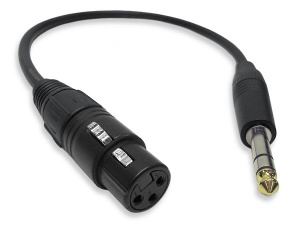
The output from the Third Party Mixer is a balanced mono XLR and the input on the L1 Model II is a balanced mono 1/4 inch (6.3 mm) Tip-Ring-Sleeve so use a cable like this.
 .
.
XLR Female to 1/4" Male TRS Cable
1/4 inch (6.3 mm) Tip-Ring-Sleeve Outputs

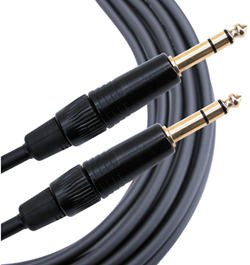
The output from the Third Party Mixer is a balanced mono 1/4 inch (6.3 mm) Tip-Ring-Sleeve and the input on the L1 Model II is a balanced mono 1/4 inch (6.3 mm) Tip-Ring-Sleeve so use a cable like this.
 .
.
1/4" TRS Balanced Patch Cable (audiopile.net)
L1 Model II Gain Staging
For each L1 Model II
L1 Model II Analog Input
The Analog input is a ¼ inch balanced input jack.

Analog input trim (volume, or gain) control
Setting the trim level on the Model II Power Stand is a one-time step. Once you have matched the output of the ToneMatch mixer to the input of the L1 you don't need to adjust it again.

- Set the Trim control on the power stand to the 0 (zero) position.
- Connect the Third Party Mixer Main Output to the Analog Input
- Adjust the volume of the Third Party Mixer Main Output to the reference or nominal output level.
- While playing the source, increase the Trim level so that the Signal/Clip indicator glows green or yellow. This will probably be around 9:00-11:00 o'clock
- If the Signal/Clip indicator glows red, decrease the Trim level so that it glows only green or yellow.
