Backing Tracks

Details about the Stereo to Mono Adapter Connection: Stereo Mini (headphone or line-out source) to two Mono ¼ inch
Plug this into your MP3 Player/computer/minidisk/iPod (headphone or line out jack)
- (black end to MP3 Player) and
- coloured ends to
- PS1 Power Stand (Classic) / Model I Channels 1 and 2 OR Channels 3 and 4 OR
- T1 ToneMatch® Audio Engine Channel 4/5
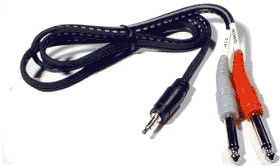
Source: Hosa CMP159
If you cannot locate a cable like the one above, you can accomplish the same thing with the combined cable and adaptors below.

and attach each coloured end to one of these,
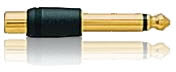
then connect to any of the ¼ inch inputs for L1 Model I or L1 Classic Channels 1/2/3/4. If you are using a T1 ToneMatch Audio Engine then you can use Channels 1,2,3 or 4/5.
If you are using the this kind of source as backing tracks, you will probably run these two connections to L1 Model I or L1 Classic Channels 3 and 4. In this case you will need to control volume and tone control from the sound source. You will not have much control through the L1 .
If you are using a T1 ToneMatch Audio Engine you will probably use Channel 4/5.
For details about the settings on the T1 ToneMatch® Audio Engine see:
T1 ToneMatch® Audio Engine / Gain Staging / Prerecorded music on Channel 4/5
Use a cable like this from your sound source (iPod, Computer, CD / DVD player) to Compact Channel 2.
 Sources for this kind of cable
iPod iPad Tablet

or if your cable has RCA (phono) jacks you can use this connection below.
Other Devices using RCA (phono) jacks
Sources for this kind of cable


Try Presets 57 and 58 for your prerecorded music / backing tracks.
T1 ToneMatch Audio Engine Presets
Category: DJ/Playback
Preset: Low Volume Music
- This is optimized for low volume music. The low bass and treble are boosted to better match the physics/psychoacoustics of our own auditory system.
- For prerecorded music at low level, for DJs and for break music at the gig. Sort of like the Fletcher-Munson (Tony Sarno calls it the “Herman Munster”) curve; bass and treble boost, just the right amount if you’re playing at 85 dB or so. Source: Presets 2.0Cliff-at-Bose

Category: DJ/Playback
Preset: High Volume Music
- This is optimized for higher volume music. Some of the bass is boosted and some of the upper mids are reduced to have a more natural sound at these higher volumes.

Source: Preset 58