T4S/T8S ToneMatch® Mixer Firmware Updates: Difference between revisions
| Line 109: | Line 109: | ||
=== Example Screenshots Updating a T4S with Windows === | === Example Screenshots Updating a T4S with Windows === | ||
After you unzip the file. Double-click the ToneMatch Updater Program | ;After you unzip the file. Double-click the ToneMatch Updater Program | ||
[[File:T4S Firmware Update 1.jpg]] | [[File:T4S Firmware Update 1.jpg]] | ||
Notice the version that is installed now (1.1.4), then click update | ;Notice the version that is installed now (1.1.4), then click update | ||
[[File:T4S Firmware Update 2.jpg]] | [[File:T4S Firmware Update 2.jpg]] | ||
Double-Click the update file (T4S or T8S) | ;Double-Click the update file (T4S or T8S) | ||
[[File:T4S Firmware Update 3.jpg]] | [[File:T4S Firmware Update 3.jpg]] | ||
Wait for it. It could take up to 15 minutes depending on the speed of your machine. | ;Wait for it. It could take up to 15 minutes depending on the speed of your machine. | ||
[[File:T4S Firmware Update 4.jpg]] | [[File:T4S Firmware Update 4.jpg]] | ||
When you see "Update done", click OK | ;When you see "Update done", click OK | ||
[[File:T4S Firmware Update 5.jpg]] | [[File:T4S Firmware Update 5.jpg]] | ||
Confirm that you now have the new version of the firmware. | ;Confirm that you now have the new version of the firmware. | ||
[[File:T4S Firmware Update 6.jpg]] | [[File:T4S Firmware Update 6.jpg]] | ||
Revision as of 21:33, 2 September 2022

T4S/T8S Fast Track Firmware Update
Updated for Firmware version 1.1.5 released June 2022
Download the file that is appropriate to your operating system. If you download these, you have all the files you need to do the update process: ToneMatch Updater software, instructions, and the Firmware file (*.bos)
ToneMatch Updater for Windows with firmware version 1.1.5
Contains updater and firmware *.bos files
OR
ToneMatch Updater for Mac with firmware version 1.1.5
Contains updater and firmware *.bos files
- Note
- Performing the firmware update will reset the USB A playback level all the way down (Mute)
Watch this video. Note: This was created before the latest update, so the references to 1.1.4 now refer to 1.1.5.
The latest version for the T4S/T4S/T8S Firmware is version 1.2.3 (Released for customer download August,2024)
Update for Firmware version 1.2.3 released August 2024
Download the file that is appropriate to your operating system. If you download these, you have all the files you need to do the update process: ToneMatch Updater software, instructions, and the Firmware file (*.bos)
- Windows
ToneMatch Updater for Windows with firmware version 1.2.3
Contains updater and firmware *.bos files for both T4S and T8S
OR
- Mac
ToneMatch Updater for Mac with firmware version 1.2.3
Contains updater and firmware *.bos files for both T4S and T8S
If you have trouble with the file above on your Mac,
- Download the ToneMatch Updater Program first.
- Download T4ST8S123.zip - the firmware only (*.bos) files for the T4S and T8S. Extract these to the same folder as you have the ToneMatch Updater program.
- Run the ToneMatch Updater Program.
- Note
- Performing the firmware update will reset the USB A playback level all the way down (Mute)
Long Version
For best results, please download and extract all files mentioned below to the same folder on your computer. This will make it easier to do the updates.
The latest version for the T4S/T4S/T8S Firmware is version 1.2.3 (Released for customer download August,2024)
Update for Firmware version 1.2.3 released August 2024
Download the file that is appropriate to your operating system. If you download these, you have all the files you need to do the update process: ToneMatch Updater software, instructions, and the Firmware file (*.bos)
- Windows
ToneMatch Updater for Windows with firmware version 1.2.3
Contains updater and firmware *.bos files for both T4S and T8S
OR
- Mac
ToneMatch Updater for Mac with firmware version 1.2.3
Contains updater and firmware *.bos files for both T4S and T8S
If you have trouble with the file above on your Mac,
- Download the ToneMatch Updater Program first.
- Download T4ST8S123.zip - the firmware only (*.bos) files for the T4S and T8S. Extract these to the same folder as you have the ToneMatch Updater program.
- Run the ToneMatch Updater Program.
- Note
- Performing the firmware update will reset the USB A playback level all the way down (Mute)
These instructions describe how to update the firmware of your ToneMatch® mixer.
- Download and install the ToneMatch Updater tool ToneMatch® Updater Software application. PC ToneMatch® Updater Software application for PC or MAC ToneMatch® Updater Software application for MAC (Supports OSX 10.7 through 10.15.x)
- Connect the mixer to your computer via the 2.0 USB Type-B port on the rear panel of your mixer.
See Figure 1.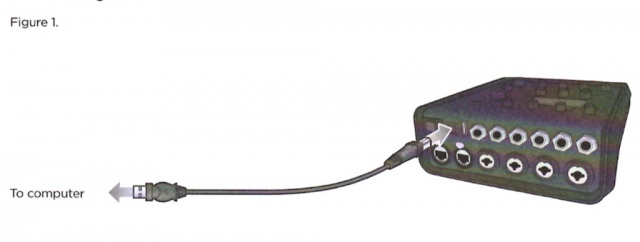
- Connect your mixer to a power source via a ToneMatch cable or power supply
- Turn off the Master Volume and then turn on your mixer.
- To download the latest firmware, follow the appropriate link:

- Important
- move the *.bos files to the same folder as the ToneMatch Updater. This will make it easier to find the files when using the ToneMatch Updater.
- Launch the ToneMatch Updater.
- Click the "Update" button next to "T4S (or T8S) Firmware". See Figure 2.

- WARNING
- Do NOT unplug or power off the mixer while it is updating.
- Important - Perform a Factory Reset to complete the Firmware Update.


This does not apply to the T1 ToneMatch Audio Engine
WARNING: Back up any saved scenes. All scenes will be overwritten when you Reset your ToneMatch mixer. You can restore them after you have done the Factory Reset. See: ToneMatch® Mixer / Scenes for more details.
Factory Reset: Turn off the ToneMatch mixer. Press and hold the MUTE buttons for Channels 1, 2, 3, 4) while you turn on the power. You will see
- Rebooting
- Factory Reset Please wait
- Factory Reset Complete
You can release the buttons when you see "Please wait"
- Please note
The ToneMatch Mixer[1] Factory settings are incorrect in the documentation.
T4S/T8S ToneMatch® Mixer Owner's Guide
T4S T8S ToneMatch Mixer Service Manual
Please see the notes below.

PDF version T4S T8S Firmware Update Instructions
- All firmware updates are cumulative. You only need to update to the latest version.
Version 1.1.5
June 2022
Version 1.1.5 addresses an audible DSP overload issue that can occur when more than 4 channels of dynamics processing are active.
Please see: Bose Portable PA Downloads
Example Screenshots Updating a T4S with Windows
- After you unzip the file. Double-click the ToneMatch Updater Program

- Notice the version that is installed now (1.1.4), then click update

- Double-Click the update file (T4S or T8S)

- Wait for it. It could take up to 15 minutes depending on the speed of your machine.

- When you see "Update done", click OK

- Confirm that you now have the new version of the firmware.

Version 1.1.4
| Download | T4S T8S Firmware Update Instructions |
| Date | 2018/06/10 |
| Replaces | T4S/T8S ToneMatch® Mixer Firmware Version 1.1.0 |
| Recommended for | All T4S/T8S owners |
| System Requirements: |
ToneMatch® Updater Software application. (two versions available)
If you have questions please see ToneMatch Updater discussion .
macOS Issues[Filename] can't be opened because the identity of the developer cannot be confirmedIf you see "[Filename] can't be opened because the identity of the developer cannot be confirmed" message displayed Mac OSX users may see this message when trying to install a Bose app. If this message appears, try the following: Mac users may need to hold the Control key (Ctrl) when opening the file. Various versions of the Mac OS cannot identify Bose as a developer. The Mountain Lion version of OS X (10.8) includes a feature called Gatekeeper to protect users from installing applications of non-Apple identified developers. The Mavericks version of OS X (10.9.5) temporarily cannot identify Bose as a developer as well. To open the application, follow these steps: How to open the app anyway
This bypasses Gatekeeper only for this one app, not globally. More information on Gatekeeper can be found at http://support.apple.com/kb/HT5290
Links to the current firmware
|
| Related | N/A |
| Announcement | November 1, 2018 |
| Release Notes |
FixesReverbThis is to fix the reverb:
Digital NoiseIn rare circumstances, ToneMatch T4S/T8S mixers may produce an audio signal that sounds distorted or “clipped.” This is likely due to corrupt data in saved scenes. Recommended Actions for Issue We recommend upgrading the mixer’s firmware to v1.1.4 and rebuilding any saved scenes using the new firmware. To do this, follow these steps:
MisprintCorrects a misprint in the Preset
This does not apply to the T1 ToneMatch Audio Engine WARNING: Back up any saved scenes. All scenes will be overwritten when you Reset your ToneMatch mixer. You can restore them after you have done the Factory Reset. See: ToneMatch® Mixer / Scenes for more details.
You can release the buttons when you see "Please wait"
The ToneMatch Mixer[1] Factory settings are incorrect in the documentation. T4S/T8S ToneMatch® Mixer Owner's Guide T4S T8S ToneMatch Mixer Service Manual
|
- All firmware updates are cumulative. You only need to update to the latest version.
Version 1.1.0
| Download |
|
| Date | 2018/06/10 |
| Replaces | T4S/T8S ToneMatch® Mixer Firmware Version 1.0.9 |
| Recommended for | All T4S/T8S owners |
| System Requirements: |
ToneMatch® Updater Software application. (two versions available)
If you have questions please see ToneMatch Updater discussion .
macOS Issues[Filename] can't be opened because the identity of the developer cannot be confirmedIf you see "[Filename] can't be opened because the identity of the developer cannot be confirmed" message displayed Mac OSX users may see this message when trying to install a Bose app. If this message appears, try the following: Mac users may need to hold the Control key (Ctrl) when opening the file. Various versions of the Mac OS cannot identify Bose as a developer. The Mountain Lion version of OS X (10.8) includes a feature called Gatekeeper to protect users from installing applications of non-Apple identified developers. The Mavericks version of OS X (10.9.5) temporarily cannot identify Bose as a developer as well. To open the application, follow these steps: How to open the app anyway
This bypasses Gatekeeper only for this one app, not globally. More information on Gatekeeper can be found at http://support.apple.com/kb/HT5290
Links to the current firmware |
| Related | N/A |
| Announcement | N/A |
| Release Notes |
FixesUpdate Factory Scenes for a better match to the T1® Factory Scenes. Note: To get the new factory scenes, save any scenes you want to keep. Then you can do the factory reset (this sets all values back to the factory defaults). This does not apply to the T1 ToneMatch Audio Engine WARNING: Back up any saved scenes. All scenes will be overwritten when you Reset your ToneMatch mixer. You can restore them after you have done the Factory Reset. See: ToneMatch® Mixer / Scenes for more details.
You can release the buttons when you see "Please wait"
The ToneMatch Mixer[1] Factory settings are incorrect in the documentation. T4S/T8S ToneMatch® Mixer Owner's Guide T4S T8S ToneMatch Mixer Service Manual
|
Version 1.0.10
| Download | T4S T8S Firmware Update Instructions |
| Date | 2018/04/25 |
| Replaces | T4S/T8S ToneMatch® Mixer Firmware Version 1.0.9 |
| Recommended for | All T4S/T8S owners |
| System Requirements: |
ToneMatch® Updater Software application. (two versions available)
If you have questions please see ToneMatch Updater discussion .
macOS Issues[Filename] can't be opened because the identity of the developer cannot be confirmedIf you see "[Filename] can't be opened because the identity of the developer cannot be confirmed" message displayed Mac OSX users may see this message when trying to install a Bose app. If this message appears, try the following: Mac users may need to hold the Control key (Ctrl) when opening the file. Various versions of the Mac OS cannot identify Bose as a developer. The Mountain Lion version of OS X (10.8) includes a feature called Gatekeeper to protect users from installing applications of non-Apple identified developers. The Mavericks version of OS X (10.9.5) temporarily cannot identify Bose as a developer as well. To open the application, follow these steps: How to open the app anyway
This bypasses Gatekeeper only for this one app, not globally. More information on Gatekeeper can be found at http://support.apple.com/kb/HT5290
Links to the current firmware |
| Related | N/A |
| Announcement | N/A |
| Release Notes |
FixesUpdate Factory Scenes for a better match to the T1® Factory Scenes. This was necessary because the units of measure on the T4S/T8S for some effects (e.g. Reverb) are different than on the T1 ToneMatch Audio Engine |
Version 1.0.9
| Download | T4S T8S Firmware Update Instructions |
| Date | 2018/04/15 |
| Replaces | T4S/T8S ToneMatch® Mixer Firmware Version 1.0.6 |
| Recommended for | All T4S/T8S owners |
| System Requirements: |
ToneMatch® Updater Software application. (two versions available)
If you have questions please see ToneMatch Updater discussion .
macOS Issues[Filename] can't be opened because the identity of the developer cannot be confirmedIf you see "[Filename] can't be opened because the identity of the developer cannot be confirmed" message displayed Mac OSX users may see this message when trying to install a Bose app. If this message appears, try the following: Mac users may need to hold the Control key (Ctrl) when opening the file. Various versions of the Mac OS cannot identify Bose as a developer. The Mountain Lion version of OS X (10.8) includes a feature called Gatekeeper to protect users from installing applications of non-Apple identified developers. The Mavericks version of OS X (10.9.5) temporarily cannot identify Bose as a developer as well. To open the application, follow these steps: How to open the app anyway
This bypasses Gatekeeper only for this one app, not globally. More information on Gatekeeper can be found at http://support.apple.com/kb/HT5290
Links to the current firmware
|
| Related | N/A |
| Announcement | N/A |
| Release Notes |
FixesMore improvements to the USB A music playback. Support for more types of USB keys |
Version 1.0.6
| Download | T4S T8S Firmware Update Instructions |
| Date | 2018/03/15 |
| Replaces | T4S/T8S ToneMatch® Mixer Firmware Version 1.0.2 |
| Recommended for | All T4S/T8S owners |
| System Requirements: |
ToneMatch® Updater Software application. (two versions available)
If you have questions please see ToneMatch Updater discussion .
macOS Issues[Filename] can't be opened because the identity of the developer cannot be confirmedIf you see "[Filename] can't be opened because the identity of the developer cannot be confirmed" message displayed Mac OSX users may see this message when trying to install a Bose app. If this message appears, try the following: Mac users may need to hold the Control key (Ctrl) when opening the file. Various versions of the Mac OS cannot identify Bose as a developer. The Mountain Lion version of OS X (10.8) includes a feature called Gatekeeper to protect users from installing applications of non-Apple identified developers. The Mavericks version of OS X (10.9.5) temporarily cannot identify Bose as a developer as well. To open the application, follow these steps: How to open the app anyway
This bypasses Gatekeeper only for this one app, not globally. More information on Gatekeeper can be found at http://support.apple.com/kb/HT5290
Links to the current firmware |
| Related | N/A |
| Announcement | N/A |
| Release Notes |
FixesImprovements to the USB A music playback. Support for more types of USB keys
|
Version 1.0.4
| Download | T4S T8S Firmware Update Instructions |
| Date | 2018/03/01 |
| Replaces | T4S/T8S ToneMatch® Mixer Firmware Version 1.0.2 |
| Recommended for | All T4S/T8S owners |
| System Requirements: |
ToneMatch® Updater Software application. (two versions available)
If you have questions please see ToneMatch Updater discussion .
macOS Issues[Filename] can't be opened because the identity of the developer cannot be confirmedIf you see "[Filename] can't be opened because the identity of the developer cannot be confirmed" message displayed Mac OSX users may see this message when trying to install a Bose app. If this message appears, try the following: Mac users may need to hold the Control key (Ctrl) when opening the file. Various versions of the Mac OS cannot identify Bose as a developer. The Mountain Lion version of OS X (10.8) includes a feature called Gatekeeper to protect users from installing applications of non-Apple identified developers. The Mavericks version of OS X (10.9.5) temporarily cannot identify Bose as a developer as well. To open the application, follow these steps: How to open the app anyway
This bypasses Gatekeeper only for this one app, not globally. More information on Gatekeeper can be found at http://support.apple.com/kb/HT5290
Links to the current firmware |
| Related | N/A |
| Announcement | N/A |
| Release Notes |
FixesImprovements to the Reverb on Aux 1 Output Ability to route USB A and USB B inputs to Aux or Last two channels. See T4S/T8S_ToneMatch®_Mixer Documentation_Update |
Version 1.0.3
Internal release, this is not available for download.
Release Notes
Fixes
Improved performance on some effects
Version 1.0.2
| Download | No longer available - please use the latest version above. |
| Date | 2018/02/15 |
| Replaces | T4S/T8S ToneMatch® Mixer Firmware Version 1.0.1 |
| Recommended for | All T4S/T8S owners |
| System Requirements: |
ToneMatch® Updater Software application. (two versions available)
If you have questions please see ToneMatch Updater discussion .
macOS Issues[Filename] can't be opened because the identity of the developer cannot be confirmedIf you see "[Filename] can't be opened because the identity of the developer cannot be confirmed" message displayed Mac OSX users may see this message when trying to install a Bose app. If this message appears, try the following: Mac users may need to hold the Control key (Ctrl) when opening the file. Various versions of the Mac OS cannot identify Bose as a developer. The Mountain Lion version of OS X (10.8) includes a feature called Gatekeeper to protect users from installing applications of non-Apple identified developers. The Mavericks version of OS X (10.9.5) temporarily cannot identify Bose as a developer as well. To open the application, follow these steps: How to open the app anyway
This bypasses Gatekeeper only for this one app, not globally. More information on Gatekeeper can be found at http://support.apple.com/kb/HT5290
Links to the current firmware |
| Related |
N/A |
| Announcement | N/A |
| Release Notes |
FixesCorrect routing of Aux 1/2 on T4S
|
Version 1.0.1
Original factory release
| Download | Download - no longer available - please use the latest version above. |
| Date | 2018/02/01 |
| Replaces | N/A |
| Recommended for | N/A |
| System Requirements: |
N/A |
| Related |
N/A |
| Announcement | N/A |