T4S/T8S Aux Input Level Setting: Difference between revisions
Jump to navigation
Jump to search
mNo edit summary |
mNo edit summary |
||
| Line 30: | Line 30: | ||
* If the signal is near the far right AND the peak indicator is at or below the red dotted line, you have a good strong signal. | * If the signal is near the far right AND the peak indicator is at or below the red dotted line, you have a good strong signal. | ||
* If the peak indicators are hitting the far right, you are clipping the input. Lower the output at the source. | * If the peak indicators are hitting the far right, you are clipping the input. Lower the output at the source. | ||
**When you have set the input levels so the peaks never hit the far right, you are finished with this setup. You don't have to do this again until you connect a new input source. You can control the volume at the source, or the {{ToneMatch Mixer}} Master Volume control. | |||
* Turn the Rotary selector to PAN/AUX and control the signal level sent through to the Master Output <br>[[File:T4S Aux Level 75 percent.png|640px]] <br> This gives you the same functionality as using channel volume controls for the other channels. | * Turn the Rotary selector to PAN/AUX and control the signal level sent through to the Master Output <br>[[File:T4S Aux Level 75 percent.png|640px]] <br> This gives you the same functionality as using channel volume controls for the other channels. | ||
Latest revision as of 21:38, 2 December 2018
Issue
The ToneMatch Mixer[1] Aux inputs do not have trim controls or LEDs. How do I set the input levels to avoid clipping?
Follow the instructions below in the Resolution section. You should only have to do this once. Then you can leave the Aux Input Levels alone until you connect a new input source. You can control the volume at the source, or the ToneMatch Mixer[1] Master Volume control.
Environment
ToneMatch Mixer[1] using Aux Inputs (4/5 on T4S ToneMatch mixer 9/10 on T8S ToneMatch mixer)
Resolution
- On the ToneMatch Mixer[1] turn the Master Volume all the way off. You don't need an audible signal to set the input levels.
- Connect the source to the ToneMatch Mixer[1] Aux inputs.
- Turn the source up to the maximum you will use during performance (as high as you can without audible distortion)
- Set the Rotary Selector to PAN/AUX
- Select Aux
- Set the Levels to 0%. You won't hear anything.
- If you are running stereo, Pan one channel LEFT and the other channel RIGHT
- Turn the Rotary Selector to Prefs
- Select Input Levels
- Select Aux channels (rightmost knob under the display)
- Play some music at your source
- Check the input levels
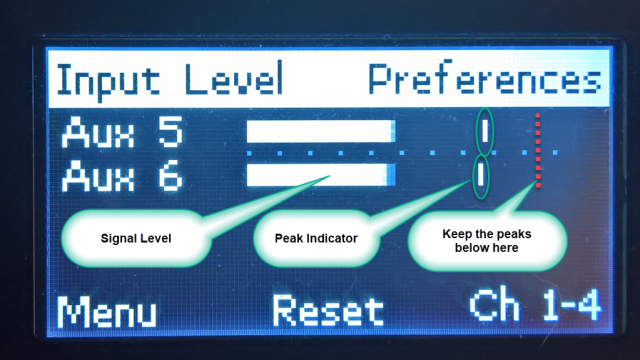

- As your signal varies, you will see the signal indicators move.
- The vertical bar is the peak indicator
- If the signal is near the far right AND the peak indicator is at or below the red dotted line, you have a good strong signal.
- If the peak indicators are hitting the far right, you are clipping the input. Lower the output at the source.
- When you have set the input levels so the peaks never hit the far right, you are finished with this setup. You don't have to do this again until you connect a new input source. You can control the volume at the source, or the ToneMatch Mixer[1] Master Volume control.
- Turn the Rotary selector to PAN/AUX and control the signal level sent through to the Master Output
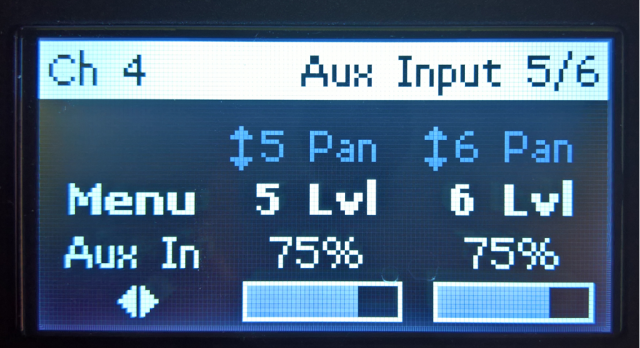
This gives you the same functionality as using channel volume controls for the other channels.
