Template:T4S/T8S Reverb Settings: Difference between revisions
Jump to navigation
Jump to search
mNo edit summary |
|||
| Line 5: | Line 5: | ||
[[File:T4ST8S Channel Reverb.png|link=http://toonz.ca/bose/wiki/images/T4ST8S/AM801203_00_EN_viewable.pdf?lbisphpreq=1|200px]] | [[File:T4ST8S Channel Reverb.png|link=http://toonz.ca/bose/wiki/images/T4ST8S/AM801203_00_EN_viewable.pdf?lbisphpreq=1|200px]] | ||
# Press or rotate the Menu control and select which output to send the reverb | # Press or rotate the Menu control and select which output (Main of Aux) to send the reverb to. | ||
# Rotate the Mix control to adjust the desired mix of dry signal (0%) to wet signal (100%). | # Rotate the Mix control to adjust the desired mix of dry signal (0%) to wet signal (100%). | ||
# Rotate the Bright control to equalize the high frequencies of reverb applied to the selected channel | # Rotate the Bright control to equalize the high frequencies of reverb applied to the selected channel | ||
Revision as of 15:23, 8 May 2018
Adding Reverb to a Channel
The Reverb function applies a user-adjustable amount of reverb to the selected channel. To select the type of reverb, see “Selecting a Reverb Type” below. Note: To mute the Reverb effects, press the Mix control. Press it again to unmute.
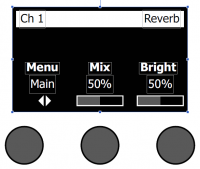
- Press or rotate the Menu control and select which output (Main of Aux) to send the reverb to.
- Rotate the Mix control to adjust the desired mix of dry signal (0%) to wet signal (100%).
- Rotate the Bright control to equalize the high frequencies of reverb applied to the selected channel
Setting Global Reverb Type
- Selecting a Reverb Type
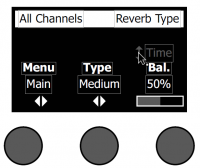
The Reverb Type function allows you to select the type of reverb that is applied to all input channels. The decay time (Time) and balance (Bal) are adjustable. Balance controls the ratio of early-to-late reflections.
Note: To mute the Reverb, press the Type control. Press it again to unmute.
- Global Reverb Settings are different from the T1 ToneMatch Audio Engine.
|
|
| Menu | Main or Aux 1 (apply following settings to Main or Aux) |
| Type | Plate, Small, Medium, Large, Cavern |
| Time | Percentage of 10 seconds (Example: 10% is 1.0 seconds) |
| Balance | Percentage (ratio of early/later reflections) |
|
|
| Type | Plate, Small, Medium, Large, Cavern |
| Time | Milliseconds from 0.20 - 9.79 seconds |
| Balance | Percentage (ratio of early/later reflections) |
- Select Reverb Type with the rotary selector.
- Press or rotate the Menu control and select which output to send the reverb too. You can send a different reverb type to either the Main or Aux sends.
- Rotate the Type control to display the list of reverbs:
- Plate – Creates the ambiance of a typical studio plate reverb. Features adjustable time and balance (ratio of early/later reflections) parameters.
- Small – Creates the ambiance of a small-sized space. Features adjustable time and balance (ratio of early/later reflections) parameters.
- Medium – Creates the ambiance of a medium-sized space. Features adjustable time and balance (ratio of early/later reflections) parameters.
- Large – Creates the ambiance of a large-sized space. Features adjustable time and balance (ratio of early/later reflections) parameters.
- Cavern – Creates the ambiance of an extremely large space. Features adjustable time and balance (ratio of early/later reflections) parameters. A unique and interesting reverb effect.
- Rotate the Type control to scroll through the reverb list and highlight the desired reverb type.
- Press the Type control to select.
- Rotating the Time control controls the decay time of the selected reverb model from its minimum decay time to its maximum decay time. At 0%, the decay time will be at minimum and will simulate the smallest room size available to the currently selected reverb type. At 100%, the decay time will be at maximum and will simulate the largest room size available to the currently selected reverb type. Each reverb type has their own usable range of decay times that work best for the selected model type. The Reverb Decay parameter allows you to adjust the reverb time between the specific ranges that work best for the selected reverb model type.
- Press the Time control to switch to Bal. Rotate the Bal. control to adjust the early-to-late reflection ratio (0% = all early reflections, 100% = all late reflections).