T4S T8S Firmware Update Instructions: Difference between revisions
Jump to navigation
Jump to search
mNo edit summary |
m added images and pdf file |
||
| Line 3: | Line 3: | ||
These instructions describe how to update the firmware of your ToneMatch® mixer. | These instructions describe how to update the firmware of your ToneMatch® mixer. | ||
# Download and install the LI System Updater tool at https://www.bose.com/en_us/l1_downloads.html. | # Download and install the LI System Updater tool at https://www.bose.com/en_us/l1_downloads.html. | ||
# Connect the mixer to your computer via the 2.0 USB Type-B port on the rear panel of your mixer. <br>See Figure 1.<br> | # Connect the mixer to your computer via the 2.0 USB Type-B port on the rear panel of your mixer. <br>See Figure 1.<br>[[File:T4S T8S firmware update figure 1.jpg]]<br> | ||
# Connect your mixer to a power source via a ToneMatch cable or power supply and turn on your mixer. | # Connect your mixer to a power source via a ToneMatch cable or power supply and turn on your mixer. | ||
# To download the latest firmware, follow the appropriate link: | # To download the latest firmware, follow the appropriate link: | ||
| Line 10: | Line 10: | ||
# Launch the L1 System Updater. | # Launch the L1 System Updater. | ||
# Click the "Update" button next to "T4S (or T8S) Firmware". See Figure 2. | # Click the "Update" button next to "T4S (or T8S) Firmware". See Figure 2. | ||
<br>[[File:T4S T8S firmware update figure 2.jpg]] | |||
PDF version [[ | |||
;WARNING: Do NOT unplug or power off the mixer while it is updating. | |||
PDF version [[Media:T4S T8S Firmware Update Instructions.pdf|T4S T8S Firmware Update Instructions]] | |||
[[Category:T4S]] | [[Category:T4S]] | ||
[[Category:T8S]] | [[Category:T8S]] | ||
Revision as of 23:19, 26 February 2018
Before proceeding, please read the following instructions:
These instructions describe how to update the firmware of your ToneMatch® mixer.
- Download and install the LI System Updater tool at https://www.bose.com/en_us/l1_downloads.html.
- Connect the mixer to your computer via the 2.0 USB Type-B port on the rear panel of your mixer.
See Figure 1.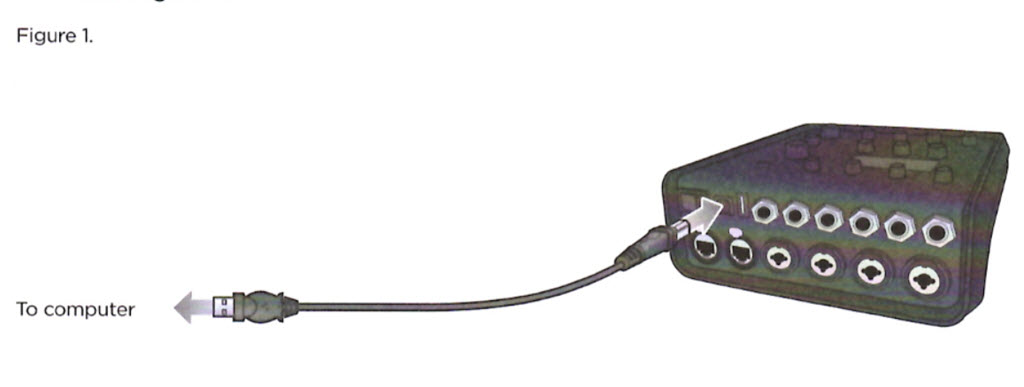
- Connect your mixer to a power source via a ToneMatch cable or power supply and turn on your mixer.
- To download the latest firmware, follow the appropriate link:
- Launch the L1 System Updater.
- Click the "Update" button next to "T4S (or T8S) Firmware". See Figure 2.


- WARNING
- Do NOT unplug or power off the mixer while it is updating.
PDF version T4S T8S Firmware Update Instructions