L1® Model II: Difference between revisions
mNo edit summary |
mNo edit summary |
||
| Line 72: | Line 72: | ||
There is a trim control for the analog input. | There is a trim control for the analog input. | ||
[[Image:Model II Analog Input Trim.png]] | |||
# Set the '''Trim''' control on the power stand to the 0 (zero) position. | |||
# Connect the audio source to the Analog Input | |||
# Adjust the volume of the audio source to the maximum output without distortion. | |||
# While playing the source, increase the '''Trim''' level so that the '''Signal/Clip''' indicator glows green or yellow. | |||
# If the '''Signal/Clip''' indicator glows red, decrease the '''Trim''' level so that it glows only green or yellow. | |||
[[Image:Model II Analog Input Level Green.png|Model 1S Analog Input]] | |||
==== Can a stereo signal be used with the analog input? ==== | ==== Can a stereo signal be used with the analog input? ==== | ||
Revision as of 20:54, 14 March 2017
|
Introduced March 29, 2007. The L1 Model II is RoHS compliant for release in Europe.
| ||||||||||||||||||||||||||||||||||||||||||||||||||||||||||||||||||||||||||
Documentation
Downloads
FirmwareHow to tell if your Model II supports the B2 Bass Module If you need it - see Model II Power Stand Firmware Updates Different ModelsHow to Tell the Difference Between Bose Portable PA ModelsThis is how to tell which L1®, S1 Pro, or F1 unit you have.
| ||||||||||||||||||||||||||||||||||||||||||||||||||||||||||||||||||||||||||

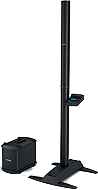


Input/Output Panel
Overview

Power/Fault LED - Indicates power status.
Blue = system on
Red = system faultPower switch - Switches the system on and off.
Bass Module Out - Bass output signal for driving one or two B1 bass modules or one B2 bass module.
Trim - Adjusts the level of the analog input signal.
ToneMatch® port - Digital audio and power connection for the optional T1 ToneMatch audio engine.
Signal/Clip LED - Indicates status of the analog input signal.
Green = normal input
Yellow = input approaching clipping
Red = input clippingAnalog Input - A line-level analog input. Accepts a ¼" TRS phone cable. Used for an instrument or other audio source.
Bass - Line Out- Post-DSP bass signal output. Accepts a ¼" TRS phone cable. Used to drive a PackLite® power amplifier.
AC Mains - AC power input connector.
ToneMatch® Port
For connecting the T1 ToneMatch Audio Engine to the L1 Model II.
The port sends electrical power to the T1 and accepts digital audio from the T1.

Close up

The connecting cable has a male Ethercon connection at each end that looks like this.

For details about the cable see: T1® Cables
Analog Input
The Analog input is a ¼ inch balanced input jack.

Analog input trim (volume, or gain) control
There is a trim control for the analog input.

- Set the Trim control on the power stand to the 0 (zero) position.
- Connect the audio source to the Analog Input
- Adjust the volume of the audio source to the maximum output without distortion.
- While playing the source, increase the Trim level so that the Signal/Clip indicator glows green or yellow.
- If the Signal/Clip indicator glows red, decrease the Trim level so that it glows only green or yellow.

Can a stereo signal be used with the analog input?
A ¼ inch Tip-Ring-Sleeve connector carrying a stereo signal should not be used with the analog input on the Model II.
Even though a ¼ inch Tip-Ring-Sleeve connector can carry a stereo signal this is not how this physical connection is used on the L1® Model II Power Stand.
The analog input on the Model II is balanced, and will therefore subtract the Left and Right signals on a stereo cable and you will hear an L-R (Left minus Right) signal in the Model II.
You cannot 'get through the gig' this way if you are a DJ or if you need to run prerecorded music or have stereo inputs.


Using a Mixer


If you are using a mixer instead of a T1 ToneMatch Audio Engine use the mixer to create a mono output and send that to the Model II Power Stand Analog input.
- If there is a stereo/mono switch then use it and send the mono output to the Model II Power Stand Analog input.
- If there is a Left/mono output then use that and send it to the Model II Power Stand Analog input.
- If there is no way to create a mono output then pan all your mixer inputs all the way to one side (e.g. Left) and then take the mixer for that side (e.g. Left) output and send it to the Model II Power Stand Analog input.
Analog Input for Second T1 ToneMatch Audio Engine
The L1 Model II can accept two inputs.

This makes it easy for two performers to connect their own T1®s to a L1® Model II Power Stand.
ToneMatch® Input
The ToneMatch® connection is specifically designed for a T1 ToneMatch Audio Engine. The ToneMatch® cable is supplied with the T1 ToneMatch Audio Engine and uses a male Ethercon connector at both ends.
Analog Input

The Analog connection is a ¼ inch phone jack. You can use this for a second T1® using the T1® Analog Master output (¼ inch phone jack).
This connection is made with a standard ¼ inch jack instrument cable. This can be Tip-Sleeve or Tip-Ring-Sleeve connectors.
Set Power Stand Analog Input Trim to 3 to have approximately the same level as you would have if you had connected with the ToneMatch® connection. You may have to adjust this, but 3 is a good place to start.
Note: A T1® connected to the the Analog input will require the optional T1 ToneMatch® Audio Engine power supply.
Analog Connection from the Second T1® to the Model II Power Stand

¼ Inch Tip-Ring-Sleeve (balanced) to ¼ Inch Tip-Ring-Sleeve (balanced)
A balanced connection is preferred and will provide better noise rejection over greater distances than the unbalanced connection.

¼ Inch Tip-Ring-Sleeve (unbalanced) to ¼ Inch Tip-Sleeve (unbalanced)
This should work fine but a balanced connection (immediately above) is preferred especially if you will have cable runs in excess of 20 feet (6 meters) or if you hear line noise, hum or hiss.

Preventative Care
There have been isolated incidents where Model II owners have had difficulty removing the Cylindrical Radiator® from the Power Stand.
- I would encourage all users that are concerned with this happening to them to add a drop of locktite to the (2) screws identified in the attached diagram.
- Thank you
- Neil — Source

Start Up / Cycle Time
The model II takes a few seconds to fully boot up and then turn the audio on. Make sure you are waiting the right amount of time.
Secondly, if you do reset the system for some reason, be sure to wait a full two or three seconds between turning it off and turning it back on.
- MikeZ-at-Bose[1]
Fan Noise
Q: The fan in the Power Stand comes on when I strike a chord on my Guitar. Is this normal? A: Your unit is functioning properly - no problem.
The fan in the Model II Power Stand comes on when the input signal level goes over a certain limit, regardless of what the internal temperature of the unit is. That way, the unit never gets too hot to where a fan needs to be on constantly.
Whatever you do, please don't cover up the fan port.[2]
There is a Firmware Update that addresses the fan behaviour. See: L1® Model II Power Stand Firmware Updates#Fan_Behavior
Starting in units manufactured in 2015 and later, the fan now runs quietly, constantly, while the Power Stand is powered on. This too is completely normal.
Noise During Shutdown
Q: When I turn off the Model II there is sound like flatulence. Is this normal?
A:
- Over a year ago we implemented an improvement which allowed the system to better withstand extreme low voltage conditions caused by brown outs etc. Units produced prior to this change were quiter during the power down sequence.
- Note: This noise is only present when the system is being turned off following use. For instances where this subtle noise is objectionable you may remove the Cylindrical Radiator loudspeaker and disconnect the Speakon cable of the B1 before powering down the system.
- For anyone that is experiencing noise during power down we want to assure you that your system is working properly. Also, there is no reason for customers with older power stands to be concerned with upgrading as any potential issues would have surfaced by now. [3]
Height
The fully assembled height of the L1 Model II is 84 inches. (213.36 cm)
Clearance required to assemble is approximately 87.5 inches. (222.25 cm)
Input Panel

- Analog input, trim control and signal/clip LED
- Line-level analog input accepts 1/4" TRS phone cable. Can be used for instruments or other audio sources like DJ mixers, MP3 players, computers or DVD systems. Trim control lets you adjust the level of analog input signal. Signal/clip LED indicates status of analog input signal.
- Bass module out
- Delivers amplified bass output signal to one or two B1 bass modules. L1 system automatically adjusts equalization appropriately when bass modules are connected.
- ToneMatch™ port
- Digital audio and power connection for ToneMatch audio engine. Use with included ToneMatch cable.
- Bass line out
- Post-DSP bass signal output. Accepts 1/4" TRS phone cable. Use to connect PackLite® amplifier with up to two additional bass modules. Can also be used to connect powered subwoofer or additional amplification system.
No Speakers Attached
If you want to record using USB without using the L1 Cylindrical Radiator® loudspeaker or B1 Bass Module ...
You can certainly run the L1 with all, some, or none of the speakers connected. With no speakers connected it will happily serve as a big power supply for the T1. You are in no way risking damage to the unit by doing this.[4]
L1® Model II Power Stand/Bass Line Out
Articulated Array®
Articulated Array
 The articulated array was introduced with the L1 Model II announced March 29, 2007. This is a collection of notes and quotes about the articulated array, primarily from people-at-Bose. (alphabetical order by author) |
Chris-at-Bose
When Cliff invented the first L1 , we all agreed it was a stunning solution to a terrible problem. The strong consensus on this forum over several years agrees with that. Making it into a product involved countless design decisions, many of them very hard to make. But one thing was clear--the array was a solution that worked; it didn't need "fixing", compared to all the other open questions whose answers were so obscure. So we worked on the murky questions, not on the array.
Once we had the product on the market, we began to learn how it could be even better, mostly from all of you on this forum. We told you we were listening and the L1 Model II is the result of that. When articulating the array was suggested by us, we were all pretty sure it would not work well in this kind of array. It was a long shot, but we tried it anyway and it worked better than any of us expected. Another theory in the dustbin. Breakthroughs sometimes happen and this was one of them, albeit a small one. So now we bring you the L1 Model II, with all our latest knowledge.
-- Chris-at-Bose, July 17, 2007
Cliff-at-Bose
At full chat, the L1 Model II is about as loud as the L1 Classic in front but definitely louder off to the side, due to the extra bit of spectrum wrap we got with the articulated array. Plus, we did all this with less power by the application of Real Science: a far better impedance match to the amp, a better amp, better power control processing and an improvement in the acoustical package. As a result, the new Power Stand is lighter. Sort of like the car engines from the 1930's can't touch today's lighter-weight EFI engines. The new unit is a real engineering achievement.
-- Cliff-at-Bose, April 3, 2007
Jesse-at-Bose
"Articulated" refers to the fact that the individual drivers in the Model II are angled slightly to the sides in an alternating pattern. (In the L1 classic, they're all facing straight ahead.) So both the L1 classic and Model II have extremely wide coverage (nearly 180 degrees,) but the M II gives you the most consistent tone as you move side to side.
We've all been impressed with the off-axis performance of the L1 Classic - the articulated array in the M II takes that even further.
-- Jesse-at-Bose, March 29, 2007
MikeZ-at-Bose
The array has been improved to give the widest, most even sound coverage across the room that we can deliver.
BUT, I want to establish that the difference between the two arrays is not like the difference between conventional gear and the L1 model I.
With the L1 Model I, if an *experienced* listener closed their eyes and walked around the room, they could tell approximately how far 'off axis' (what angle they were standing relative to the speaker) they were. With the model II, the listener cannot tell what angle they are relative to the speaker array.
-- MikeZ-at-Bose, March 29, 2007
- Question Does the articulated array of the Model II have as long of a throw as the original L-1? I seem to recall hearing the the Classic maintained a cylindrical pattern out to around 85 or 90 feet.
Yes. The basic cylindrical wavefront properties of the L1 Model II are unchanged from the L1 Classic / L1 Model I. I have not measured or audibly noticed any difference in the speakers 'throw ability'.
-- MikeZ-at-Bose, July 5, 2007
Lower Section Only
Q: Can I run with only the lower section of the L1 Cylindrical Radiator® loudspeaker?
A: From a technical standpoint it is safe to operate the system with only the lower section of the L1® Model II , however the spatial and spectral performance of will be greatly reduced, so this has only a very limited application. - Hilmar-at-Bose[5]
Correcting the Tone
Try inserting a ¼ inch connector in the Bass Line Out of the Power Stand. This will cause the internal logic to reduce the Bass output, and this should give you a better overall tonal balance when running with only one section of the L1® Model II.
For very detailed notes about this see Half Stack.
Identifying this Model

- Retractable legs
- Provide stability for streamlined L1 Model II power stand and loudspeaker. Four retractable legs fold out of power stand simultaneously for quick setup and compact transport. Small footprint also frees up room on tight stages.
- Light weight (23.7 lbs (10.7 kg)
Rubber Feet
If you need to replace the rubber feet.

Mark (Le5) on the Bose® Pro Portable PA Community provided this helpful research about replacement rubber feet for the L1 s.
Diameter 1-3/16" X height 3/8" (30mm X 9.6mm)
The maximum height of 3/8" (9.6mm) for the feet is important for stability; it is not recommended to use thicker feet because the ends of the fold out legs would be raised off of the floor
The recesses where the feet are installed will not accept a larger diameter than the original feet but 1" (25.4mm) should work fine.
I did a bit of research for you for some possible replacement feet: This type of feet are commonly used under guitar amp cabinets, it's a matter of finding some of the correct height and of a diameter that will fit. These need to have a steel washer for the mounting screw.
This should help you find suitable replacement feet.
Mark
Source: Le5 Rubber Feet for L1®
Acoustical Output
The maximum output volume of the L1 Classic, the L1 Model I, and the L1 Model II are virtually identical.
In the L1 Classic, the L1 Cylindrical Radiator® loudspeaker is powered by two (2) 250 Watt amplifiers. In the Model I and Model II, the L1 Cylindrical Radiator® loudspeaker is powered by one (1) 250 Watt amplifier. The Classic, the Model I, and the Model II all use a second 250 Watt amplifier to power one or two B1 bass modules (update: or a single B2 Bass Module).
Although these numbers serve as a point of reference they do not tell the whole story. During the design of the L1 Model I and the L1 Model II the impedance of the L1 Cylindrical Radiator® loudspeaker was lowered. As a result of the lower impedance, a single 250W amplifier now powers the system to within 1.75 dB of the max SPL of the L1 Classic. Several other changes were made to the signal processing and acoustical sections to further reduce this small difference. Particular attention was paid to this change and many A/B comparisons were conducted by Bose to confirm that there was no significant audible difference between the two systems.
— Source: Ken-at-Bose, Neil-at-Bose
Compatibility with Other Members of the L1® Family of Products
Cylindrical Radiator®s
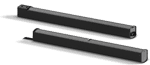
Cylindrical Radiator®s are not interchangeable across models
Specifically (and without exception)
- The Cylindrical Radiator speaker sections of the L1 Classic, the L1 Model I and L1 Model 1S and the L1 Model II are not compatible with each other.
- The Cylindrical Radiator speaker sections of the L1 Classic can only be used with the Classic PS1 power stand (no orange markings on the input/output panel).
- The Cylindrical Radiator speaker sections of the L1 Model I (orange markings on the back of both sections) can only be used with the Model I PS1 power stand (orange markings on the input/output panel).
- The Cylindrical Radiator speaker sections of the L1 Model II can only be used with the L1 Model II power stand.
- The Cylindrical Radiator speaker sections of the L1 Model 1S can only be used with the L1 Model 1S power stand.
T1 ToneMatch® Audio Engine, T4S/T8S ToneMatch® Mixers
- The ToneMatch mixers can be used with the
PackLite® power amplifier Model A1
- The PackLite® power amplifier model A1 can be used with
B1 Bass Module
- The B1 Bass Module can be used with the
B2 Bass Module
- The B2 Bass Module can be used with the
- L1 Classic Normal Mode only
- L1 Model I Normal Mode only
- L1 Model 1S all modes
- L1 Model II all modes but L1® Model II Power Stand Firmware version 1.4 or later required
Related Documents
- L1® Model II System Owner's Guide
- L1® Model II System Quick Set-up Guide
- L1® Model II Technical Data
- L1 Model II Service Manual
- L1® Model II FAQs (Bose® official version)
- L1 Model II Online Support (Bose.com)
Design Team
In 23 years at Bose, the L1 Model II and T1 ToneMatch Audio Engine are the most lovingly designed products I have ever had the fortune to work on. More care by more experienced people went into this than anything I've been involved in.
The most minute details were studiously created. As one tiny but important example, a propriety light pipe was designed so that the light from volume knob indicators smoothly wrapped around the knob from top to side, giving the musician a clear indication of volume from any angle. The color and intensity of the light was carefully designed so that it was visible in an extraordinarily wide range of stage lighting conditions.
Here is a picture of some members of the design team when we reached the point in May of 2006 of having the proprietary folding mechanism for the Model II power stand and industrial design for the new Articulated Array speaker finally finished.
Ken-at-Bose[6]

- ↑ MikeZ-at-Bose talks about Start Up and Cycle times with the L1® Model II
- ↑ MikeZ-at-Bose Model II Fan Noise
- ↑ Neil-at-Bose Modell II Shutdown Noises August 3, 2009
- ↑ MikeZ-at-Bose talks about Using the L1™ Model II Power Stand without any speakers attached
- ↑ Hilmar-at-Bose talks about using the lower half (only) of the L1® Cylindrical Radiator in the Bose® Musicians Community Message Boards
- ↑ Ken-at-Bose April 4, 2007 Help choosing between the Model I and the Model II
Mechanical Specifications
L1 Model II
- L1 Model II Cylindrical Radiator® loudspeaker top:
- Top array 39.63” H x 4.15” W x 4.13” D (100.6 cm x 10.6 cm x 10.5 cm
- 16.3 lbs (7.4 kg)
- L1 Model II Cylindrical Radiator® loudspeaker bottom:
- Bottom array 43.5” H x 4.15” W x 4.13” D (111.0 mm x 9.0 cm x 10.5 cm)
- 17.4 lbs (7.9 kg)
- L1 Model II power stand:
- 5H x 10W x 27D (12.8 cm x 26.2 cm x 69.2 cm)
- 23.7 lbs (10.7 kg)
B1 Bass module
- 15H x 10 1/4W x 17 3/4D (38.0 cm x 26.0 cm x 45.0 cm)
- 25.1 lbs (11.4 kg)
Total System Weight
The total assembled system weight with the B1 bass module 84 lb (38.10 kg).
The total assembled system weight with the B2 bass module 102 lb (46.2 kg).
T1 ToneMatch™ audio engine
- 2 2/3H x 6 1/2W x 8 1/4D (6.76 cm x 16.6 cm x 20.9 cm)
- 2.1 lbs (1.0 kg)
Electrical
- AC power rating:
- 100-120V 50/60Hz 500W (USA/Canada)
- Power stand inputs/outputs
- ToneMatch port for T1 ToneMatch audio engine
- 1/4" analog input
- 1/4" bass line output
- Neutrik NL4 bass module out
What's in the Box
- L1 Model II Cylindrical Radiator® loudspeaker box ===
- Loudspeaker top and bottom
- Carrying bags
- Power stand box
- Power stand
- Power cord
- Protective plug
- Carrying bag
Bose L1® Model II
URL http://worldwide.bose.com/pro/en_us/web/l1_model2/page.html
Release Date: 2007-03-29
Height: 84 inches
Weight: 84 pounds (includes B1)
Power Stand Depth:27.2 inches
Power Stand Width:26 inches
Description: FAQ, documentation, hints and tips for owners of the L1® Model II
Description:
Key Features
High-performing, powered, portable two-way loudspeaker system with a 195° H x 0° V nominal dispersion designed for the production and reproduction of live music, music playback, speeches and A/V sound reproduction
24-driver articulated line array loudspeaker technology produces wide, uniform sound coverage throughout the entire listening area—even off to the extreme sides
Consistent front-to-back coverage, 24 drivers mounted in a vertical line array produce little drop in sound pressure level per doubling in distance than a conventional point source
Retractable folding leg mechanism for easy transport
Lightweight, interlocking components
Expandable bass design supports the use of multiple B1 bass modules or a single B2 bass module
Digital Ethercon port provides single-wire connectivity for the T1 ToneMatch audio engine
Physical
Enclosure
Power Stand: Polypropylene cover with cast aluminum legs and steel chassis base
Cylindrical Radiator: Aluminum enclosuure with ABS baffle
Dimensions
Assembled height: 84.0" (2134 mm)
Net Weight
Power Stand: 23.7 lb (10.7 kg)
Cylindrical Radiators (pair): 33.7 lb (15.3 kg)
B1 bass module: 26.6 lb (12.1 kg)
B2 bass module: 45 lb (20.41 kg)
Color
Black
Package Contents
1 system