T1 ToneMatch® Audio Engine / USB: Difference between revisions
m →USB from T1® to Computer: formatting |
|||
| Line 27: | Line 27: | ||
On the {{T1 nl}} you can decide where you want it. You can route it either to the master (e.g. when using the PC to play background tracks) or into channel 4/5 to process it to your hearts content. | On the {{T1 nl}} you can decide where you want it. You can route it either to the master (e.g. when using the PC to play background tracks) or into channel 4/5 to process it to your hearts content. | ||
[[Image:USBtoPC1.png|right]] | |||
The {{T1}} can also send audio back to the PC. You can select what you want to send. It can be either channel (1,2,3,4/5) or Aux or Master. For example you can make a little submix on the AUX bus and record that with for example Windows Sound Recorder or [http://audacity.sourceforge.net/ Audacity]. | The {{T1}} can also send audio back to the PC. You can select what you want to send. It can be either channel (1,2,3,4/5) or Aux or Master. For example you can make a little submix on the AUX bus and record that with for example Windows Sound Recorder or [http://audacity.sourceforge.net/ Audacity]. | ||
Here is an excerpt from page 30 of the [http://www.bose.com/pdf/musicians/product_guides/t1_tonematch_audio_engine.pdfT1 ToneMatch® Audio Engine Owner's Guide] | |||
=== USB from T1® to Computer === | === USB from T1® to Computer === | ||
Revision as of 04:25, 2 January 2014

Connection from Computer to T1 ToneMatch® Audio Engine
Here is an excerpt from the T1 ToneMatch® Audio Engine Owner's Guide (62 pages)
T1 ToneMatch Audio Engine Service Manual

Here is a close up of the ends of the cable.
{{#Click:http://www.amazon.com/Belkin-F3U133-10-Hi-Speed-Cable-Feet/dp/B00004Z5M1%7CImage:USBAtoUSBB.jpg%7COrder on Amazon}}
Live Application of USB in the T1 ToneMatch® Audio Engine
Hilmar-at-Bose talks about the USB interface[1]
Firstly, the T1 ToneMatch Audio Engine is designed as a convenient and powerful interface for a live musician. We try to put many useful controls directly at your finger tips so you can operate them while your playing or between songs. This basic idea has also influenced how we've implemented USB audio streaming. We try to accommodate the most common use cases (background tracks, DJ, quick recording) with the least amount of hassle & configuration work, even if that makes less common uses cases more difficult to accommodate.
USB audio in general
Hilmar-at-Bose talks about the USB interface[2]
When you plug in the T1 ToneMatch® Audio Engine into your PC it will appear to the PC as a USB sound card (USB audio device in Windows). You can play and record audio just like with any other soundcard, i.e. if you use for example Windows Media Player to play a song, the audio will be routed via USB to the T1 ToneMatch Audio Engine.
On the T1 ToneMatch® Audio Engine you can decide where you want it. You can route it either to the master (e.g. when using the PC to play background tracks) or into channel 4/5 to process it to your hearts content.

The T1 ToneMatch Audio Engine can also send audio back to the PC. You can select what you want to send. It can be either channel (1,2,3,4/5) or Aux or Master. For example you can make a little submix on the AUX bus and record that with for example Windows Sound Recorder or Audacity.
Here is an excerpt from page 30 of the ToneMatch® Audio Engine Owner's Guide
USB from T1® to Computer


And this is the result of sending T1® Channels 1 and 2 to USB LEFT and RIGHT

Here is how you can send Master and Aux outputs to USB LEFT and RIGHT


Setting USB from Computer to Channel 4/5
Video
Step by Step
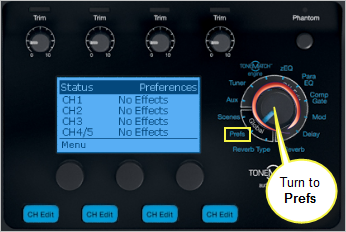
- Turn the Rotary Selector to Global section and Prefs
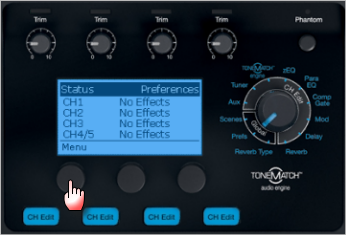
- Press the first button, Menu
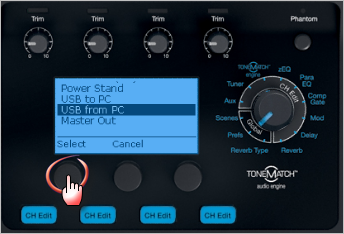
- Turn the Menu to USB from PC, Press
- By default the USB from PC Left and Right channels are routed to the Master Output and you control all of the sound from the computer.
You can route one or both channels to Channel 4/5 and this gives you local control of Presets, zEQ, ParaEQ, Effects and volume.
Press the middle button Left to change the routing of the Left channel
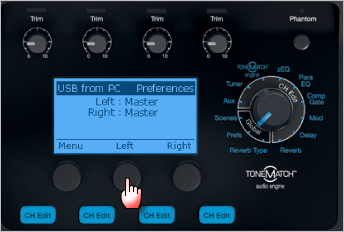
- Turn to select Channel 4/5, Press
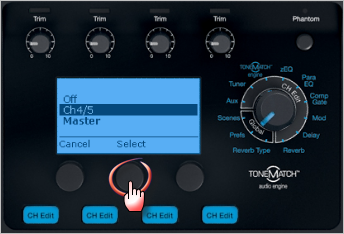
- If you want to route the the Right Channel to Channel 4/5
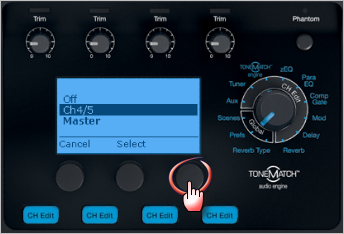
Press the right button Right to change the routing of the Right channel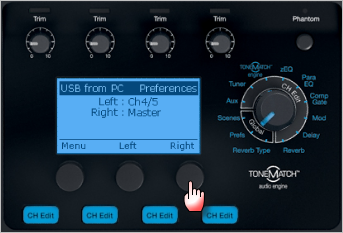
- Turn to select Channel 4/5, Press
- Here is the final result
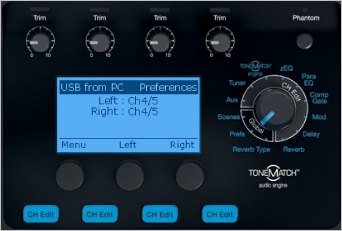


USB and Channel 4/5 Analog at the same time
You can connect the USB input to T1® Channel 4/5 for a stereo source (computer) AND an analog input to T1® Channel 4/5 at the same time. While it is unlikely you would play both sources simultaneously, you can raise and lower the outputs at the source. This allows you to control the sources applying ToneMatch® Presets, EQ, and volume using the Channel 4/5 Vol control.
See: Settings USB from Computer to Channel 4/5 (above) for USB setup and Analog Connection below.
Analog Connection

Latency and Digital Audio Workstation
USB audio requires a fairly complicated driver stack and hence we have decided to operate with the Windows standard drivers. That's fairly rugged but also not particularly fast, so processing sounds in real time on the PC and sending back to the T1 may or may not work depending how the computer is configured, what operating system is running, and what other processes are going on at the same time. See also: Latency and The L1®
Digital Media players and USB host
The T1 ToneMatch Audio Engine is only a USB client and requires a USB host (= PC). That means you cannot connect an MP3 player directly to the T1 digitally. The best way to connect is analog through Ch 4/5.
Stereo or Mono
Hilmar answers [3]
Tom Munch asked: Can channels 4 & 5 be assigned separately to the Aux & Master outs to send to 2 L1's?
Not really. 4/5 are immediately summed to mono and treated the always the same. You could route the left USB channel to the master, and the right USB channel to 4/5, turning the 4/5 channel volume all the way down and using a pre-fade AUX feed for 4/5 to get it out the Aux.
That's certainly a little convoluted but would enable you to route a USB source to two different L1s.
No Reverb from USB
From page 30 of the T1 ToneMatch® Audio Engine Owner's Guide (62 pages)
T1 ToneMatch Audio Engine Service Manual

Work Around
- Hard wire Master Output to Channel 4 input
- Channel 4 Aux Level 100% | Tap: Pre
- Channel 4 Vol off (Mute too to be safe but not critical)
- Prefs: USB to PC set to Aux
Source: ST discussion in the Forum
- ↑ Hilmar-at-Bose in the Stereo Operation discussion Bose Message Boards
- ↑ Hilmar-at-Bose in the Stereo Operation discussion Bose Message Boards
- ↑ Hilmar-at-Bose Channels 4/5 as stereo?