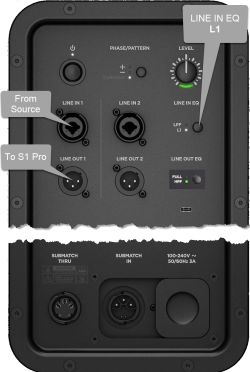
|RightBody = The Sub EQ setting is a crossover that optimizes system EQ for setup scenarios in which a powered subwoofer is connected to the system LINE OUT port.
|RightBody = The Sub EQ setting is a crossover that optimizes system EQ for setup scenarios in which a powered subwoofer is connected to the system LINE OUT port.
You can use Sub EQ with any powered subwoofer, but for optimal performance, Bose recommends the Bose Subi or Sub2 Powered Bass Module.
You can use Sub EQ with any powered subwoofer, but for optimal performance, Bose recommends the Bose Sub1 or Sub2 Powered Bass Module.
Once you enable Sub EQ, it stays enabled until you disable it or the system powers off.
Once you enable Sub EQ, it stays enabled until you disable it or the system powers off.
With the Sub EQ mode you can use the {{S1 Pro+}} internal mixer as the sound source (e.g., microphone and guitar and backing tracks via Bluetooth). This is different from the {{S1 Pro}} where the preferred method was to route all sound sources to the Sub1/Sub2 first and from the Sub1/Sub2 to the {{S1 Pro}}. This is because the {{S1 Pro}} did not have the Sub EQ mode.
The Sub EQ setting is a crossover that optimizes system EQ for setup scenarios in which a powered subwoofer is connected to the system LINE OUT port.
You can use Sub EQ with any powered subwoofer, but for optimal performance, Bose recommends the Bose Sub1 or Sub2 Powered Bass Module.
Once you enable Sub EQ, it stays enabled until you disable it or the system powers off.
With the Sub EQ mode you can use the S1 Pro+ internal mixer as the sound source (e.g., microphone and guitar and backing tracks via Bluetooth). This is different from the S1 Pro system where the preferred method was to route all sound sources to the Sub1/Sub2 first and from the Sub1/Sub2 to the S1 Pro system. This is because the S1 Pro system did not have the Sub EQ mode.
Using Inputs on S1 Pro+
You can use the S1 Pro+ as the sound source (e.g., microphone and guitar and backing tracks via Bluetooth). This is different from the S1 Pro system where the preferred method was to route all sound sources to the Sub1/Sub2 first and from the Sub1/Sub2 to the S1 Pro system. This is because the S1 Pro system did not have the Sub EQ mode.
Engage the S1 Pro+ Sub EQ and use the S1 Pro+ Line Out to send a full range signal to the Sub1/Sub2.
👉 No need to set LINE OUT EQ when using the S1 Pro+ if you have turned on Sub EQ
Note the following:
On the S1 Pro+ turn on the Sub EQ setting. This sets the internal high pass filter to approximately 150 Hz.
The Sub EQ setting does not affect the S1 Pro+ Line Out. The Line Out remains full-range
With the Sub EQ turned on, the S1 Pro+ will produce frequencies above 150 Hz and you will be able to push S1 Pro+ harder (louder) without low-end distortion
Without the Sub EQ turned on, the S1 Pro+ will sound the same as without the subwoofer
The Sub1 or Sub2 will cover from 40 Hz (Sub1) 37 Hz (Sub2) to 150 Hz