Sennheiser EW IEM G4: Difference between revisions
mNo edit summary |
mNo edit summary |
||
| Line 28: | Line 28: | ||
#Select RF Mute for Only This Device, press the jog dial to confirm the message and deactivate the radio signal for the transmitter. | #Select RF Mute for Only This Device, press the jog dial to confirm the message and deactivate the radio signal for the transmitter. | ||
The blue light will appear and *SYNC will appear in the window indicating that the transmitter is ready to receive a frequency list from a transmitter. | The blue light will appear and *SYNC will appear in the window indicating that the transmitter is ready to receive a frequency list from a transmitter. | ||
[[File:SR_IEM_Menu_Easy-Setup.png}600px]] | |||
*Notes [https://www.sennheiser-sites.com/responsive-manuals/ewG4/IEM/EN/index.html#page/ew%20IEM%20G4/ewG4_Operation_SRIEM_EN.13.13.html#wwconnect_header Easy Setup on the SR IEM G4 Transmitter] | *Notes [https://www.sennheiser-sites.com/responsive-manuals/ewG4/IEM/EN/index.html#page/ew%20IEM%20G4/ewG4_Operation_SRIEM_EN.13.13.html#wwconnect_header Easy Setup on the SR IEM G4 Transmitter] | ||
;On the EK IEM G4 portable Receiver | ;On the EK IEM G4 portable Receiver | ||
| Line 35: | Line 38: | ||
#*You will have the opportunity to select a different channel (but you don't need to). Press the jog dial to confirm the Bank and Channel selection. | #*You will have the opportunity to select a different channel (but you don't need to). Press the jog dial to confirm the Bank and Channel selection. | ||
#*You will see the message STORED. | #*You will see the message STORED. | ||
[[File:EK_IEM_Menu_EasySetup_ScanNewList.png|600px]] | |||
* Notes [https://www.sennheiser-sites.com/responsive-manuals/ewG4/IEM/EN/index.html#page/ew%20IEM%20G4/ewG4_Operation_EKIEM_EN.12.11.html#wwconnect_header Easy Setup on the EK IEM G4 Portable Receiver] | * Notes [https://www.sennheiser-sites.com/responsive-manuals/ewG4/IEM/EN/index.html#page/ew%20IEM%20G4/ewG4_Operation_EKIEM_EN.12.11.html#wwconnect_header Easy Setup on the EK IEM G4 Portable Receiver] | ||
===To SYNC the Transmitter to the Receiver=== | ===To SYNC the Transmitter to the Receiver=== | ||
# On the Transmitter, press the SYNC button | # On the Transmitter, press the SYNC button | ||
Revision as of 00:19, 16 April 2022
Sennheiser EW IEM G4
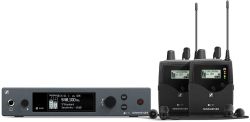
Main Components
- SR IEM G4 stereo transmitter
- 2 EK IEM G4 stereo receiver
- 2 IE 4 earphones
Sync Transmitter to Receiver(s)
Scan and Transfer Available Frequencies to the Receiver
- On the SR IEM G4 Transmitter
- Open the Easy Setup menu item
- Select RF Mute for Only This Device, press the jog dial to confirm the message and deactivate the radio signal for the transmitter.
The blue light will appear and *SYNC will appear in the window indicating that the transmitter is ready to receive a frequency list from a transmitter.
[[File:SR_IEM_Menu_Easy-Setup.png}600px]]
- On the EK IEM G4 portable Receiver
- Perform a frequency scan on an EK IEM G4 portable receiver
- From the scan results on the receiver, select a frequency Bank with enough free Channels.
- Hold the infrared interface of the EK IEM G4 receiver in front of the infrared interface of an SR IEM G4 transmitter to transfer the scan results from the receiver to this transmitter.
- You will have the opportunity to select a different channel (but you don't need to). Press the jog dial to confirm the Bank and Channel selection.
- You will see the message STORED.

To SYNC the Transmitter to the Receiver
- On the Transmitter, press the SYNC button
- On the Receiver, open the battery door to and hold the infrared interface of the EK IEM G4 receiver in front of the infrared interface of an SR IEM G4 transmitter to SYNC the frequency. The Transmitter will display a check mark when the units are SYNCd.
References:
Stereo to Split Mono
- How can I get two (2) separate mono mixes out of one stereo transmitter?
- Plug your first mono mix into the left input port on the back of the SR IEM G4 stereo transmitter and then plug your second mono mix into the right side input.
- Make sure the transmitter is set to stereo mode
- Turn on your bodypack receiver and hit the "set" button to enter the menu list
- Find the "Mode" option, hit the set button, change the setting to "Focus", and hit the set button again to save it
- Scroll until you find "Exit" and hit set to leave the menu screen
- Now you are back on the main screen of the pack. From the main screen, you can now choose which mix you want to hear by panning left or right with the arrow keys. Hit the down arrow a few times until only mix #1 can be heard, or hit the up arrow a few times until only mix #2 can be heard. The arrows act as a crossfader between the two sources.
- There is no limit to how many receiver packs can tune in to these 2 mono mixes you are transmitting, so if you have additional packs just set them to the same frequency and repeat steps 3-6 above.
- Just be aware that there may be a small amount of bleed from one channel into the other during quiet passages.
— Source
Why do I hear a Noise/Hiss in the IEM system?
- Why do I hear a Noise/Hiss in the IEM system?
The most common hiss that is referred to is caused by RF interference. An important step in setting up a system is to tune the equipment properly to ensure that external RF signals are avoided and hence interference is avoided.
The other hiss that is sometimes noticed is the internal workings of the unit itself. The body back receiver has inherent noise from the components especially when there is a low input signal. This phenomenon is not unique to Sennheiser but occurs across all manufacturers.
This internal noise is made more apparent when in a very quiet environment (like a recording studio) or when more sensitive earbuds (such as custom in-ear molds). From a practical standpoint once you have audio through the IEM system it will overshadow the noise from the internal components and most people will not even realize the noise is there.