{{T4S icon}}{{T8S icon}}{{S1 Pro icon}}{{Sub icon}}
{{T4S icon}}{{T8S icon}}{{S1 Pro icon}}{{Sub icon}}
=== Preferred Method ===
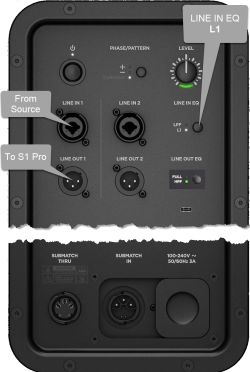
Connections with Sub1 or Sub2 and the {{S1 Pro}}
Connections with Sub1 or Sub2 and the {{S1 Pro}}
Line 25:
Line 28:
If you use an XLR to XLR cable, the signal will likely be too hot for the {{S1 Pro}}
If you use an XLR to XLR cable, the signal will likely be too hot for the {{S1 Pro}}
=== Alternative Connection ===
; Can I connect the S1 Pro Line Out to the Sub?
; Can I connect the S1 Pro Line Out to the Sub?
The method described above is preferred, but you can use the {{S1 Pro}} as the sound source (e.g., microphone and guitar and backing tracks via Bluetooth)
The method described above is preferred, but you can use the {{S1 Pro}} as the sound source (e.g., microphone and guitar and backing tracks via Bluetooth)
The picture shows a stereo setup, but illustrates the principles for mono. The signal flow is from left to right.
Recommended cable
Use an XLR to 1/4 inch (6.3 mm) Tip-Ring-Sleeve cable for best results.
If you use an XLR to XLR cable, the signal will likely be too hot for the S1 Pro system
Alternative Connection
Can I connect the S1 Pro Line Out to the Sub?
The method described above is preferred, but you can use the S1 Pro system as the sound source (e.g., microphone and guitar and backing tracks via Bluetooth)
Note the following:
The S1 Pro system will sound the same as without the subwoofer (62 Hz - 17 kHz)
The Sub1 or Sub2 will cover from 40 Hz (Sub1) 37 Hz (Sub2) to 150 Hz
You will be able to push S1 Pro system harder (louder) if you route the signal as described at the top of this article