Template:S1 Pro with Sub1 or Sub2: Difference between revisions
Jump to navigation
Jump to search
mNo edit summary |
mNo edit summary |
||
| Line 21: | Line 21: | ||
<div> | <div> | ||
;Recommended cable | ;Recommended cable | ||
Use | Use an XLR to {{1/4 TRS}} cable for best results. | ||
[[File: | [[File:14TRStoXLRFemale.jpg|300px]] | ||
</div> | </div> | ||
<div> | <div> | ||
</div> | </div> | ||
</div> | </div> | ||
Revision as of 02:54, 31 May 2021


Connections with Sub1 or Sub2 and the S1 Pro system
For best results, the signal flow should go from
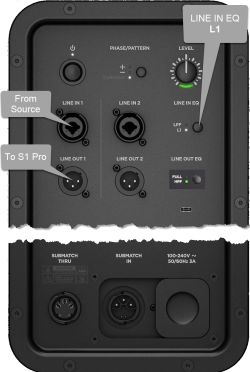
Sub io panel - The Sub1 or Sub2 subwoofer LINE IN 1
- The Sub1 or Sub2 subwoofer LINE OUT 1 to
- The S1 Pro system with channel volume set to 10 o'clock.

Set up this way,
- The Sub1 or Sub2 handles frequencies from 40 Hz (Sub1) 37 Hz (Sub2) to 150 Hz
- The S1 Pro system handles frequencies above 150 Hz
The picture shows a stereo setup, but illustrates the principles for mono. The signal flow is from left to right.


- Recommended cable
Use an XLR to 1/4 inch (6.3 mm) Tip-Ring-Sleeve cable for best results.

If you use the S1 Pro system as the sound source (e.g., microphone and guitar and backing tracks via Bluetooth)
- The S1 Pro system will sound the same as without the subwoofer (62 Hz - 17 kHz)
- The Sub1 or Sub2 will cover from 40 Hz (Sub1) 37 Hz (Sub2) to 150 Hz