Kemper Profiler: Difference between revisions
| Line 49: | Line 49: | ||
# Designate one computer as the Source and the other, the destination. | # Designate one computer as the Source and the other, the destination. | ||
# On the source, navigate to C:\Users\<username>\AppData\Local\Kemper Amps\RigManager | # On the source, navigate to C:\Users\<username>\AppData\Local\Kemper Amps\RigManager | ||
# | #* Note: Folders for | ||
##* Local Library | ##* Local Library (contains Rigs) | ||
##* Prf (Contains Performances) | ##* Prf (Contains Performances) | ||
##* Prst (Contains Presets) | ##* Prst (Contains Presets) | ||
# On a shared drive or USB key, create the same three folders (Local Library, Prf, Prst) | # On a shared drive or USB key, create the same three folders (Local Library, Prf, Prst) | ||
##* Local Library | |||
##* Prf | |||
##* Prst | |||
# Copy the contents of the files you want to replicate into the respective folders on the shared drive or USB key | # Copy the contents of the files you want to replicate into the respective folders on the shared drive or USB key | ||
# On the destination, navigate to C:\Users\<username>\AppData\Local\Kemper Amps\RigManager | # On the destination, navigate to C:\Users\<username>\AppData\Local\Kemper Amps\RigManager | ||
Revision as of 01:07, 15 February 2021

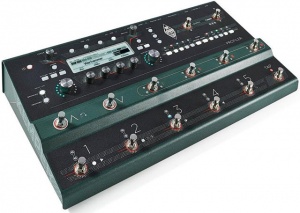
Kemper Profiling Amp
This article is a collection of snippets of information about the Kemper Profiling Amp.

Documentation
Specifications
Power Consumption
- Approximate draw 12 watts
The Kemper Profiler with Remote
- Approximate draws approximately 17 watts
EQ in Output Section
Frequencies of the Output EQ
Bass Shelf 150 Hz (steep)
Mid Peak 600 Hz
Treble Shelf 2400 Hz
Presence Shelf 10000 Hz
The Tonestack (EQ in the Stack) is different and softer. There is interaction between the controls, so there are no defined frequencies, that can be announced.
Let me say an important word, as assumptions like on this thread keeps me busy since quite a time. There were about four threads in the last too weeks where I had to disagree to assumptions made by measurements Whenever you try to visualize a sonic behavior in means of scope, waveform display or frequency plot, to derive a deeper interpretation, you are very likely to fail. What you see is rarely what you hear. Trust your ears instead! It requires an immense knowledge to make qualified measurements and assumptions to derive better information by measurements and watching the results by your eyes, that you can simply hear with your ears.
In knowledge thereof, I rarely use scopes or analyzers for my development work, as I have failed to often by interpreting what I saw, even though I probably have the background knowledge needed. Instead I use my ears every day.
There are several related discussions that are equally interesting. Here are some examples.
This whole FRFR discussion is something, that I don't understand.
Linear speakers are never fully linear, that's true. But they try to. Modern studio monitors are very linear. I had the chance to participate in a comparison test of different studio monitors. The best of them sounded surprisingly equal, when different brands where compared.
However there is no absolute linearity, since the perceived frequency responce differs with the room we listen, and the angle to the speakers etc.
Is this a problem? Not at all. We all grew up listening to speakers here, there and everywhere, and in the car e.g. We listen to our favorite music by headphones, by kitchen radio, in our studio, by television. Some are better, some are worse. In the same way we have listened to our guitar heros. The speakers that we utilized have an impact to their studio guitar sound, as well as to the rest of the music. Did we bother? Not really. If we didn't like a speaker, it was due to the general perception of the music, not explicitly the guitar sound.
Do you guys make your own music recordings with guitar embedded? You will run into the same situation as every other recording: It will be listened to by a variety of speakers.
Now to the pure guitar sound of the Profiler, which is a studio sound. Still not a different situation. The guitar sound is colored by the speakers in the exact same way a piece of music would be colored with that guitar embedded. Would you ask for a complex EQ for correcting the frequency responce? Maybe yes. But the EQ should be set for the whole music, not just the guitar.
I am aware that many guitarists are not used to the studio sound of a guitar, even though they have listened to studio sounds all their live. Users sometimes state profiles do not sound good through their speakers. Well, that's the sound of a guitar amp in a studio, heard through your speakers. Get used to it! it's reality. Play along some music through the same speakers, and the sound will make sense.
Professional guitarists have got used to the studio sound of amps. They play in studios often, or by Inear monitors on stage. It is probably a similar situation like singers getting used to listen to their own recordings.
EQ presets for different FRFR simply do not make sense. There is no pro guitarist or producer, that has ever asked us for a complex EQ or Highcut or Lowcut or correction curves for linear speakers. They know about the everpresent relativity of frequency responces, that is colouring music in whole as well as guitar sounds in detail.
If you cannot handle linear speakers for your guitar sound, then play the profiler through a guitar speaker. But be aware that you have been listening to guitars by linear speakers for all your life, it's simply that the sound is odd to you when not embedded into music.
Profiles
Studio or Merged
Kemper Profiles How to Distinguish a Studio Profile from a Merged Profile
Quick Tips
Swap Up/Down Buttons
Swap Up/Down buttons on the Kemper Profiler Remote or the Kemper Stage
- On the Profiler

- Press the System button
- Navigate to page 12/18 [Remote]
- Press soft button 3 [Button Assignment]
- Press soft button 1 [Switch Up & Down]
- On the Stage

- Press the System button
- Navigate to page 4/11 [User Interface 2)
- Press soft button 3 [Button Assignment]
- Press soft button 1 [Switch Up & Down]
Wah Settings
Rig Manager Tips
Synchronize Two Instances of Rig Manager (Windows 10)
There is no automated way to synchronize two instances of Rig Manager. You can manage manually this way.
- Designate one computer as the Source and the other, the destination.
- On the source, navigate to C:\Users\<username>\AppData\Local\Kemper Amps\RigManager
- Note: Folders for
- Local Library (contains Rigs)
- Prf (Contains Performances)
- Prst (Contains Presets)
- On a shared drive or USB key, create the same three folders (Local Library, Prf, Prst)
- Local Library
- Prf
- Prst
- Copy the contents of the files you want to replicate into the respective folders on the shared drive or USB key
- On the destination, navigate to C:\Users\<username>\AppData\Local\Kemper Amps\RigManager
- Copy the contents of the shared drive or USB key to the respective folders on the destination
Factory Reset
From Kemper support:
1. First, consider creating a backup as this process will delete all user data and reset all global settings.
2. Upgrade to the current PROFILER operating system release software. If your Profiler is currently running a version older than 7.3.2 you need to update to that version first. You can find it here
https://www.kemper-amps.com/do…8/Older-Software-Versions
3. Switch the PROFILER Head or Rack model off and press and hold soft button 1 (left above the display) while powering it on into tuner mode. If you are a STAGE user press the soft button 1 and the SYSTEM button and power the unit on.
4. Keep holding the soft button until "System Maintenance " appears on the display.
5. In maintenance mode press "Recovery", "Init&Factory Content", "Yes", "Ok".
6. Then press the Reboot soft button and reboot or simply restart the PROFILER with the chicken-head knob.
Kemper Recovery Options
Kemper Profiler Recovery Options
Kemper Export/Import Performances
Kemper Export/Import Performances
Profiling Overview


