T8S XLR Outputs to House System: Difference between revisions
Jump to navigation
Jump to search
mNo edit summary |
mNo edit summary |
||
| Line 6: | Line 6: | ||
;On the house system: | ;On the house system: | ||
* Use the input trim and lower the input sensitivity<br>[[File:Mixer Input Trim.jpg|400px]]<br> | * Use the input trim and lower the input sensitivity<br>[[File:Mixer Input Trim.jpg|400px]]<br> | ||
** On the house set system, set the input trim so you get a strong input signal without clipping. See the owners manual for the house mixer for details. | |||
* Use the MIC/LINE or ATTENUATION switch to lower the input sensitivity to LINE LEVEL<br>[[File:Mixer Input Pad Switch.jpg|400px]]<br> | * Use the MIC/LINE or ATTENUATION switch to lower the input sensitivity to LINE LEVEL<br>[[File:Mixer Input Pad Switch.jpg|400px]]<br> | ||
* Use the 1/4 inch (6.3 mm) Tip-Ring-Sleeve LINE LEVEL input <br>[[File:Allen Heath 60 10FX Inputs.jpg|400px]]<br> | * Use the 1/4 inch (6.3 mm) Tip-Ring-Sleeve LINE LEVEL input <br>[[File:Allen Heath 60 10FX Inputs.jpg|400px]]<br> | ||
** Use an XLR to 1/4 inch Tip-Ring-Sleeve converter<br>[[File:MP-105 600w DETAILw.jpg|400px]]><br> | ** Use an XLR to 1/4 inch Tip-Ring-Sleeve converter<br>[[File:MP-105 600w DETAILw.jpg|400px]]><br> | ||
* Use a -30 dB attenuation [[Pad]] to between the T8S and the house system<br>[[File:Pad.jpg|link=http://www.bing.com/search?q=whirlwind+IMPAD30|200px|Find them on the web]]<br> | |||
;On the {{T8S}}: | |||
** Use the {{T8S}} 1/4 Tip-Ring-Sleeve output<br>[[File:T8S Outputs 14.jpg|400px]]<br> | |||
---- | ---- | ||
[[Category:T8S]] | [[Category:T8S]] | ||
[[Category:Connections]] | [[Category:Connections]] | ||
Revision as of 14:45, 24 April 2019
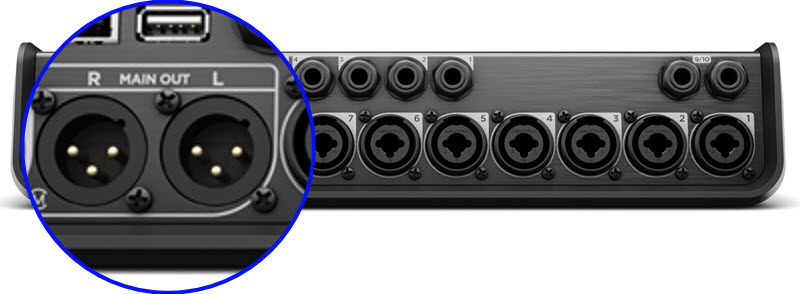
The T8S ToneMatch mixer XLR outputs are LINE LEVEL. If the house system mixer XLR inputs are MIC LEVEL, the T8S ToneMatch mixer signal from the XLR outputs will be too hot. You've several ways to resolve the mismatch.
Most house system mixers should have one of the three options below.
- On the house system
- Use the input trim and lower the input sensitivity
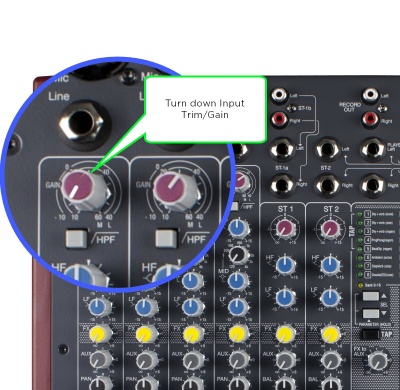

- On the house set system, set the input trim so you get a strong input signal without clipping. See the owners manual for the house mixer for details.
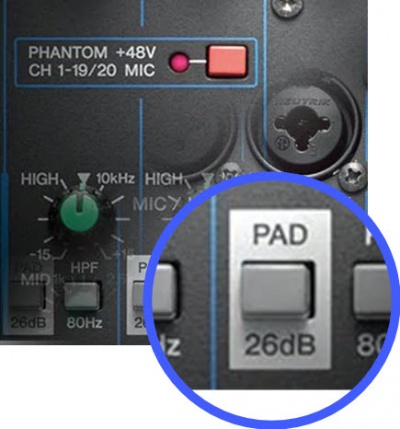
- Use the MIC/LINE or ATTENUATION switch to lower the input sensitivity to LINE LEVEL

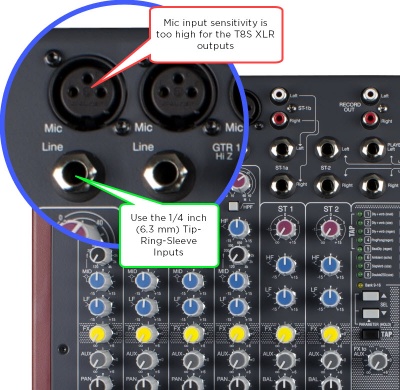
- Use the 1/4 inch (6.3 mm) Tip-Ring-Sleeve LINE LEVEL input

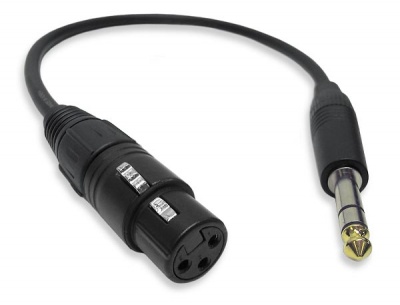
- Use an XLR to 1/4 inch Tip-Ring-Sleeve converter
 >
>
- Use an XLR to 1/4 inch Tip-Ring-Sleeve converter

- Use a -30 dB attenuation Pad to between the T8S and the house system

- On the T8S ToneMatch mixer
- Use the T8S ToneMatch mixer 1/4 Tip-Ring-Sleeve output
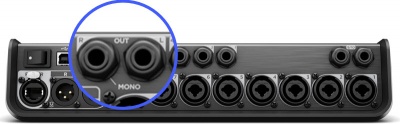
- Use the T8S ToneMatch mixer 1/4 Tip-Ring-Sleeve output
