S1 Pro Firmware Update: Difference between revisions
Jump to navigation
Jump to search
mNo edit summary |
mNo edit summary |
||
| Line 2: | Line 2: | ||
;This process works only with computers running Windows or iOS. | ;This process works only with computers running Windows or iOS. | ||
If you want to update the firmware for the {{S1}} without using the [[S1 Pro System with Bose Connect App|Bose Connect]] app: | If you want to update the firmware for the {{S1}} without using the [[S1 Pro System with Bose Connect App|Bose Connect]] app: | ||
# Navigate to [http://btu.bose.com the Bose Updater Site] | |||
You will need a USB cable like this. USB A to USB B Micro | |||
[[File:USB A to Micro USB.jpg|400px|USB A to USB B Micro]] | |||
# Navigate to [http://btu.bose.com the Bose Updater Site] | |||
# Follow the prompts on the screen | # Follow the prompts on the screen | ||
# When the screen looks like this connect the {{S1}} to your computer<br> [[File:S1 Pro Firmware Update 1.jpg|400px]] | # When the screen looks like this connect the {{S1}} to your computer<br> [[File:S1 Pro Firmware Update 1.jpg|400px]] | ||
Revision as of 20:34, 16 May 2019

- This process works only with computers running Windows or iOS.
If you want to update the firmware for the S1 Pro System without using the Bose Connect app:
You will need a USB cable like this. USB A to USB B Micro

- Navigate to the Bose Updater Site
- Follow the prompts on the screen
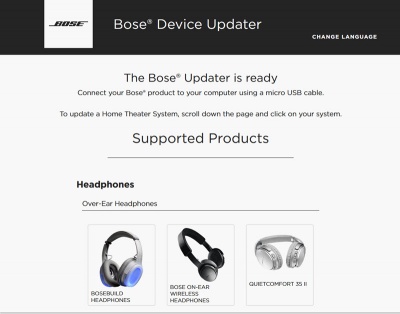
- When the screen looks like this connect the S1 Pro System to your computer
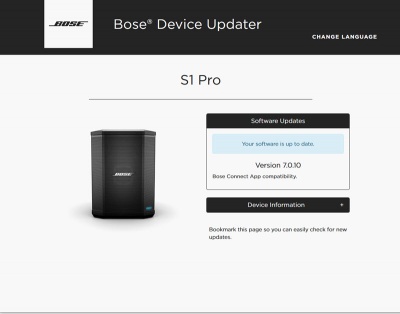
- If the screen says your system is up to date, you don't have to do anything more.
- If Bose Support has told you to reload the latest firmware
Type adv followed by the up-arrow, down-arrow
The screen will look like this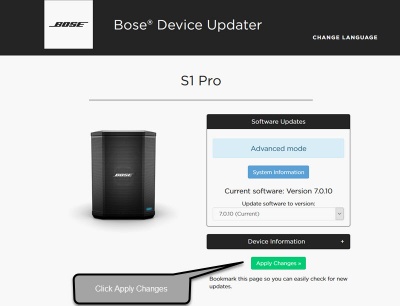
- Click Install Update and follow the prompts on the screen


If you have difficulty doing the steps above or updating the firmware does not resolve your issue, please contact Bose Support.