T4S ToneMatch Mixer Monitor Outputs: Difference between revisions
Jump to navigation
Jump to search
Created page with "{{T4S icon}}{{Model II icon}} <table><tr> <td valign="top" width="250">__TOC__</td> <td valign="top"> ;How do I set up a powered monitor with my {{T4S}} and {{Model II}} or {{..." |
mNo edit summary |
||
| Line 11: | Line 11: | ||
You have several options for creating a monitor mix. | You have several options for creating a monitor mix. | ||
# The same sound as you are sending to the L1 system | # The same sound as you are sending to the L1 system | ||
#* If you have connected the L1 to ToneMatch Port <br> connect your monitor to the Main Right Output<br>[[File:T4S Monitor Outputs Main Out.png| | #* If you have connected the L1 to ToneMatch Port <br> connect your monitor to the Main Right Output<br>[[File:T4S Monitor Outputs Main Out.png|400px]] | ||
# Use the channel pan controls to set up a monitor mix. <br>[[File:T4S Monitor Outputs Left Out.png| | # Use the channel pan controls to set up a monitor mix. <br>[[File:T4S Monitor Outputs Left Out.png|400px]] | ||
#* Panned center will give you the same sound as you are sending to the L1 | #* Panned center will give you the same sound as you are sending to the L1 | ||
#* Panned Hard Left will give you all of the sound in the monitor mix and not the L1 | #* Panned Hard Left will give you all of the sound in the monitor mix and not the L1 | ||
#* Panned Slightly Left will give more of the sound in the monitor mix and than the L1 | #* Panned Slightly Left will give more of the sound in the monitor mix and than the L1 | ||
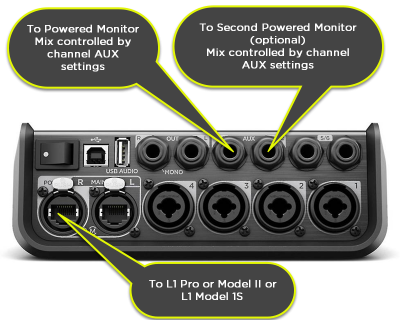
# Use the [[T4S Aux|channel Aux settings]] to set up a monitor mix. <br>[[File:T4S Monitor Outputs Aux Out.png| | # Use the [[T4S Aux|channel Aux settings]] to set up a monitor mix. <br>[[File:T4S Monitor Outputs Aux Out.png|400px]] | ||
Revision as of 16:18, 25 February 2019


|

You have several options for creating a monitor mix.
- The same sound as you are sending to the L1 system
- If you have connected the L1 to ToneMatch Port
connect your monitor to the Main Right Output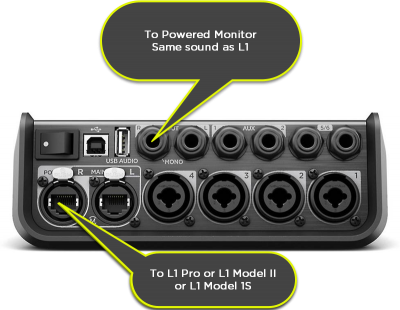
- If you have connected the L1 to ToneMatch Port
- Use the channel pan controls to set up a monitor mix.
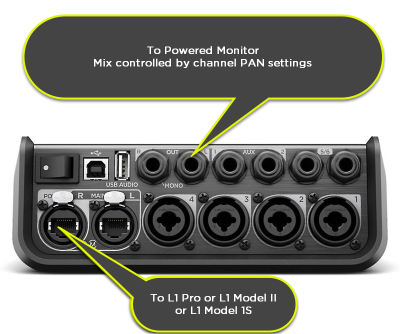
- Panned center will give you the same sound as you are sending to the L1
- Panned Hard Left will give you all of the sound in the monitor mix and not the L1
- Panned Slightly Left will give more of the sound in the monitor mix and than the L1
- Use the channel Aux settings to set up a monitor mix.