Template:ToneMatch Mixer Backing Tracks: Difference between revisions
mNo edit summary |
m →Analog Connections: formatting |
||
| Line 23: | Line 23: | ||
</includeonly> | </includeonly> | ||
===== | == Analog Connections == | ||
=== Aux Inputs === | |||
Connect to the Aux Inputs to leave the combo jack inputs available. The Aux inputs are routed directly to the Main outputs. You can set Pan and Level using the Rotary Selector '''PAN/AUX''' settings | Connect to the Aux Inputs to leave the combo jack inputs available. The Aux inputs are routed directly to the Main outputs. You can set Pan and Level using the Rotary Selector '''PAN/AUX''' settings | ||
{{{ImageAuxIn|[[File:Backtracks to T4S 56.png|600px]]}}} | {{{ImageAuxIn|[[File:Backtracks to T4S 56.png|600px]]}}} | ||
=== Combo Inputs === | |||
If you need to use Presets, Effects, or the physical volume controls, connect to the last two channels that have combo inputs. | If you need to use Presets, Effects, or the physical volume controls, connect to the last two channels that have combo inputs. | ||
| Line 33: | Line 35: | ||
===Stereo to Mono Adapter === | |||
Plug this into your source device: {{{SourceDevice|an iPad, iPod, Tablet, Computer}}} (headphone or line out jack) | |||
* | Plug this into your source device: {{{SourceDevice|an iPad, iPod, Tablet, Computer}}} (headphone or line out jack). Connect: | ||
* | * 1/8 inch (3 mm) Tip-Ring-Sleeve jack on the source device and | ||
* Colored ends to the {{{Device|T4S}}} | |||
[[File:StereoMiniTo14.gif|link=http://www.amazon.com/HOSA-CMP159-Stereo-Phone-Y-Cable/dp/B000068O3C/ref=pd_sim_e_1/178-7040482-5196650|280px|Hosa CMP159]] | [[File:StereoMiniTo14.gif|link=http://www.amazon.com/HOSA-CMP159-Stereo-Phone-Y-Cable/dp/B000068O3C/ref=pd_sim_e_1/178-7040482-5196650|280px|Hosa CMP159]] | ||
Revision as of 02:57, 7 July 2018
Usage
{{S1 Pro with External Device
|SourceDevice= an iPad, iPod, Tablet, Computer
|DeviceLink= Short form name of the device T4S or T8S
|Device= name of the device eg T4S ToneMatch mixer T8S ToneMatch mixer
|ImageAuxIn= image for Aux Inputs eg [[File:Backtracks_to_T4S_56.png|600px]]
|ImageLastChannelsIn= image for Aux Inputs eg [[File:Backtracks to T4S 34.png|600px]]
|discussion page = link to forum discussion (optional) e.g. discussion in the Bose Message Board }} Template will render as it appears below this line.
Analog Connections
Aux Inputs
Connect to the Aux Inputs to leave the combo jack inputs available. The Aux inputs are routed directly to the Main outputs. You can set Pan and Level using the Rotary Selector PAN/AUX settings

Combo Inputs
If you need to use Presets, Effects, or the physical volume controls, connect to the last two channels that have combo inputs.

Stereo to Mono Adapter
Plug this into your source device: an iPad, iPod, Tablet, Computer (headphone or line out jack). Connect:
- 1/8 inch (3 mm) Tip-Ring-Sleeve jack on the source device and
- Colored ends to the T4S
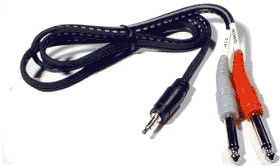
Source: Hosa CMP159
T1 ToneMatch® Audio Engine / Gain Staging / Prerecorded music on Channel 4/5
iPad or iPod
You can use just one input on the source device: an iPad, iPod, Tablet, Computer if uo can set the source device output to mono. Typically, you can do this under Accessibility options.
[[Category:{{{Device}}}]]