Please note: Bose recommends that if you have two Model 1S systems using the same source, that you place the Model 1S systems at least 20 feet apart (6 meters). This is to avoid Multiple Source Interference
Running two Model 1S systems with the same source is running Dual Mono and not recommended unless the L1®s are at least 20 feet apart.
System 1
Connect the first system with the ToneMatch cable that came with the T1®.
T1® ToneMatch port to the Model 1S Power Stand ToneMatch port.
System 2
Connect the second system with a ¼ inch jack Tip-Ring-Sleeve cable
T1® Master Output to the Model 1S Power Stand Analog input
on the Model 1S Power Stand set the analog input trim to "3" and adjust as necessary to get a good balance with the other system.
For best results use a Tip-Ring-Sleeve (balanced) connection. You can use a Tip-Sleeve (unbalanced connection) but the Tip-Ring-Sleeve (balanced connection is preferred).
Model II Analog input trim (volume, or gain) control
There is a trim control for the analog input.
Set the Trim control on the power stand to the 0 (zero) position.
Connect the T1 Master Output to the Analog Input using a 1/4 inch (6mm) Tip-Ring-Sleeve cable
Adjust the volume of the audio source to the maximum output without distortion.
While playing the source, increase the Trim level so that the Signal/Clip indicator glows green or yellow.
If the Signal/Clip indicator glows red, decrease the Trim level so that it glows only green or yellow.
Set the input trim to 10:00 - 11:00 o'clock to get results similar to the other L1® connected through the ToneMatch port.
Stereo
This article will primarily be of interest to DJs.
You can run a two signals (for example stereo tracks) through a single T1 ToneMatch Audio Engine out to two L1 s. How you do that will depend on your input, USB or Analog. Both of these methods involve sending one track to the Main output, and one track to the Aux output.
In this case you connect one half of the stereo pair to one T1® Channel (1, 2 or 4/5) and let that be amplified through the T1® Main output. Then connect the other half of the stereo pair to another T1® Channel. In this example I did that on Channel 3. By routing Channel 3 exclusively to the T1® Aux output, you can keep the Stereo channels left and right separated.
Once you get the balance set you will probably want to control the overall volume from the sound source. It is not really convenient to do that in the T1® because there is no joint control for both Main and Aux outputs.
T1™ Aux
Using Aux to send a signal exclusively to a second System
Using a T1 ToneMatch Audio Engine with two L1 s, you may want to send an input to one System, but not the other.
In this example, we are taking an input in Channel 3, and sending it to Aux, and not to Main.
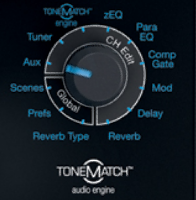
Set the Selector to Aux
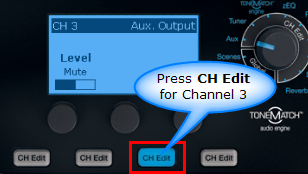
Press CH Edit for Channel 3
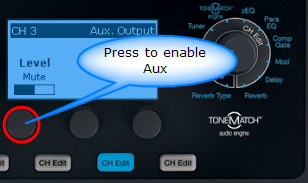
Press button 1 to enable Aux
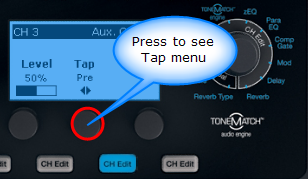
Press button 2 to see the Tap menu
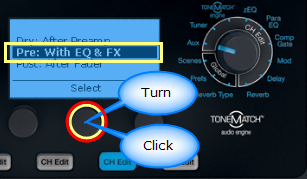
Turn the Tap setting to Pre: With EQ & FX. Press the button to Select.
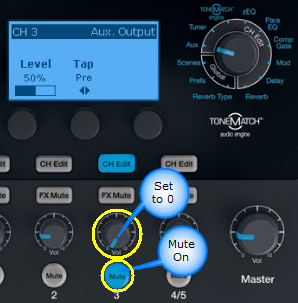
Set the Channel Volume to 0 (zero). I set the Volume to 0 to avoid unwanted consequences of accidentally hitting Mute. Just to be safe, I also Mute the channel.
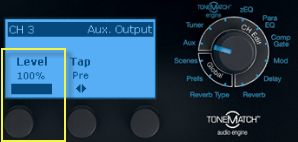
Adjust Aux Volume if necessary. You will probably end up at or near 100%
USB
Playback stereo tracks from a USB connection from your computer
If you need to playback stereo tracks from a USB from your computer, this how you can do it.
NOTE: You will want to control the volume and balance from your computer. It is not convenient to do this from the T1 ToneMatch Audio Engine in this configuration because one of the channels is routed through the T1 ToneMatch Audio Engine Aux buss and the other is through the Master. It is not easy to control both of these at the same time on the T1 ToneMatch Audio Engine.
Equipment Required
L1® Classic/Model I or Model 1S or Model II or Compact (L1® LEFT)
L1® Classic/Model I or Model 1S or Model II or Compact (L1® RIGHT)
If one of the L1®s is a L1 Model II then you will not need the connection marked "To L1 RIGHT". This will be replaced by the ToneMatch® connection to the L1® Model II.
USB to PC
We want to split the USB signal from the computer so that
the Stereo Left channel goes through Channel 4/5 to Aux and from there to an analog connection to an L1®
the Stereo Right channel goes through to Master and from there to an analog connection or digital connection to another L1™
Prefs
Turn the main selector to Prefs.
Select USB from PC
Set Left: Ch 4/5
Set Right: Master
Channel 4/5
Press Chan 4/5 CH Edit
Rotate the selector to Aux
Set the Level to 0% (not bypass)
Set the Tap to Pre
Mute this Channel. You can turn down the level as well. It you leave the Mute off then you will be sending both Left and Right stereo signals to the Main output.
Setting the Relative Levels
On the Computer: Start playing a track. Turn up the volume on the computer a little. You won't hear anything yet.
On the T1® Turn up the Master Volume. You should be hearing the Stereo Right channel.
Work the volume on the computer and the T1® until you are happy with a workable volume level.
On the T1® Turn up the Aux Level. Your setting will look something like this. The actual value you set may be different. That's okay.
This is the Stereo Left channel. Bring up the volume until it matches the output from the Master. Note: This Aux volume is completely independent of the Master volume. This is why you want to set it to be equally balanced with the Master. You will then be able to control the balance and level from the computer.
Download Shared Scene
Here is a Shared Scene you can load into your T1 ToneMatch Audio Engine. If you have been following along and have set up our T1 ToneMatch® Audio Engine with the settings above, you do not need to download this Shared Scene. I just included this as a convenience in case you wanted to try the Shared Scene system.
This scene has very generic settings for Channels 1,2 and 3 and the settings discussed in this article for Channel 4/5.
Channels 1,2,3 are set to Vocal Microphones: Handheld Microphones - no effects, muted.
Channel 4/5 is set as described above with USB routed to 4/5 routed to Aux. This is muted so that this Channel is not sent to the Main output.
Please read the entire article before using this Shared Scene. It is provided as a convenience to save you some time is you want to have the same settings.
Warning
This is an experimental file and I strongly recommend that you back up all your scenes before loading this one, just in case you overwrite something by accident. I have tested this and it works in my environment, but I cannot accept responsibility for any issues you may have when you apply it to your T1 ToneMatch® Audio Engine
You will need to understand how to use the L1 Software Updater program to load this Shared Scene.
Things you must have and understand to use a Shared Scene
These are the latest versions of the ToneMatch Updater application.
To update your L1 Model II with a T1 ToneMatch Audio Engine use the older version of the L1 Updater software
L1® Updater Software application. Note: This is required to do any updates for the T1 ToneMatch® Audio Engine and L1® Model II Power Stand. (Two versions available)
[Filename] can't be opened because the identity of the developer cannot be confirmed
If you see "[Filename] can't be opened because the identity of the developer cannot be confirmed" message displayed
Mac OSX users may see this message when trying to install a Bose app. If this message appears, try the following:
Mac users may need to hold the Control key (Ctrl) when opening the file.
Various versions of the Mac OS cannot identify Bose as a developer. The Mountain Lion version of OS X (10.8) includes a feature called Gatekeeper to protect users from installing applications of non-Apple identified developers. The Mavericks version of OS X (10.9.5) temporarily cannot identify Bose as a developer as well.
To open the application, follow these steps:
How to open the app anyway
Open System Settings.
Go to Privacy & Security.
Scroll all the way down.
You will see a message saying:
"ToneMatch Updater.app was blocked from use because it is not from an identified developer."
Click Allow Anyway.
Open the app again — macOS will now show a different dialog with an Open button.
Click Open.
This bypasses Gatekeeper only for this one app, not globally.
If your firmware update is not successful - Caution
After you update the T1 ToneMatch Audio Engine or L1 Model II firmware, if you see a window on the PC that says the update was not successful, you should:
turn the L1 and T1 off
wait three seconds
then turn the L1 and T1 back on
Do this before trying the update again!
This allows the L1 and T1s to re-establish a good copy of the software.
On the L1® Classic / L1® Model I set the Power Stand Input Level to 3. You may want to fine tune that a bit but it should be a reasonable starting point.
Two Model IIs
For the L1 Model II with the Analog connection - try setting the Analog input trim 3. You may want to fine tune that a bit but it should be a reasonable starting point.
Two Model 1S
For the L1 Model II with the Analog connection - try setting the Analog input trim 3. You may want to fine tune that a bit but it should be a reasonable starting point.
Two Compacts
For the L1 Compact connect to Channel 2 with the volume straight up. You may want to fine tune that a bit but it should be a reasonable starting point.