(4 intermediate revisions by the same user not shown)
Line 1:
Line 1:
===General Questions===
===General Questions===
{{FAQList
| content =
{{FAQItem
| question = Where did these questions and answers come from?
| answer = These are questions that come from people who use Bose L1 Pro systems. The answers are from Bose, authoritative sources, best practices in the field and first-hand experiences.
}}
{{FAQItem
{{FAQItem
| question = How much coverage can I get?
| question = How much coverage can I get?
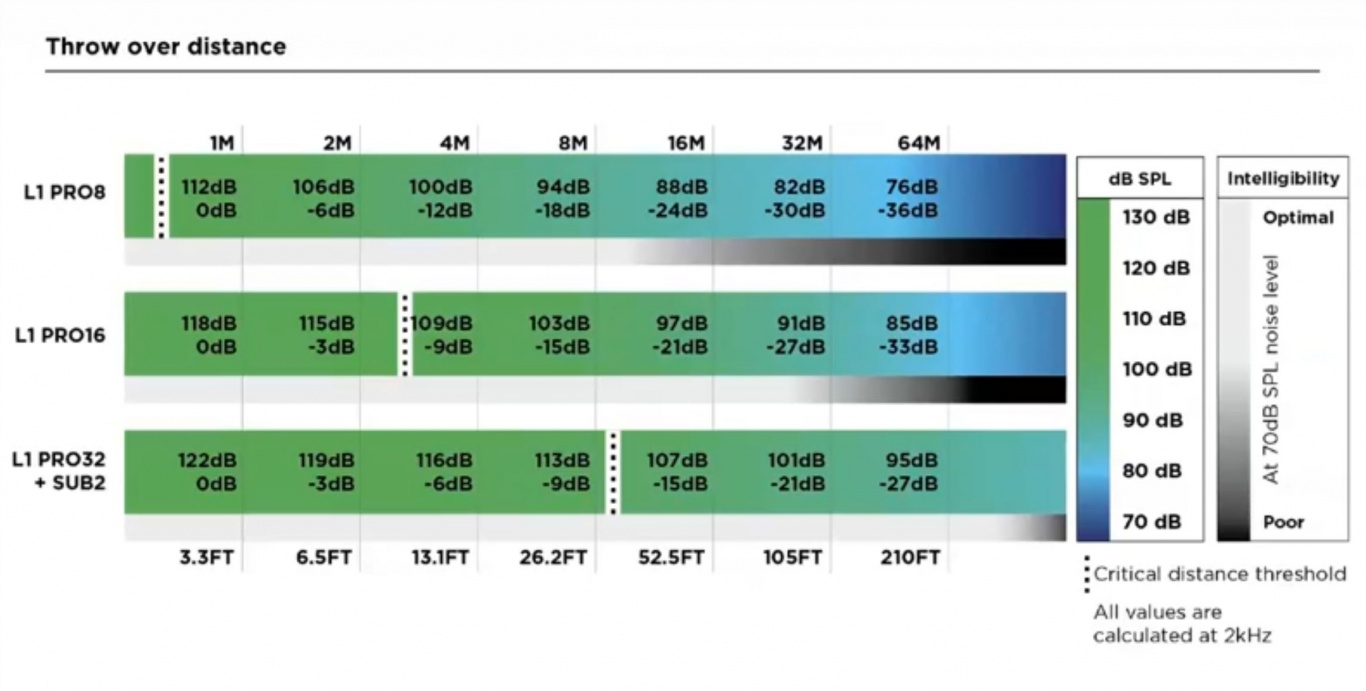
| answer = Use the chart below to see the performance over distance of the different models.
| answer =
Several factors determine how large an area you can cover with your sound.
* The distance to the listener farthest away
* The noise level in the listening area
* Walls and boundaries that affect reflections that support low frequencies
Use the chart below to see the performance over distance of the different models. This will help you to predict how well you can be heard at a distance.
{{#lst:Throw Over Distance | throw}}
{{#lst:Throw Over Distance | throw}}
There is a lot more information, including comparisons to legacy models, in this article [[Throw Over Distance]]
There is a lot more information, including comparisons to legacy models, in this article [[Throw Over Distance]]
Line 10:
Line 22:
|answer = Arrays on all units feature an extruded aluminum sleeve. Perforated grille on the front, solid on the back. Source: [https://www.facebook.com/groups/BoseL1/posts/10161224768097446?comment_id=10161256043032446 Craig Small]
|answer = Arrays on all units feature an extruded aluminum sleeve. Perforated grille on the front, solid on the back. Source: [https://www.facebook.com/groups/BoseL1/posts/10161224768097446?comment_id=10161256043032446 Craig Small]
}}
}}
{{FAQItem
|question = Do the L1 Pro systems wobble?
|answer = {{L1 Pro Wobble}}
}}
}}
==== New Owner Questions ====
==== New Owner Questions ====
{{FAQList
{{FAQList
Line 106:
Line 122:
It only selects the ToneMatch Preset applied to the input. <br>It does '''not''' adjust the channel’s gain staging or level.
It only selects the ToneMatch Preset applied to the input. <br>It does '''not''' adjust the channel’s gain staging or level.
{{ToneMatch Switch}}
{{ToneMatch Switch}}
}}
{{FAQItem
|question = How does the L1 Pro Line Out work?
|answer =
{{L1 Pro Line Out}}
}}
}}
{{FAQItem
{{FAQItem
Line 245:
Line 266:
|question = Can I use Bluetooth to connect two L1 Pros?
|question = Can I use Bluetooth to connect two L1 Pros?
|answer =
|answer =
No.
No
L1 Pro systems can receive Bluetooth audio from a Bluetooth source (for example, a phone, tablet, or computer).
L1 Pro systems can receive Bluetooth audio from a Bluetooth source (for example, a phone, tablet, or computer).
Line 283:
Line 304:
|question = Can I connect my L1 Pros so they share inputs?
|question = Can I connect my L1 Pros so they share inputs?
|answer =
|answer =
You can't.
No
* You cannot take the three inputs on each L1 Pro and hear all six inputs through both units.
* You cannot take the three inputs on each L1 Pro and hear all six inputs through both units.
* While you can daisy chain the inputs of the first L1 Pro to a second L1 Pro, you cannot send the inputs of the second L1 Pro back to the first. Doing so will create a feedback loop.
* While you can daisy chain the inputs of the first L1 Pro to a second L1 Pro, you cannot send the inputs of the second L1 Pro back to the first. Doing so will create a feedback loop.
Line 289:
Line 310:
For more details, see [[L1 Pro Daisy Chain]].
For more details, see [[L1 Pro Daisy Chain]].
}}
}}
<!---
{{FAQItem
|question = Can I run two L1 Pros in mono without a mixer?
|answer =
You can't.
There is no way to link two L1 Pros so they both play the same mono signal without using an external mixer.
Each L1 Pro only plays the signals connected to its own inputs.
If you need both L1 Pros to reproduce the same mono mix, you must use a mixer and send the same output to each unit.
These are questions that come from people who use Bose L1 Pro systems. The answers are from Bose, authoritative sources, best practices in the field and first-hand experiences.
Several factors determine how large an area you can cover with your sound.
The distance to the listener farthest away
The noise level in the listening area
Walls and boundaries that affect reflections that support low frequencies
Use the chart below to see the performance over distance of the different models. This will help you to predict how well you can be heard at a distance.
This is the chart used to estimate critical distance and drop-off over distance.
There is a lot more information, including comparisons to legacy models, in this article Throw Over Distance
Pro16 "wobble" is an exaggerated myth. There are no line array systems with zero wobble, and the L1 Pro16 is within the range of legacy and competitor systems with regard to play in the array. The extension is a durable polypropylene plastic with a sufficient wall thickness, which has proven to have a high flexural strength and has passed all quality, reliability (thousands of mating cycles), and safety tests. Performance of the system is not affected, as the connections between the array, extender and bass module are very secure and would require a significant amount of force to damage. The L1 Pro16, all current L1 Pro systems, and legacy L1 products meet the same horizontal force stability requirements (or tip testing requirements). Lastly, the electrical connectors used in the L1 Pro16 are the same that have been used on legacy L1 products, which have 17+ years of field usage and satisfactory performance.
Source: Craig Small, Product Manager, Bose Professional on Facebook 2020-12-29
The L1 Pro system extensions are made of a very durable polypropylene with sufficient wall thickness, proven to have a high flexural strength and meets our rigorous quality, reliability, and safety testing requirements. Reliability testing includes mating and un-mating of the array, extension, and subwoofer components that simulates 10 years of product life, and revealed no degradation in fit or stability. Additionally, the L1 Pro16 meets the same horizontal force stability requirements, or tip testing requirements, that all our L1 legacy products, and current family of L1 Pro products meet. The margin in the extension, array, and subwoofer fit experienced by some users is common with portable line array designs, including our legacy L1 systems.
Source: Craig Small, Product Manager, Bose Professional on Facebook 2021-03-26
Use the Bose Updater to update compatible Bose products. This web-based updater is an easy way to keep your product up-to-date with the latest features and improvements.
Compatibility Information
To use the Bose updater, use a compatible computer operating system and web browser. While other operating systems and browsers might work, the updater is designed for those listed below.
Compatible operating systems
Windows 10 or later
macOS (the latest two versions)
Compatible web browsers
Chrome
Edge
Firefox
Safari
I just got my new Bose system. Do I NEED to update the firmware?
The System EQ feature on the L1 Pro systems applies an EQ preset to the master output. This is similar to a graphic equalizer on traditional analogue mixers, but it uses four presets instead for quick access:
Off - i.e. 'Flat', no EQ applied.
Live - best for live performances
Slight reduction in 100Hz, bump around 1KHz, slight reduction at 10KHz
Music - best for DJ sets.
Increase around 100Hz, increase around 10KHz
Speech - best for just dialogue, if using the system for public address.
Reduction between 100Hz and 500Hz, bump around 2KHz-3KHz, bump over 11KHz
The System EQ setting will not affect the system's XLR line output audio.
The L1 Pro32 can be used without the upper array. This configuration is useful when a venue ceiling cannot accommodate the height of the L1 Pro32 Source: Page 7 of the L1 Pro32 Owners Guide
For best results, ensure the array is at ear level for listeners
The L1 Pro32 automatically adjusts the level of the bass output to maintain the appropriate spectral balance.
It’s a valid use case to use only the bottom array section. In fact, the EQ automatically adjusts to compensate. Craig Small - Bose
Half Stack Not Recommended for Small Gigs
Running only the lower section of the Line Array is a workaround when there isn't enough ceiling clearance to use both sections. For small gigs, turn down the volume on the L1 Pro32, don't run without the top section of the array because
You'll need to elevate the system so the array is at ear level for the audience. Otherwise, the sound will be muffled
You will reduce your projection over distance. The sound will drop off more over distance.
You may need to turn up the volume louder than if you were using the full array. As a result, you increase the likelihood of feedback.
In addition to the three inputs on the L1 Pro systems, you can add a T4S. When you do,
The inputs and controls on the T4S operate independently from the inputs and controls on the L1 Pro
The three inputs on the L1 Pro operate independently of the T4S. The operation of the controls of the L1 Pro is the same whether or not a T4S is connected via the ToneMatch port.
You can connect from the T4S to one or two L1 Pro systems using the ToneMatch ports.
In addition to the three inputs on the L1 Pro systems, you can add a T8S. When you do,
The inputs and controls on the T8S operate independently from the inputs and controls on the L1 Pro
The three inputs on the L1 Pro operate independently of the T8S. The operation of the controls of the L1 Pro is the same whether or not a T8S is connected via the ToneMatch port.
You can connect from the T8S to one L1 Pro system using the ToneMatch port. There are also XLR and ¼″ (6.3 mm) Tip‑Ring‑Sleeve outputs.
An analog cable from the T1 ToneMatch Audio Engine Master Output to one of the L1 Pro channels (preferably channel 3)
Required
ToneMatch cable (these were included with the T1 ToneMatch Audio Engine), or network cable (CAT5/6/7) up to 50 feet OR you can use a ToneMatch Power Supply instead of connecting to the L1 Pro System[1] for power.
¼″ (6.3 mm) Tip‑Ring‑Sleeve cable. This is the preferred cable for best results, but you can use a ¼″ (6.3 mm) Tip‑Sleeve cable. You'll be more vulnerable to line noise but if your cable length is less than 20-25 feet, this can work.
Connections and initial settings
On the L1 Pro, turn off the system and turn down the volume on all channels
Power: Connect the L1 Pro[1] ToneMatch port to the T1 ToneMatch Audio Engine ToneMatch port using the ToneMatch cable
Audio: Connect the T1 ToneMatch Audio Engine Master Output to the L1 Pro[1] channel 3 unless you are already using it for Bluetooth or another sound source. This leaves channels 1 and 2 open for other sound sources.
On channel 3, set Treble and Bass at 12:00 (flat)
If you connect to L1 Pro[1] channel 1 or channel 2
Regarding T1 compatibility with the L1 Pro systems: The architecture of the T1 ToneMatch differs from that of the T4S and T8S ToneMatch mixers and is not compatible with the L1 Pro’s S/PDIF audio architecture.
The T1 ToneMatch is based on S/PDIF, but with a proprietary connection for legacy L1 products which allows them to carry other data such as firmware updates. The T4S and T8S ToneMatch mixers use an updated version of ToneMatch protocol, which is compatible with legacy L1 products, but also fully compatible with S/PDIF. Since the L1 Pro architecture is designed to use standard S/PDIF protocol, the T1 ToneMatch cannot communicate the same way and is unable to send audio via the ToneMatch port.
Although the T1 ToneMatch is unable to send audio it can still receive power from an L1 Pro system via the ToneMatch port. In order for the L1 Pro system to receive audio, users of the T1 ToneMatch would need to connect the analog main out of the T1 to an available input on the L1 Pro system.
* Use the T1 ToneMatch Audio Engine to add three more XLR/Combo jack inputs and channel 4/5 dual input (combines stereo to mono). You give up the third input on the L1 Pro System[1] but get four inputs — a net gain of three inputs
The L1 Pro32 built-in mixer has ToneMatch Presets, Bass, Treble, and Reverb.
If you prefer to run your inputs to the S1 Pro+ and send the output to the L1 Pro, see S1 Pro+ To L1 Pro
If you have a mixer, you may prefer to send the monitor mix from the mixer to the monitors instead of the L1 Pro Line Out
The L1 Pro was designed to be placed behind the performers.
If you can do that, you may not need a monitor — you should be able to hear yourself clearly.
For more about that, see The L1® Approach and the History Of Amplification.
By design, the input sensitivity of the Channel 3 ¼″ (6.3 mm) Tip‑Ring‑Sleeve input is lower than the ¼″ (6.3 mm) Tip‑Ring‑Sleeve inputs on Channels 1 and 2.
This allows Channel 3 to handle line‑level sources with less risk of clipping.
You can achieve the same overall output level from Channel 3, but you may need to turn the Channel 3 volume control higher to do it.
This difference is most noticeable when connecting a third‑party mixer to the L1 Pro.
People tend to hear louder as better, so you may prefer to use Channels 1 and 2 instead of 3, but you can get the same result by turning up the volume on Channel 3, leaving the other channels available.
L1 Pro systems can receive Bluetooth audio from a Bluetooth source (for example, a phone, tablet, or computer).
They cannot send Bluetooth to another L1 Pro, and even if they could, the latency (delay) would make this unusable in a live sound setting.
You can send the output of one L1 Pro to another (Daisy Chain), but you can't send the output of the second one back to the first.
That is: You cannot take the three inputs on each L1 Pro and hear all six inputs through both units.
Each unit only plays the signals connected to its own inputs.
If you want both L1 Pros to play the same mono mix, use a mixer and send the same output to each unit:
From the mixer Mono Output → L1 Pro (Left) Channel 3 ¼″ (6.3 mm) Tip‑Ring‑Sleeve input
From the mixer Mono Output → L1 Pro (Right) Channel 3 ¼″ (6.3 mm) Tip‑Ring‑Sleeve input
This gives you two identical mono feeds, but the L1 Pros still operate as separate systems.
You cannot take the three inputs on each L1 Pro and hear all six inputs through both units.
While you can daisy chain the inputs of the first L1 Pro to a second L1 Pro, you cannot send the inputs of the second L1 Pro back to the first. Doing so will create a feedback loop.
Hiss with nothing connected to the L1 Pro inputs when I turn up the volume
Symptoms
Hiss with nothing connected, volume turned up
Possible Causes
with no input, turning up the volume amplifies noise
Solutions
turn down the volume or mute any unused channels
For more details see L1 Pro Hiss
Hiss when connecting the LINE OUT from an L1 Pro to a second L1 Pro with an XLR cable
Symptoms
Hiss, noise, clipping
Possible Causes
LINE OUT from the first L1 Pro is line-level. XLR input on the second L1 Pro is microphone-level
Solutions
Connect the first L1 Pro LINE OUT to the second L1 Pro Channel 3 input
The cable: Female XLR to 1/4-inch (6.3mm) Tip-Ring-Sleeve cable
For more details see L1 Pro Daisy Chain
Hiss when connecting a mixer to the L1 Pro Channels 1 or 2 with an XLR cable
Symptoms
Hiss, noise, clipping
Possible Causes
No causes provided
Solutions
Connect the mixer mono output to the L1 Pro Channel 3 input
The cable: Female XLR to 1/4-inch (6.3mm) Tip-Ring-Sleeve cable
For more details see Mixer to L1 Pro
Feedback happens when the sound from the loudspeaker is louder at the microphone than the sound of the voice.
If the microphone “hears” more speaker than performer, the system will feed back.
Set your source at its loudest performance level, then raise the Trim until you get solid green with occasional yellow (never red).
Once Trim is set, use channel volume for mixing — not Trim.
The first thing you do when connecting a sound source to your ToneMatch mixer is set the input trim. This is gain staging. Then you can set the ToneMatch Preset for your source. We'll do both in the short video below.
At the beginning of the video, I'm doing a factory reset so we don't bump into any old settings. You do not have to do a factory reset before you set the input trim on your ToneMatch mixer.
The trim controls across the top will be different
The trim controls across the top of your ToneMatch mixer will likely be different. This is because the output levels of your input sources will likely be different. This is normal.
Mixing - Use the volume controls not the trim controls
Once you have set the input trim, you should not have to change it until you change the input source (e.g. different microphone, singer, or instrument). Do not use the trim control to change the channel volume. Use the channel volume control.
Scenes
Saved Scenes do not capture the trim, channel volume, or Master Volume settings.
Set Up Your Source
Set your source at the maximum that it will be when performing.
Microphone
Sing directly into the microphone using close microphone technique (lips just brushing the windscreen). Sing as loudly as you will sing during your performance. You want to set the Trim to work at your maximum volume.
Instrument
Turn your input as high as it is likely to go during performance.
Trim Controls
The ToneMatch Mixer[2] trim controls for Channels 1-4 (1-8 for the T8S ToneMatch mixer) provide a significant gain increase when you reach the upper limit. This increase in gain is normal operation.
Most sources like typical microphones and piezo pickup systems can provide enough level without the need to add significant gain from the trim control. Certain sources like passive acoustic guitar pickups require additional gain and in these cases it can be necessary to set the trim level to the upper range of the control. When the trim control is set this high you may notice the gain change. This is normal operation. If you want to run the trim control at lower settings we recommend using a preamp or simple stomp box level booster.
The trim for Aux input channels 5/6 (9/10 for the T8S ToneMatch mixer) do not exhibit the same behavior as the trim controls for Channels 1-4 (1-8 for the T8S ToneMatch mixer). The Aux inputs are designed for line level sources and do not have the same gain staging as channels 5/6 (9/10 for the T8S ToneMatch mixer).
Here's a quick video to help you set the input trim for a microphone on the T1 ToneMatch Audio Engine. This is called Gain Staging.
The trim controls across the top will be different
The trim controls across the top of your T1 ToneMatch Audio Engine will likely be different. This is because the output levels of your input sources will likely be different. This is normal.
Mixing - Use the volume controls not the trim controls
Once you have set the input trim, you should not have to change it until you change the input source (e.g. different microphone, singer, or instrument). Do not use the trim control to change the channel volume. Use the channel volume control.
Scenes
Saved Scenes do not capture the trim, channel volume, or Master Volume settings.
The same principles apply to an instrument or line-level input.
Set the source to the highest level you will need during the show
Set the input trim so that you get solid green, occasional yellow flickers, and never see red.
Get close to the microphone when you want to be loud. No other technique has a big an impact on feedback. Each halving of distance is approximately another 6 dB of gain before feedback. This relationship in physics is known as the Inverse Square Law. This means that the difference between working a microphone at 2 inches, and 1/4 inch is 18 dB, which is more than twice as loud. While good mic technique often involves "working" the microphone at different distances, singers must be mindful of the fact that small changes in distance from the mouth result in very dramatic changes in sound level.
In the feedback diagram at the top, getting close to the microphone means getting more sound from voice which translates to more gain without feedback.
Yes.
Supercardioid and hypercardioid microphones provide the best gain‑before‑feedback, followed by cardioid.
Omnidirectional microphones provide the least.
Use a directional microphone. Hypercardioid is better than cardioid, which is better than omnidirectional. All sound waves impinging on the microphone from a direction other than the intended signal is "noise" and will lower the threshold of feedback.
Directional microphones "collect" less sound from directions other than what they're supposed to amplify (the voice, or an instrument) and hence are less likely to feed back.
In addition, most directional microphones have a strong behavior called proximity effect. This is the strong buildup of bass and low-mid response as the source (say the voice) to microphone distance decreases. For microphones intended to sound natural when the voice is very close -- say one of a number of popular stage vocal microphones -- what this means is that low-to-middle frequencies from sources at a distance, including loudspeakers being used to amplify the voice, are largely rejected by the microphone. This is a real plus in terms of avoiding microphone feedback.
Conversely, an omnidirectional microphone (equal sensitivity to sound coming from any direction) has no proximity effect. This is an advantage, often in the studio where the engineer wants a consistent tone regardless of distance. But it's a disadvantage on stage in terms of feedback. An omnidirectional mic collects more sound that's not the target, and because it has no proximity effect, it is more susceptible to feedback at low-to-mid frequencies than a directional mic.
Omnidirectional and Unidirectional Microphones
Recommendation
Bose has always recommended using microphones with supercardioid or hypercardioid polar patterns for best gain-before-feedback with the Bose L1 systems.
For live sound applications with Bose systems, in preferred order, use:
Hypercardioid or Supercardioid
Audix OM 5, OM 3b, OM 6, OM 7, VX 5
EV N/D 767A
Neumann KMS 105
Sennheiser e 845, e 865, e 945, e 965, MD 441, MD 945,
Shure Beta 58A, Beta 87A
Cardioid
Sennheiser e 835, e 935, MD 935
Shure SM 58, SM 57, Beta 87C
Omnidirectional
Not recommended for live sound applications
Reference Reading
There are two basic types of microphone — omnidirectional and unidirectional[3]
.
Omnidirectional Microphone
Omnidirectional mic. It is sensitive to sounds from all directions.
It's unlikely you will use an omnidirectional microphone in a live performance setting. You will pick up too much ambient noise from the room, the audience, and the loudspeakers (leading to feedback).
Use omnidirectional microphones when the sound source could be anywhere around the microphone. This picks up a lot of room ambiance, which sometimes is the goal. Direct and ambient sound can be adjusted by moving the microphone closer to or further from the sound source.
Unidirectional Microphone
Unidirectional microphones are sensitive to sound coming from only one direction. Examples:
a vocalist singing directly on axis, directly into the microphone
a guitar amplifier with the microphone aimed directly at the speaker cone
All of the following types are unidirectional
Cardioid
The most common type of unidirectional microphone is called a “cardioid” because its pickup pattern is heart-shaped. It picks up most sound from the front of the microphone and some from the sides.
Although you will get better gain-before-feedback from a cardioid microphone than an omnidirectional microphone, you will get better gain-before-feedback from a supercardioid or hypercardioid microphone (see next section).
Examples of common cardioid microphones (good to great microphones, but not necessarily the best for gain-before-feedback with Bose L1 systems)
Sennheiser e 835, e 935, MD 935
Shure SM 58, SM 57, Beta 87C
Supercardioid / Hypercardioid
Supercardioid or hypercardioid microphones offer even greater sound isolation through narrower pickup patterns.
Examples of common supercardioid/hypercardioid microphones
Audix OM 5, OM 3b, OM 6, OM 7, VX 5
EV N/D 767A
Neumann KMS 105
Sennheiser e 845, e 865, e 945, e 965, MD 441, MD 945,
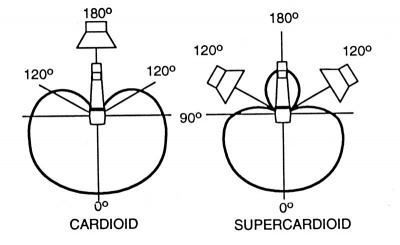
Other variants on the unidirectional polar pattern include supercardioid and hypercardioid options. Both patterns offer narrower front pickup angles than the cardioid – 115 degrees for the supercardioid and 105 degrees for the hypercardioid – alongside greater rejection of ambient sound. Additionally, while the cardioid is least sensitive at the rear (180 degrees off-axis), the supercardioid is least sensitive at 125 degrees and the hypercardioid at 110 degrees. When placed properly they can provide more 'focused' pickup than the cardioid pattern, but they also have less rejection at the rear. If you're using either of these polar patterns on stage with wedge monitors, it's important make sure you avoid placing the wedges directly behind the mic in this instance. Instead, place them either side at the mics least sensitive angle.
How many open microphones can I use before feedback becomes a problem?
Every time you double the number of open microphones, you lose about 3 dB of gain before feedback.
Use as few open mics as possible, and mute or gate unused ones.