Kemper Profiler Player with XSONIC AIRSTEP: Difference between revisions
Created page with " These are the settings on the Airstep to make it mimic the behaviour of the Kemper rig buttons one through five {| class="wikitable" ! Switch Name !! Toggle Mode !! LED Disp..." |
mNo edit summary |
||
| (46 intermediate revisions by the same user not shown) | |||
| Line 1: | Line 1: | ||
{{DivToc | |||
|RightHead = Connecting the XSONIC Airstep/Airstep Lite to Kemper Profilers | |||
|RightBody = | |||
[[File:Kemper Player Airstep.jpg|400px|right]] | |||
I started down this path to get my Airstep and Airstep Lite to control my Kemper Profile Player with the Level III update. | |||
I have tested everything documented here, and it all works with | |||
* Kemper Player Profiler (Level III) | |||
* Kemper Stage (original version) | |||
* Kemper Power Rack (original version) | |||
* Kemper Profiler (original version) | |||
* Check out thie [https://greendog.co.uk/kemper/nrpn-calculator.php NRPN Calculator] | |||
|Categories = | |||
[[Category:How To]] | |||
[[Category:Kemper]] | |||
[[Category:MIDI]] | |||
}} | |||
== MIDI Connection == | |||
=== USB Wired Connection === | |||
[[File:USB-C to USB-B.jpg|150px|right]] | |||
Connecting the Airstep USB-C to the Kemper USB-B port works. If you don't have this cable, you can get it from XSONIC in their [https://xsonicaudio.com/products/airstep-cable-pack Airstep Cable Pack] | |||
Connecting the Airstep USB-C to the Kemper USB-A does not work. The Kemper freezes. | |||
=== Bluetooth MIDI Connection === | |||
[[File:M-VAVE MIDI.jpg|400px|right|link=https://www.amazon.com/M-VAVE-Transmission-Controller-Instrument-Synthesizer/dp/B0F8V9B1RY/]] | |||
This works to connect to the Kemper Profile Player USB-A port. | |||
[https://www.amazon.com/M-VAVE-Transmission-Controller-Instrument-Synthesizer/dp/B0F8V9B1RY/ M-VAVE Wireless MIDI Transmission System Ultra Low Latency, USB Bluetooth Option for MIDI Controller Mac, iOS, Windows, 5-PIN DIN Interface Wireless MIDI Keyboard Instrument] | |||
The XSONIC Airstep finds the M-VAVE USB-A automatically. | |||
The XSONIC Airstep finds the M-VAVE 5-Pin MIDI connectors automatically (right side of the photo) and these work with the Kemper Stage and Kemper Profilers (Head and Rack versions) | |||
I've read that the [https://www.amazon.com/CME-WIDI-Bud-Pro-performance/dp/B09GS3J3J5/ref=sxbs_pa_sp_search_thematic_btf_sspa WIDI Bud Pro] works but I have not tried it. | |||
== Rig Buttons == | |||
These settings will emulate the behaviour of the Kemper Remote or Kemper Stage. | |||
=== Switch A === | |||
{| class="wikitable" style="width:400px" | |||
|- | |||
! style="background-color:#f2f2f2; width:40%" | Field !! style="background-color:#f2f2f2" | Value | |||
|- | |||
| Name || Rig/Slot 1 | |||
|- | |||
| Toggle Mode || Off | |||
|- | |||
| LED Display || Normal Mode | |||
|} | |||
'''Message 1''' | |||
{| class="wikitable" style="width:400px" | |||
|- | |||
! style="background-color:#f2f2f2; width:40%" | Field !! style="background-color:#f2f2f2" | Value | |||
|- | |||
| Trigger || Release | |||
|- | |||
| Message Type || MIDI | |||
|- | |||
| Output Interface || ALL | |||
|- | |||
| MIDI Type || Control Change | |||
|- | |||
| MIDI Channel || 1 | |||
|- | |||
| CC Number || 50 | |||
|- | |||
| CC Value || 1 | |||
|} | |||
'''Message 2''' | |||
{| class="wikitable" style="width:400px" | |||
|- | |||
! style="background-color:#f2f2f2; width:40%" | Field !! style="background-color:#f2f2f2" | Value | |||
|- | |||
| Trigger || Release | |||
|- | |||
| Message Type || MIDI | |||
|- | |||
| Output Interface || ALL | |||
|- | |||
| MIDI Type || Control Change | |||
|- | |||
| MIDI Channel || 1 | |||
|- | |||
| CC Number || 50 | |||
|- | |||
| CC Value || 0 | |||
|} | |||
=== Switch B === | |||
{| class="wikitable" style="width:400px" | |||
|- | |||
! style="background-color:#f2f2f2; width:40%" | Field !! style="background-color:#f2f2f2" | Value | |||
|- | |||
| Name || Rig/Slot 2 | |||
|- | |||
| Toggle Mode || Off | |||
|- | |||
| LED Display || Normal Mode | |||
|} | |||
'''Message 1''' | |||
{| class="wikitable" style="width:400px" | |||
|- | |||
! style="background-color:#f2f2f2; width:40%" | Field !! style="background-color:#f2f2f2" | Value | |||
|- | |||
| Trigger || Release | |||
|- | |||
| Message Type || MIDI | |||
|- | |||
| Output Interface || ALL | |||
|- | |||
| MIDI Type || Control Change | |||
|- | |||
| MIDI Channel || 1 | |||
|- | |||
| CC Number || 51 | |||
|- | |||
| CC Value || 1 | |||
|} | |||
'''Message 2''' | |||
{| class="wikitable" style="width:400px" | |||
|- | |||
! style="background-color:#f2f2f2; width:40%" | Field !! style="background-color:#f2f2f2" | Value | |||
|- | |||
| Trigger || Release | |||
|- | |||
| Message Type || MIDI | |||
|- | |||
| Output Interface || ALL | |||
|- | |||
| MIDI Type || Control Change | |||
|- | |||
| MIDI Channel || 1 | |||
|- | |||
| CC Number || 51 | |||
|- | |||
| CC Value || 0 | |||
|} | |||
=== Switch C === | |||
{| class="wikitable" style="width:400px" | |||
|- | |||
! style="background-color:#f2f2f2; width:40%" | Field !! style="background-color:#f2f2f2" | Value | |||
|- | |||
| Name || Rig/Slot 3 | |||
|- | |||
| Toggle Mode || Off | |||
|- | |||
| LED Display || Normal Mode | |||
|} | |||
'''Message 1''' | |||
{| class="wikitable" style="width:400px" | |||
|- | |||
! style="background-color:#f2f2f2; width:40%" | Field !! style="background-color:#f2f2f2" | Value | |||
|- | |||
| Trigger || Release | |||
|- | |||
| Message Type || MIDI | |||
|- | |||
| Output Interface || ALL | |||
|- | |||
| MIDI Type || Control Change | |||
|- | |||
| MIDI Channel || 1 | |||
|- | |||
| CC Number || 52 | |||
|- | |||
| CC Value || 1 | |||
|} | |||
'''Message 2''' | |||
{| class="wikitable" style="width:400px" | |||
|- | |||
! style="background-color:#f2f2f2; width:40%" | Field !! style="background-color:#f2f2f2" | Value | |||
|- | |||
| Trigger || Release | |||
|- | |||
| Message Type || MIDI | |||
|- | |||
| Output Interface || ALL | |||
|- | |||
| MIDI Type || Control Change | |||
|- | |||
| MIDI Channel || 1 | |||
|- | |||
| CC Number || 52 | |||
|- | |||
| CC Value || 0 | |||
|} | |||
=== Switch D === | |||
{| class="wikitable" style="width:400px" | |||
|- | |||
! style="background-color:#f2f2f2; width:40%" | Field !! style="background-color:#f2f2f2" | Value | |||
|- | |||
| Name || Rig/Slot 4 | |||
|- | |||
| Toggle Mode || Off | |||
|- | |||
| LED Display || Normal Mode | |||
|} | |||
'''Message 1''' | |||
{| class="wikitable" style="width:400px" | |||
|- | |||
! style="background-color:#f2f2f2; width:40%" | Field !! style="background-color:#f2f2f2" | Value | |||
|- | |||
| Trigger || Release | |||
|- | |||
| Message Type || MIDI | |||
|- | |||
| Output Interface || ALL | |||
|- | |||
| MIDI Type || Control Change | |||
|- | |||
| MIDI Channel || 1 | |||
|- | |||
| CC Number || 53 | |||
|- | |||
| CC Value || 1 | |||
|} | |||
'''Message 2''' | |||
{| class="wikitable" style="width:400px" | |||
|- | |||
! style="background-color:#f2f2f2; width:40%" | Field !! style="background-color:#f2f2f2" | Value | |||
|- | |||
| Trigger || Release | |||
|- | |||
| Message Type || MIDI | |||
|- | |||
| Output Interface || ALL | |||
|- | |||
| MIDI Type || Control Change | |||
|- | |||
| MIDI Channel || 1 | |||
|- | |||
| CC Number || 53 | |||
|- | |||
| CC Value || 0 | |||
|} | |||
=== Switch E === | |||
{| class="wikitable" style="width:400px" | |||
|- | |||
! style="background-color:#f2f2f2; width:40%" | Field !! style="background-color:#f2f2f2" | Value | |||
|- | |||
| Name || Rig/Slot 5 | |||
|- | |||
| Toggle Mode || Off | |||
|- | |||
| LED Display || Normal Mode | |||
|} | |||
'''Message 1''' | |||
{| class="wikitable" style="width:400px" | |||
|- | |||
! style="background-color:#f2f2f2; width:40%" | Field !! style="background-color:#f2f2f2" | Value | |||
|- | |||
| Trigger || Release | |||
|- | |||
| Message Type || MIDI | |||
|- | |||
| Output Interface || ALL | |||
|- | |||
| MIDI Type || Control Change | |||
|- | |||
| MIDI Channel || 1 | |||
|- | |||
| CC Number || 54 | |||
|- | |||
| CC Value || 1 | |||
|} | |||
'''Message 2''' | |||
{| class="wikitable" style="width:400px" | |||
|- | |||
! style="background-color:#f2f2f2; width:40%" | Field !! style="background-color:#f2f2f2" | Value | |||
|- | |||
| Trigger || Release | |||
|- | |||
| Message Type || MIDI | |||
|- | |||
| Output Interface || ALL | |||
|- | |||
| MIDI Type || Control Change | |||
|- | |||
| MIDI Channel || 1 | |||
|- | |||
| CC Number || 54 | |||
|- | |||
| CC Value || 0 | |||
|} | |||
=== Summary of Kemper MIDI Logic (Slots + Morph) === | |||
* '''CC#50–54''': Load Slots 1–5 in Performance Mode or Rigs 1–5 in Browser Mode. | |||
* '''Morph Triggering''': If the same CC is sent again (with value 1–127), Morph is engaged. | |||
* '''Morph Release''': Sending value 0 disengages Morph. | |||
* '''Momentary vs Latching''': Controlled by the Rig’s internal “Momentary” setting. | |||
=== Why Your Airstep Setup Works === | |||
* '''Press''' = CC#50–54 value 1 → Loads Rig or Slot | |||
* '''Release''' = CC#50–54 value 0 → Ends Morph (if Momentary is enabled) | |||
* '''Repeated Presses''' → Toggle Morph (if Momentary is disabled) | |||
* '''Single Button Logic''' → Matches Kemper Stage/Remote behavior exactly | |||
=== Kemper MIDI Documentation === | |||
: If Rig Button Morph is activated in System Settings, and the PROFILER receives subsequent control changes #50-#54 following the initial Slot load, these will trigger Morphing. | |||
So, the same button could be used to first load a Rig, and then act as a Morph Button for that Rig. To support all functions, values 1-127 should be sent when the button is hit, and value 0 should follow when the button is released. The setting of the “Momentary” option in Rig Settings | |||
determines whether the Morphing latches the morph sound and base sound, or if it immediately returns to the base | |||
sound as soon as you release the button. | |||
== Effects Stomps == | |||
=== Airstep Bank 2 – Stomp Mode Control (Kemper Profile Player) === | |||
When I use both the Airstep and the Airstep Lite, I use the Airstep for Rig buttons (above) and the Airstep Lite for Effects Buttons (below) | |||
CC# 75-78 to map to Effects buttons 1-4, and the last button set to Tuner on/off. | |||
I did this instead of using CC# 17-22, which map to Modules A-D, because sometimes I use the Kemper Profile Player without the Airstep, and I wanted to use the Kemper Player mapping instead of the Profiler mappings. If I change the Effects buttons 1-4 on the Player, I wanted the Airstep to match. | |||
'''Summary''' | |||
This shows all the values in a concise table. However, it will be easier to configure the settings in the Airstep app by following the detail in the next section. | |||
{| class="wikitable" | {| class="wikitable" | ||
! Switch Name !! Toggle Mode !! LED Display !! Trigger !! MIDI Type !! CC# !! Value !! Output Interface !! MIDI Channel | ! Switch Name !! Toggle Mode !! LED Display !! Trigger !! MIDI Type !! CC# !! Value !! Output Interface !! MIDI Channel | ||
|- | |- | ||
| | | Effect Button 1 || On || Toggle Mode || Toggle On<br/>Message 1|| CC || 75 || 127 || ALL || 1 | ||
|- | |||
| || || || Toggle Off<br/>Message 1|| CC || 75 || 0 || ALL || 1 | |||
|- | |||
| Effect Button 2 || On || Toggle Mode || Toggle On<br/>Message 1|| CC || 76 || 127 || ALL || 1 | |||
|- | |||
| || || || Toggle Off<br/>Message 1|| CC || 76 || 0 || ALL || 1 | |||
|- | |||
| Effect Button 3 || On || Toggle Mode || Toggle On<br/>Message 1 || CC || 77 || 127 || ALL || 1 | |||
|- | |||
| || || || Toggle Off<br/>Message 1 || CC || 77 || 0 || ALL || 1 | |||
|- | |||
| Effect Button 4 || On || Toggle Mode || Toggle On<br/>Message 1|| CC || 78 || 127 || ALL || 1 | |||
|- | |||
| || || || Toggle Off<br/>Message 1|| CC || 78 || 0 || ALL || 1 | |||
|- | |||
| Stomp (e.g. Tuner) || On || Toggle Mode || Toggle On<br/>Message 1|| CC || 31 || 127 || ALL || 1 | |||
|- | |||
| || || || Toggle Off<br/>Message 1|| CC || 31 || 0 || ALL || 1 | |||
|} | |||
''' Detailed Configuration ''' | |||
=== Switch A === | |||
{| class="wikitable" style="width:400px" | |||
|- | |||
! style="background-color:#f2f2f2; width:40%" | Field !! style="background-color:#f2f2f2" | Value | |||
|- | |||
| Name || Effect Button 1 | |||
|- | |||
| Toggle Mode || On | |||
|- | |||
| LED Display || Toggle Mode | |||
|} | |||
'''Toggle On'''</br>'''Message 1''' | |||
{| class="wikitable" style="width:400px" | |||
|- | |||
! style="background-color:#f2f2f2; width:40%" | Field !! style="background-color:#f2f2f2" | Value | |||
|- | |||
| Message Type || MIDI | |||
|- | |||
| Output Interface || ALL | |||
|- | |||
| MIDI Type || Control Change | |||
|- | |||
| MIDI Channel || 1 | |||
|- | |||
| CC Number || 75 | |||
|- | |||
| CC Value || 1 | |||
|} | |||
'''Toggle Off'''</br>'''Message 1''' | |||
{| class="wikitable" style="width:400px" | |||
|- | |||
! style="background-color:#f2f2f2; width:40%" | Field !! style="background-color:#f2f2f2" | Value | |||
|- | |||
| Message Type || MIDI | |||
|- | |||
| Output Interface || ALL | |||
|- | |||
| MIDI Type || Control Change | |||
|- | |||
| MIDI Channel || 1 | |||
|- | |||
| CC Number || 75 | |||
|- | |||
| CC Value || 0 | |||
|} | |||
=== Switch B === | |||
{| class="wikitable" style="width:400px" | |||
|- | |||
! style="background-color:#f2f2f2; width:40%" | Field !! style="background-color:#f2f2f2" | Value | |||
|- | |||
| Name || Effect Button 2 | |||
|- | |||
| Toggle Mode || On | |||
|- | |||
| LED Display || Toggle Mode | |||
|} | |||
'''Toggle On'''</br>'''Message 1''' | |||
{| class="wikitable" style="width:400px" | |||
|- | |||
! style="background-color:#f2f2f2; width:40%" | Field !! style="background-color:#f2f2f2" | Value | |||
|- | |||
| Message Type || MIDI | |||
|- | |||
| Output Interface || ALL | |||
|- | |- | ||
| | | MIDI Type || Control Change | ||
|- | |- | ||
| | | MIDI Channel || 1 | ||
|- | |- | ||
| CC Number || 76 | |||
|- | |- | ||
| KPA 3 || Off || Normal Mode || Press || CC || | | CC Value || 1 | ||
|} | |||
'''Toggle Off'''</br>'''Message 1''' | |||
{| class="wikitable" style="width:400px" | |||
|- | |||
! style="background-color:#f2f2f2; width:40%" | Field !! style="background-color:#f2f2f2" | Value | |||
|- | |||
| Message Type || MIDI | |||
|- | |||
| Output Interface || ALL | |||
|- | |||
| MIDI Type || Control Change | |||
|- | |||
| MIDI Channel || 1 | |||
|- | |||
| CC Number || 76 | |||
|- | |||
| CC Value || 0 | |||
|} | |||
=== Switch C === | |||
{| class="wikitable" style="width:400px" | |||
|- | |||
! style="background-color:#f2f2f2; width:40%" | Field !! style="background-color:#f2f2f2" | Value | |||
|- | |||
| Name || Effect Button 3 | |||
|- | |||
| Toggle Mode || On | |||
|- | |||
| LED Display || Toggle Mode | |||
|} | |||
'''Toggle On'''</br>'''Message 1''' | |||
{| class="wikitable" style="width:400px" | |||
|- | |||
! style="background-color:#f2f2f2; width:40%" | Field !! style="background-color:#f2f2f2" | Value | |||
|- | |||
| Message Type || MIDI | |||
|- | |||
| Output Interface || ALL | |||
|- | |||
| MIDI Type || Control Change | |||
|- | |||
| MIDI Channel || 1 | |||
|- | |||
| CC Number || 77 | |||
|- | |||
| CC Value || 1 | |||
|} | |||
'''Toggle Off'''</br>'''Message 1''' | |||
{| class="wikitable" style="width:400px" | |||
|- | |||
! style="background-color:#f2f2f2; width:40%" | Field !! style="background-color:#f2f2f2" | Value | |||
|- | |||
| Message Type || MIDI | |||
|- | |||
| Output Interface || ALL | |||
|- | |||
| MIDI Type || Control Change | |||
|- | |||
| MIDI Channel || 1 | |||
|- | |||
| CC Number || 77 | |||
|- | |||
| CC Value || 0 | |||
|} | |||
=== Switch D === | |||
{| class="wikitable" style="width:400px" | |||
|- | |||
! style="background-color:#f2f2f2; width:40%" | Field !! style="background-color:#f2f2f2" | Value | |||
|- | |||
| Name || Effect Button 4 | |||
|- | |||
| Toggle Mode || On | |||
|- | |||
| LED Display || Toggle Mode | |||
|} | |||
'''Toggle On'''</br>'''Message 1''' | |||
{| class="wikitable" style="width:400px" | |||
|- | |||
! style="background-color:#f2f2f2; width:40%" | Field !! style="background-color:#f2f2f2" | Value | |||
|- | |||
| Message Type || MIDI | |||
|- | |||
| Output Interface || ALL | |||
|- | |||
| MIDI Type || Control Change | |||
|- | |||
| MIDI Channel || 1 | |||
|- | |||
| CC Number || 78 | |||
|- | |||
| CC Value || 1 | |||
|} | |||
'''Toggle Off'''</br>'''Message 1''' | |||
{| class="wikitable" style="width:400px" | |||
|- | |||
! style="background-color:#f2f2f2; width:40%" | Field !! style="background-color:#f2f2f2" | Value | |||
|- | |||
| Message Type || MIDI | |||
|- | |||
| Output Interface || ALL | |||
|- | |||
| MIDI Type || Control Change | |||
|- | |||
| MIDI Channel || 1 | |||
|- | |||
| CC Number || 78 | |||
|- | |||
| CC Value || 0 | |||
|} | |||
=== Switch E === | |||
{| class="wikitable" style="width:400px" | |||
|- | |||
! style="background-color:#f2f2f2; width:40%" | Field !! style="background-color:#f2f2f2" | Value | |||
|- | |||
| Name || Stomp (e.g. Tuner) | |||
|- | |||
| Toggle Mode || On | |||
|- | |||
| LED Display || Toggle Mode | |||
|} | |||
'''Toggle On'''</br>'''Message 1''' | |||
{| class="wikitable" style="width:400px" | |||
|- | |||
! style="background-color:#f2f2f2; width:40%" | Field !! style="background-color:#f2f2f2" | Value | |||
|- | |||
| Message Type || MIDI | |||
|- | |||
| Output Interface || ALL | |||
|- | |||
| MIDI Type || Control Change | |||
|- | |||
| MIDI Channel || 1 | |||
|- | |||
| CC Number || 31 | |||
|- | |||
| CC Value || 1 | |||
|} | |||
'''Toggle Off'''</br>'''Message 1''' | |||
{| class="wikitable" style="width:400px" | |||
|- | |||
! style="background-color:#f2f2f2; width:40%" | Field !! style="background-color:#f2f2f2" | Value | |||
|- | |||
| Message Type || MIDI | |||
|- | |||
| Output Interface || ALL | |||
|- | |||
| MIDI Type || Control Change | |||
|- | |||
| MIDI Channel || 1 | |||
|- | |||
| CC Number || 31 | |||
|- | |||
| CC Value || 0 | |||
|} | |||
=== Notes === | |||
* '''Toggle Mode On''' lets the Airstep track internal switch state, so LEDs reflect effect status (assuming Kemper doesn’t override). | |||
* '''CC#75–79''' are fully valid and can be assigned to any effect slot in Kemper’s MIDI settings. | |||
* You can '''remap these CCs''' in Kemper’s System Settings to match your preferred stomp layout. | |||
== Airstep Configuration – Kemper Profiler Player Looper Control == | |||
Use the Airstep Preset for KPA Looper. It works, mimicking the Profiler Foot Controller and the Kemper Stage. | |||
For each function (e.g. Rec/Play/Overdub), there is a table with five rows. Each row represents an Airstep "Message". All the values are the same except for the second row in each table (88,89,90,91,92,93) | |||
What follows is the documentation in case you want to reassign the buttons. In my case, I never use "Reverse" so I replaced it with "Undo". | |||
=== Rec/Play/Overdub === | |||
* '''Switch Name''': Rec/Play/Overdub | |||
* '''Toggle Mode''': Off | |||
* '''LED Display''': Normal Mode | |||
{| class="wikitable" | |||
! Message !! Trigger !! CC# !! Value !! Description | |||
|- | |||
| 1 || Press || 99 || 125 || NRPN MSB (Looper) | |||
|- | |||
| 2 || Press || 98 || 88 || NRPN LSB (Rec/Play/Overdub) | |||
|- | |||
| 3 || Press || 6 || 0 || Data Entry MSB | |||
|- | |||
| 4 || Press || 38 || 1 || Data Entry LSB (Execute) | |||
|- | |||
| 5 || Release || 38 || 0 || Data Entry LSB (Reset) | |||
|} | |||
=== Stop/Erase === | |||
* '''Switch Name''': Stop/Erase | |||
* '''Toggle Mode''': Off | |||
* '''LED Display''': Normal Mode | |||
{| class="wikitable" | |||
! Message !! Trigger !! CC# !! Value !! Description | |||
|- | |||
| 1 || Press || 99 || 125 || NRPN MSB (Looper) | |||
|- | |||
| 2 || Press || 98 || 89 || NRPN LSB (Stop/Erase) | |||
|- | |||
| 3 || Press || 6 || 0 || Data Entry MSB | |||
|- | |||
| 4 || Press || 38 || 1 || Data Entry LSB (Execute) | |||
|- | |||
| 5 || Release || 38 || 0 || Data Entry LSB (Reset) | |||
|} | |||
=== Trigger === | |||
* '''Switch Name''': Trigger | |||
* '''Toggle Mode''': Off | |||
* '''LED Display''': Normal Mode | |||
{| class="wikitable" | |||
! Message !! Trigger !! CC# !! Value !! Description | |||
|- | |||
| 1 || Press || 99 || 125 || NRPN MSB (Looper) | |||
|- | |||
| 2 || Press || 98 || 90 || NRPN LSB (Trigger) | |||
|- | |||
| 3 || Press || 6 || 0 || Data Entry MSB | |||
|- | |||
| 4 || Press || 38 || 1 || Data Entry LSB (Execute) | |||
|- | |||
| 5 || Release || 38 || 0 || Data Entry LSB (Reset) | |||
|} | |||
=== Reverse === | |||
* '''Switch Name''': Reverse | |||
* '''Toggle Mode''': Off | |||
* '''LED Display''': Normal Mode | |||
{| class="wikitable" | |||
! Message !! Trigger !! CC# !! Value !! Description | |||
|- | |||
| 1 || Press || 99 || 125 || NRPN MSB (Looper) | |||
|- | |||
| 2 || Press || 98 || 91 || NRPN LSB (Reverse) | |||
|- | |||
| 3 || Press || 6 || 0 || Data Entry MSB | |||
|- | |||
| 4 || Press || 38 || 1 || Data Entry LSB (Execute) | |||
|- | |||
| 5 || Release || 38 || 0 || Data Entry LSB (Reset) | |||
|} | |||
=== Half Speed === | |||
* '''Switch Name''': Half Speed | |||
* '''Toggle Mode''': Off | |||
* '''LED Display''': Normal Mode | |||
{| class="wikitable" | |||
! Message !! Trigger !! CC# !! Value !! Description | |||
|- | |||
| 1 || Press || 99 || 125 || NRPN MSB (Looper) | |||
|- | |||
| 2 || Press || 98 || 92 || NRPN LSB (Half Speed) | |||
|- | |||
| 3 || Press || 6 || 0 || Data Entry MSB | |||
|- | |||
| 4 || Press || 38 || 1 || Data Entry LSB (Execute) | |||
|- | |||
| 5 || Release || 38 || 0 || Data Entry LSB (Reset) | |||
|} | |||
=== Undo === | |||
* '''Switch Name''': Undo | |||
* '''Toggle Mode''': Off | |||
* '''LED Display''': Normal Mode | |||
{| class="wikitable" | |||
! Message !! Trigger !! CC# !! Value !! Description | |||
|- | |||
| 1 || Press || 99 || 125 || NRPN MSB (Looper) | |||
|- | |||
| 2 || Press || 98 || 93 || NRPN LSB (Undo) | |||
|- | |||
| 3 || Press || 6 || 0 || Data Entry MSB | |||
|- | |||
| 4 || Press || 38 || 1 || Data Entry LSB (Execute) | |||
|- | |||
| 5 || Release || 38 || 0 || Data Entry LSB (Reset) | |||
|} | |||
<!-- | |||
== Airstep Configuration – Kemper Profiler Player Looper Control == | |||
For each function (e.g. Rec/Play/Overdub), there is a table with five rows. Each row represents an Airstep "Message". All the values are the same except for the second row in each table (88,89,90,91,92,93) | |||
== Airstep Configuration – Kemper Profiler Player Looper Control == | |||
=== Rec/Play/Overdub === | |||
* '''Switch Name''': Rec/Play/Overdub | |||
* '''Toggle Mode''': Off | |||
* '''LED Display''': Normal Mode | |||
{| class="wikitable" | |||
! Message !! Trigger !! CC# !! Value !! Description | |||
|- | |||
| 1 || Press || 99 || 125 || NRPN MSB (Looper) | |||
|- | |||
| 2 || Press || 98 || 88 || NRPN LSB (Rec/Play/Overdub) | |||
|- | |||
| 3 || Press || 6 || 0 || Data Entry MSB | |||
|- | |||
| 4 || Press || 38 || 1 || Data Entry LSB (Execute) | |||
|- | |||
| 5 || Release || 38 || 0 || Data Entry LSB (Reset) | |||
|} | |||
=== Stop/Erase === | |||
* '''Switch Name''': Stop/Erase | |||
* '''Toggle Mode''': Off | |||
* '''LED Display''': Normal Mode | |||
{| class="wikitable" | |||
! Message !! Trigger !! CC# !! Value !! Description | |||
|- | |||
| 1 || Press || 99 || 125 || NRPN MSB (Looper) | |||
|- | |||
| 2 || Press || 98 || 89 || NRPN LSB (Stop/Erase) | |||
|- | |||
| 3 || Press || 6 || 0 || Data Entry MSB | |||
|- | |||
| 4 || Press || 38 || 1 || Data Entry LSB (Execute) | |||
|- | |||
| 5 || Release || 38 || 0 || Data Entry LSB (Reset) | |||
|} | |||
=== Trigger === | |||
* '''Switch Name''': Trigger | |||
* '''Toggle Mode''': Off | |||
* '''LED Display''': Normal Mode | |||
{| class="wikitable" | |||
! Message !! Trigger !! CC# !! Value !! Description | |||
|- | |||
| 1 || Press || 99 || 125 || NRPN MSB (Looper) | |||
|- | |||
| 2 || Press || 98 || 90 || NRPN LSB (Trigger) | |||
|- | |||
| 3 || Press || 6 || 0 || Data Entry MSB | |||
|- | |||
| 4 || Press || 38 || 1 || Data Entry LSB (Execute) | |||
|- | |||
| 5 || Release || 38 || 0 || Data Entry LSB (Reset) | |||
|} | |||
=== Reverse === | |||
* '''Switch Name''': Reverse | |||
* '''Toggle Mode''': Off | |||
* '''LED Display''': Normal Mode | |||
{| class="wikitable" | |||
! Message !! Trigger !! CC# !! Value !! Description | |||
|- | |||
| 1 || Press || 99 || 125 || NRPN MSB (Looper) | |||
|- | |||
| 2 || Press || 98 || 91 || NRPN LSB (Reverse) | |||
|- | |||
| 3 || Press || 6 || 0 || Data Entry MSB | |||
|- | |||
| 4 || Press || 38 || 1 || Data Entry LSB (Execute) | |||
|- | |||
| 5 || Release || 38 || 0 || Data Entry LSB (Reset) | |||
|} | |||
=== Half Speed === | |||
* '''Switch Name''': Half Speed | |||
* '''Toggle Mode''': Off | |||
* '''LED Display''': Normal Mode | |||
{| class="wikitable" | |||
! Message !! Trigger !! CC# !! Value !! Description | |||
|- | |||
| 1 || Press || 99 || 125 || NRPN MSB (Looper) | |||
|- | |||
| 2 || Press || 98 || 92 || NRPN LSB (Half Speed) | |||
|- | |||
| 3 || Press || 6 || 0 || Data Entry MSB | |||
|- | |||
| 4 || Press || 38 || 1 || Data Entry LSB (Execute) | |||
|- | |||
| 5 || Release || 38 || 0 || Data Entry LSB (Reset) | |||
|} | |||
=== Undo === | |||
* '''Switch Name''': Undo | |||
* '''Toggle Mode''': Off | |||
* '''LED Display''': Normal Mode | |||
{| class="wikitable" | |||
! Message !! Trigger !! CC# !! Value !! Description | |||
|- | |- | ||
| | | 1 || Press || 99 || 125 || NRPN MSB (Looper) | ||
|- | |- | ||
| | | 2 || Press || 98 || 93 || NRPN LSB (Undo) | ||
|- | |- | ||
| | | 3 || Press || 6 || 0 || Data Entry MSB | ||
|- | |- | ||
| | | 4 || Press || 38 || 1 || Data Entry LSB (Execute) | ||
|- | |- | ||
| | | 5 || Release || 38 || 0 || Data Entry LSB (Reset) | ||
|} | |} | ||
--> | |||
---- | |||
[[Category:Kemper]] | |||
[[Category:MIDI]] | |||
[[Category:XSONIC]] | |||
Latest revision as of 19:18, 1 October 2025
Connecting the XSONIC Airstep/Airstep Lite to Kemper Profilers

I started down this path to get my Airstep and Airstep Lite to control my Kemper Profile Player with the Level III update.
I have tested everything documented here, and it all works with
- Kemper Player Profiler (Level III)
- Kemper Stage (original version)
- Kemper Power Rack (original version)
- Kemper Profiler (original version)
- Check out thie NRPN Calculator
MIDI Connection
USB Wired Connection

Connecting the Airstep USB-C to the Kemper USB-B port works. If you don't have this cable, you can get it from XSONIC in their Airstep Cable Pack
Connecting the Airstep USB-C to the Kemper USB-A does not work. The Kemper freezes.
Bluetooth MIDI Connection
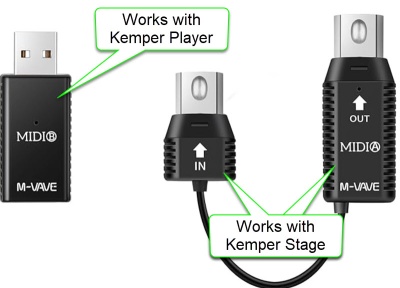
This works to connect to the Kemper Profile Player USB-A port.
The XSONIC Airstep finds the M-VAVE USB-A automatically.
The XSONIC Airstep finds the M-VAVE 5-Pin MIDI connectors automatically (right side of the photo) and these work with the Kemper Stage and Kemper Profilers (Head and Rack versions)
I've read that the WIDI Bud Pro works but I have not tried it.
Rig Buttons
These settings will emulate the behaviour of the Kemper Remote or Kemper Stage.
Switch A
| Field | Value |
|---|---|
| Name | Rig/Slot 1 |
| Toggle Mode | Off |
| LED Display | Normal Mode |
Message 1
| Field | Value |
|---|---|
| Trigger | Release |
| Message Type | MIDI |
| Output Interface | ALL |
| MIDI Type | Control Change |
| MIDI Channel | 1 |
| CC Number | 50 |
| CC Value | 1 |
Message 2
| Field | Value |
|---|---|
| Trigger | Release |
| Message Type | MIDI |
| Output Interface | ALL |
| MIDI Type | Control Change |
| MIDI Channel | 1 |
| CC Number | 50 |
| CC Value | 0 |
Switch B
| Field | Value |
|---|---|
| Name | Rig/Slot 2 |
| Toggle Mode | Off |
| LED Display | Normal Mode |
Message 1
| Field | Value |
|---|---|
| Trigger | Release |
| Message Type | MIDI |
| Output Interface | ALL |
| MIDI Type | Control Change |
| MIDI Channel | 1 |
| CC Number | 51 |
| CC Value | 1 |
Message 2
| Field | Value |
|---|---|
| Trigger | Release |
| Message Type | MIDI |
| Output Interface | ALL |
| MIDI Type | Control Change |
| MIDI Channel | 1 |
| CC Number | 51 |
| CC Value | 0 |
Switch C
| Field | Value |
|---|---|
| Name | Rig/Slot 3 |
| Toggle Mode | Off |
| LED Display | Normal Mode |
Message 1
| Field | Value |
|---|---|
| Trigger | Release |
| Message Type | MIDI |
| Output Interface | ALL |
| MIDI Type | Control Change |
| MIDI Channel | 1 |
| CC Number | 52 |
| CC Value | 1 |
Message 2
| Field | Value |
|---|---|
| Trigger | Release |
| Message Type | MIDI |
| Output Interface | ALL |
| MIDI Type | Control Change |
| MIDI Channel | 1 |
| CC Number | 52 |
| CC Value | 0 |
Switch D
| Field | Value |
|---|---|
| Name | Rig/Slot 4 |
| Toggle Mode | Off |
| LED Display | Normal Mode |
Message 1
| Field | Value |
|---|---|
| Trigger | Release |
| Message Type | MIDI |
| Output Interface | ALL |
| MIDI Type | Control Change |
| MIDI Channel | 1 |
| CC Number | 53 |
| CC Value | 1 |
Message 2
| Field | Value |
|---|---|
| Trigger | Release |
| Message Type | MIDI |
| Output Interface | ALL |
| MIDI Type | Control Change |
| MIDI Channel | 1 |
| CC Number | 53 |
| CC Value | 0 |
Switch E
| Field | Value |
|---|---|
| Name | Rig/Slot 5 |
| Toggle Mode | Off |
| LED Display | Normal Mode |
Message 1
| Field | Value |
|---|---|
| Trigger | Release |
| Message Type | MIDI |
| Output Interface | ALL |
| MIDI Type | Control Change |
| MIDI Channel | 1 |
| CC Number | 54 |
| CC Value | 1 |
Message 2
| Field | Value |
|---|---|
| Trigger | Release |
| Message Type | MIDI |
| Output Interface | ALL |
| MIDI Type | Control Change |
| MIDI Channel | 1 |
| CC Number | 54 |
| CC Value | 0 |
Summary of Kemper MIDI Logic (Slots + Morph)
- CC#50–54: Load Slots 1–5 in Performance Mode or Rigs 1–5 in Browser Mode.
- Morph Triggering: If the same CC is sent again (with value 1–127), Morph is engaged.
- Morph Release: Sending value 0 disengages Morph.
- Momentary vs Latching: Controlled by the Rig’s internal “Momentary” setting.
Why Your Airstep Setup Works
- Press = CC#50–54 value 1 → Loads Rig or Slot
- Release = CC#50–54 value 0 → Ends Morph (if Momentary is enabled)
- Repeated Presses → Toggle Morph (if Momentary is disabled)
- Single Button Logic → Matches Kemper Stage/Remote behavior exactly
Kemper MIDI Documentation
- If Rig Button Morph is activated in System Settings, and the PROFILER receives subsequent control changes #50-#54 following the initial Slot load, these will trigger Morphing.
So, the same button could be used to first load a Rig, and then act as a Morph Button for that Rig. To support all functions, values 1-127 should be sent when the button is hit, and value 0 should follow when the button is released. The setting of the “Momentary” option in Rig Settings determines whether the Morphing latches the morph sound and base sound, or if it immediately returns to the base sound as soon as you release the button.
Effects Stomps
Airstep Bank 2 – Stomp Mode Control (Kemper Profile Player)
When I use both the Airstep and the Airstep Lite, I use the Airstep for Rig buttons (above) and the Airstep Lite for Effects Buttons (below)
CC# 75-78 to map to Effects buttons 1-4, and the last button set to Tuner on/off. I did this instead of using CC# 17-22, which map to Modules A-D, because sometimes I use the Kemper Profile Player without the Airstep, and I wanted to use the Kemper Player mapping instead of the Profiler mappings. If I change the Effects buttons 1-4 on the Player, I wanted the Airstep to match.
Summary
This shows all the values in a concise table. However, it will be easier to configure the settings in the Airstep app by following the detail in the next section.
| Switch Name | Toggle Mode | LED Display | Trigger | MIDI Type | CC# | Value | Output Interface | MIDI Channel |
|---|---|---|---|---|---|---|---|---|
| Effect Button 1 | On | Toggle Mode | Toggle On Message 1 |
CC | 75 | 127 | ALL | 1 |
| Toggle Off Message 1 |
CC | 75 | 0 | ALL | 1 | |||
| Effect Button 2 | On | Toggle Mode | Toggle On Message 1 |
CC | 76 | 127 | ALL | 1 |
| Toggle Off Message 1 |
CC | 76 | 0 | ALL | 1 | |||
| Effect Button 3 | On | Toggle Mode | Toggle On Message 1 |
CC | 77 | 127 | ALL | 1 |
| Toggle Off Message 1 |
CC | 77 | 0 | ALL | 1 | |||
| Effect Button 4 | On | Toggle Mode | Toggle On Message 1 |
CC | 78 | 127 | ALL | 1 |
| Toggle Off Message 1 |
CC | 78 | 0 | ALL | 1 | |||
| Stomp (e.g. Tuner) | On | Toggle Mode | Toggle On Message 1 |
CC | 31 | 127 | ALL | 1 |
| Toggle Off Message 1 |
CC | 31 | 0 | ALL | 1 |
Detailed Configuration
Switch A
| Field | Value |
|---|---|
| Name | Effect Button 1 |
| Toggle Mode | On |
| LED Display | Toggle Mode |
Toggle On
Message 1
| Field | Value |
|---|---|
| Message Type | MIDI |
| Output Interface | ALL |
| MIDI Type | Control Change |
| MIDI Channel | 1 |
| CC Number | 75 |
| CC Value | 1 |
Toggle Off
Message 1
| Field | Value |
|---|---|
| Message Type | MIDI |
| Output Interface | ALL |
| MIDI Type | Control Change |
| MIDI Channel | 1 |
| CC Number | 75 |
| CC Value | 0 |
Switch B
| Field | Value |
|---|---|
| Name | Effect Button 2 |
| Toggle Mode | On |
| LED Display | Toggle Mode |
Toggle On
Message 1
| Field | Value |
|---|---|
| Message Type | MIDI |
| Output Interface | ALL |
| MIDI Type | Control Change |
| MIDI Channel | 1 |
| CC Number | 76 |
| CC Value | 1 |
Toggle Off
Message 1
| Field | Value |
|---|---|
| Message Type | MIDI |
| Output Interface | ALL |
| MIDI Type | Control Change |
| MIDI Channel | 1 |
| CC Number | 76 |
| CC Value | 0 |
Switch C
| Field | Value |
|---|---|
| Name | Effect Button 3 |
| Toggle Mode | On |
| LED Display | Toggle Mode |
Toggle On
Message 1
| Field | Value |
|---|---|
| Message Type | MIDI |
| Output Interface | ALL |
| MIDI Type | Control Change |
| MIDI Channel | 1 |
| CC Number | 77 |
| CC Value | 1 |
Toggle Off
Message 1
| Field | Value |
|---|---|
| Message Type | MIDI |
| Output Interface | ALL |
| MIDI Type | Control Change |
| MIDI Channel | 1 |
| CC Number | 77 |
| CC Value | 0 |
Switch D
| Field | Value |
|---|---|
| Name | Effect Button 4 |
| Toggle Mode | On |
| LED Display | Toggle Mode |
Toggle On
Message 1
| Field | Value |
|---|---|
| Message Type | MIDI |
| Output Interface | ALL |
| MIDI Type | Control Change |
| MIDI Channel | 1 |
| CC Number | 78 |
| CC Value | 1 |
Toggle Off
Message 1
| Field | Value |
|---|---|
| Message Type | MIDI |
| Output Interface | ALL |
| MIDI Type | Control Change |
| MIDI Channel | 1 |
| CC Number | 78 |
| CC Value | 0 |
Switch E
| Field | Value |
|---|---|
| Name | Stomp (e.g. Tuner) |
| Toggle Mode | On |
| LED Display | Toggle Mode |
Toggle On
Message 1
| Field | Value |
|---|---|
| Message Type | MIDI |
| Output Interface | ALL |
| MIDI Type | Control Change |
| MIDI Channel | 1 |
| CC Number | 31 |
| CC Value | 1 |
Toggle Off
Message 1
| Field | Value |
|---|---|
| Message Type | MIDI |
| Output Interface | ALL |
| MIDI Type | Control Change |
| MIDI Channel | 1 |
| CC Number | 31 |
| CC Value | 0 |
Notes
- Toggle Mode On lets the Airstep track internal switch state, so LEDs reflect effect status (assuming Kemper doesn’t override).
- CC#75–79 are fully valid and can be assigned to any effect slot in Kemper’s MIDI settings.
- You can remap these CCs in Kemper’s System Settings to match your preferred stomp layout.
Airstep Configuration – Kemper Profiler Player Looper Control
Use the Airstep Preset for KPA Looper. It works, mimicking the Profiler Foot Controller and the Kemper Stage. For each function (e.g. Rec/Play/Overdub), there is a table with five rows. Each row represents an Airstep "Message". All the values are the same except for the second row in each table (88,89,90,91,92,93)
What follows is the documentation in case you want to reassign the buttons. In my case, I never use "Reverse" so I replaced it with "Undo".
Rec/Play/Overdub
- Switch Name: Rec/Play/Overdub
- Toggle Mode: Off
- LED Display: Normal Mode
| Message | Trigger | CC# | Value | Description |
|---|---|---|---|---|
| 1 | Press | 99 | 125 | NRPN MSB (Looper) |
| 2 | Press | 98 | 88 | NRPN LSB (Rec/Play/Overdub) |
| 3 | Press | 6 | 0 | Data Entry MSB |
| 4 | Press | 38 | 1 | Data Entry LSB (Execute) |
| 5 | Release | 38 | 0 | Data Entry LSB (Reset) |
Stop/Erase
- Switch Name: Stop/Erase
- Toggle Mode: Off
- LED Display: Normal Mode
| Message | Trigger | CC# | Value | Description |
|---|---|---|---|---|
| 1 | Press | 99 | 125 | NRPN MSB (Looper) |
| 2 | Press | 98 | 89 | NRPN LSB (Stop/Erase) |
| 3 | Press | 6 | 0 | Data Entry MSB |
| 4 | Press | 38 | 1 | Data Entry LSB (Execute) |
| 5 | Release | 38 | 0 | Data Entry LSB (Reset) |
Trigger
- Switch Name: Trigger
- Toggle Mode: Off
- LED Display: Normal Mode
| Message | Trigger | CC# | Value | Description |
|---|---|---|---|---|
| 1 | Press | 99 | 125 | NRPN MSB (Looper) |
| 2 | Press | 98 | 90 | NRPN LSB (Trigger) |
| 3 | Press | 6 | 0 | Data Entry MSB |
| 4 | Press | 38 | 1 | Data Entry LSB (Execute) |
| 5 | Release | 38 | 0 | Data Entry LSB (Reset) |
Reverse
- Switch Name: Reverse
- Toggle Mode: Off
- LED Display: Normal Mode
| Message | Trigger | CC# | Value | Description |
|---|---|---|---|---|
| 1 | Press | 99 | 125 | NRPN MSB (Looper) |
| 2 | Press | 98 | 91 | NRPN LSB (Reverse) |
| 3 | Press | 6 | 0 | Data Entry MSB |
| 4 | Press | 38 | 1 | Data Entry LSB (Execute) |
| 5 | Release | 38 | 0 | Data Entry LSB (Reset) |
Half Speed
- Switch Name: Half Speed
- Toggle Mode: Off
- LED Display: Normal Mode
| Message | Trigger | CC# | Value | Description |
|---|---|---|---|---|
| 1 | Press | 99 | 125 | NRPN MSB (Looper) |
| 2 | Press | 98 | 92 | NRPN LSB (Half Speed) |
| 3 | Press | 6 | 0 | Data Entry MSB |
| 4 | Press | 38 | 1 | Data Entry LSB (Execute) |
| 5 | Release | 38 | 0 | Data Entry LSB (Reset) |
Undo
- Switch Name: Undo
- Toggle Mode: Off
- LED Display: Normal Mode
| Message | Trigger | CC# | Value | Description |
|---|---|---|---|---|
| 1 | Press | 99 | 125 | NRPN MSB (Looper) |
| 2 | Press | 98 | 93 | NRPN LSB (Undo) |
| 3 | Press | 6 | 0 | Data Entry MSB |
| 4 | Press | 38 | 1 | Data Entry LSB (Execute) |
| 5 | Release | 38 | 0 | Data Entry LSB (Reset) |