Template:L1 Model II with Sub1/Sub2: Difference between revisions
Jump to navigation
Jump to search
mNo edit summary |
|||
| (8 intermediate revisions by the same user not shown) | |||
| Line 13: | Line 13: | ||
===== Mixer to Sub1/Sub2 to {{Model II}} ===== | ===== Mixer to Sub1/Sub2 to {{Model II}} ===== | ||
#On the mixer route all inputs to a single mono output | #On the mixer route all inputs to a single mono output. More information - [[Stereo Mixer to Mono L1®]] | ||
#Connect the mixer output to the Sub1/Sub2 Input 1 | #Connect the mixer output to the Sub1/Sub2 Input 1 | ||
#Connect the Sub1/Sub2 Line Out 1 to the {{Model II}} Analog Input | #Connect the Sub1/Sub2 Line Out 1 to the {{Model II}} Analog Input | ||
#Set the {{Model II}} Analog Input Trim to 10:00 o'clock. You adjust to suit so you see solid green. | #Set the {{Model II}} Analog Input Trim to 10:00 o'clock. You adjust to suit so you see solid green.<br>[[File:Model II Analog Input Level Green.png|link=Model_II#Analog_Input||Model II Analog Input]] | ||
#On the Sub1/Sub2 set the LPF setting to L1. | #On the Sub1/Sub2 set the LPF setting to L1. | ||
#On the Sub1/Sub2 set the Output EQ to Full Range OR HPF. <br>It doesn't matter which setting you choose since the L1 Model II crossover is set at 200 Hz, and either setting will work. | |||
#DO NOT connect Sub1/Sub2 to the L1 Model II Bass Line Out. That output is EQd for the B2 or B1. | #DO NOT connect Sub1/Sub2 to the L1 Model II Bass Line Out. That output is EQd for the B2 or B1. | ||
===== Mixer to {{Model II}} and Sub ===== | ===== Mixer to {{Model II}} and Sub ===== | ||
This method is known as '''Aux Fed Sub''' | This method is known as '''Aux Fed Sub''' | ||
#On the mixer route all inputs to a single mono output | #On the mixer route all inputs to a single mono output. More information - [[Stereo Mixer to Mono L1®]] | ||
#Connect the mixer output to the {{Model II}} Analog Input | #Connect the mixer output to the {{Model II}} Analog Input | ||
#Set the {{Model II}} Analog Input Trim to 10:00 o'clock. You adjust to suit so you see solid green. | #Set the {{Model II}} Analog Input Trim to 10:00 o'clock. You adjust to suit so you see solid green.<br>[[File:Model II Analog Input Level Green.png|link=Model_II#Analog_Input||Model II Analog Input]] | ||
#Connect the mixer Sub or Aux line out to Sub1/Sub2 Input 1. | #Connect the mixer Sub or Aux line out to Sub1/Sub2 Input 1. | ||
#On the Sub1/Sub2 set the LPF setting to L1. | #On the Sub1/Sub2 set the LPF setting to L1. | ||
#On the Sub1/Sub2 set the Output EQ to Full Range OR HPF. <br>It doesn't matter which setting you choose since the L1 Model II crossover is set at 200 Hz so that either setting will work. | |||
#DO NOT connect Sub1/Sub2 to the L1 Model II Bass Line Out. That output is EQd for the B2 or B1. | #DO NOT connect Sub1/Sub2 to the L1 Model II Bass Line Out. That output is EQd for the B2 or B1. | ||
Latest revision as of 16:53, 4 November 2025
L1 Model II with Sub1/Sub2
If you have a T1 ToneMatch mixer

- Connect the T1 Main Output to the Sub1/Sub2
- 1/4 inch Tip Ring Sleeve to Sub1/Sub2 Input 1.
- If you prefer, you can use a 1/4 inch (6.3 mm) Tip-Ring-Sleeve to XLR (T1 to Sub1/Sub2 Input 1).
There's no particular benefit to choosing one cable over the other.
- On the Sub1/Sub2 set the LPF setting to L1.
- DO NOT connect Sub1/Sub2 to the L1 Model II Bass Line Out. That output is EQd for the B2 or B1. Also, if you have one or two B1s connected to the Model II Power Stand and you connect something to the Bass Line Out, the system will reduce the overall bass output by -12 dB [1]
- You can continue to use the ToneMatch cable between the T1 and L1 Model II (no need to use a ToneMatch Power Supply)
If you have a third-party mixer
DO NOT connect Sub1/Sub2 to the L1 Model II Bass Line Out. That output is EQd for the B2 or B1.
Mixer to Sub1/Sub2 to L1 Model II
- On the mixer route all inputs to a single mono output. More information - Stereo Mixer to Mono L1®
- Connect the mixer output to the Sub1/Sub2 Input 1
- Connect the Sub1/Sub2 Line Out 1 to the L1 Model II Analog Input
- Set the L1 Model II Analog Input Trim to 10:00 o'clock. You adjust to suit so you see solid green.
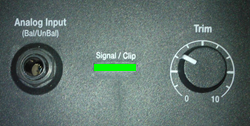
- On the Sub1/Sub2 set the LPF setting to L1.
- On the Sub1/Sub2 set the Output EQ to Full Range OR HPF.
It doesn't matter which setting you choose since the L1 Model II crossover is set at 200 Hz, and either setting will work. - DO NOT connect Sub1/Sub2 to the L1 Model II Bass Line Out. That output is EQd for the B2 or B1.
Mixer to L1 Model II and Sub
This method is known as Aux Fed Sub
- On the mixer route all inputs to a single mono output. More information - Stereo Mixer to Mono L1®
- Connect the mixer output to the L1 Model II Analog Input
- Set the L1 Model II Analog Input Trim to 10:00 o'clock. You adjust to suit so you see solid green.
- Connect the mixer Sub or Aux line out to Sub1/Sub2 Input 1.
- On the Sub1/Sub2 set the LPF setting to L1.
- On the Sub1/Sub2 set the Output EQ to Full Range OR HPF.
It doesn't matter which setting you choose since the L1 Model II crossover is set at 200 Hz so that either setting will work. - DO NOT connect Sub1/Sub2 to the L1 Model II Bass Line Out. That output is EQd for the B2 or B1.