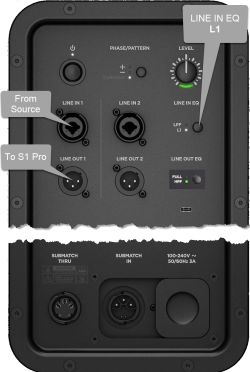
You can use the {{S1 Pro+}} as the sound source (e.g., microphone and guitar and backing tracks via Bluetooth). Engage the {{S1 Pro+}} Sub EQ and use the {{S1 Pro+}} Line Out to send a full range signal to the Sub1/Sub2.
You can use the {{S1 Pro+}} as the sound source (e.g., microphone and guitar and backing tracks via Bluetooth). This is different from the {{S1 Pro}} where the preferred method was to route all sound sources to the Sub1/Sub2 first and from the Sub1/Sub2 to the {{S1 Pro}}. This is because the {{S1 Pro}} did not have the Sub EQ mode.
Engage the {{S1 Pro+}} Sub EQ and use the {{S1 Pro+}} Line Out to send a full range signal to the Sub1/Sub2.
;Note these settings on the {{S1 Pro+}}
;Note these settings on the {{S1 Pro+}}
:👉 Turn on the Sub EQ (see the excerpt from the manual below)
:👉 Turn on the [[#Sub EQ Settings|Sub EQ (see the excerpt from the manual below)]]
;Note these settings on the Sub1 or Sub2
;Note these settings on the Sub1 or Sub2
:👉 Set LINE IN EQ to '''L1'''
:👉 Set LINE IN EQ to '''L1'''
:👉 Set LINE OUT EQ to '''S1''' (Press and hold LINE OUT EQ button for 4 seconds)
:👉 No need to set LINE OUT EQ when using the S1 Pro+ if you have turned on Sub EQ
Note the following:
Note the following:
Line 34:
Line 38:
# The Sub1 or Sub2 handles frequencies from 40 Hz (Sub1) 37 Hz (Sub2) to 150 Hz
# The Sub1 or Sub2 handles frequencies from 40 Hz (Sub1) 37 Hz (Sub2) to 150 Hz
# The {{S1 Pro}} handles frequencies above 150 Hz
# The {{S1 Pro}} handles frequencies above 150 Hz
=== Sub EQ Settings ===
[[File:S1 Pro+ SubEQ settings.jpg]]
<!--
<!--
Latest revision as of 15:50, 8 March 2026
Using Inputs on S1 Pro+
You can use the S1 Pro+ as the sound source (e.g., microphone and guitar and backing tracks via Bluetooth). This is different from the S1 Pro system where the preferred method was to route all sound sources to the Sub1/Sub2 first and from the Sub1/Sub2 to the S1 Pro system. This is because the S1 Pro system did not have the Sub EQ mode.
Engage the S1 Pro+ Sub EQ and use the S1 Pro+ Line Out to send a full range signal to the Sub1/Sub2.
👉 No need to set LINE OUT EQ when using the S1 Pro+ if you have turned on Sub EQ
Note the following:
On the S1 Pro+ turn on the Sub EQ setting. This sets the internal high pass filter to approximately 150 Hz.
The Sub EQ setting does not affect the S1 Pro+ Line Out. The Line Out remains full-range
With the Sub EQ turned on, the S1 Pro+ will produce frequencies above 150 Hz and you will be able to push S1 Pro+ harder (louder) without low-end distortion
Without the Sub EQ turned on, the S1 Pro+ will sound the same as without the subwoofer
The Sub1 or Sub2 will cover from 40 Hz (Sub1) 37 Hz (Sub2) to 150 Hz