Template:T1® Prefs Input Level: Difference between revisions
Jump to navigation
Jump to search
mNo edit summary |
m ST moved page Template:T1® Prefs Input Level to Template:T1® Prefs Input Level |
||
| (2 intermediate revisions by the same user not shown) | |||
| Line 1: | Line 1: | ||
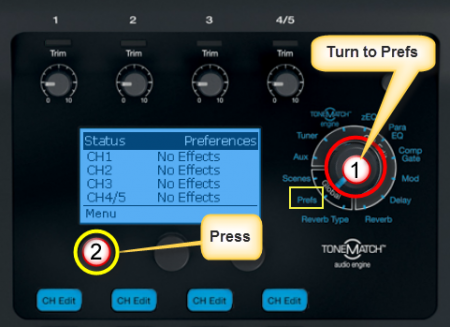
# Turn the Rotary Selector to Global section and Prefs | # Turn the Rotary Selector to Global section and Prefs | ||
# Press the first button, Menu<br>[[Image:T1PrefsInput01.png| | # Press the first button, Menu<br>[[Image:T1PrefsInput01.png|450px]] | ||
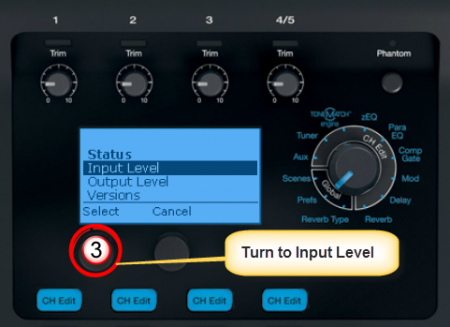
# Turn the Menu to Input Level. <br>[[Image:T1PrefsInput02.png| | # Turn the Menu to Input Level. <br>[[Image:T1PrefsInput02.png|450px]] | ||
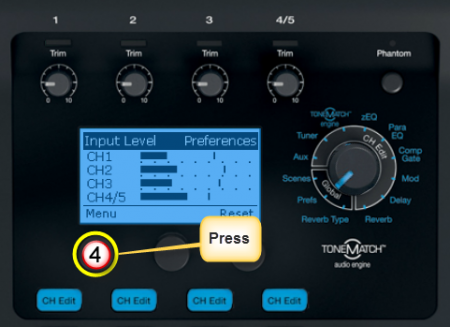
# Press the first button to view the Input Levels<br>[[Image:T1PrefsInput03.png| | # Press the first button to view the Input Levels<br>[[Image:T1PrefsInput03.png|450px]] | ||
---- | <noinclude>---- | ||
[[Category:T1]] | [[Category:T1]] | ||
[[Category:USB]] | [[Category:USB]] | ||
[[Category:Prefs]] | [[Category:Prefs]] | ||
</noinclude> | |||
Latest revision as of 08:00, 26 March 2017
- Turn the Rotary Selector to Global section and Prefs
- Press the first button, Menu
- Turn the Menu to Input Level.
- Press the first button to view the Input Levels