L1® Model 1S: Difference between revisions
m New page: __NOEDITSECTION__ {| id="toc" |- | width="360" valign="top" rowspan="2" | __TOC__ | valign="top" | {{Bose Reviewed}} {{Model II icon}} {{L1® Model 1S}} Introduced September 27, 2012. ... |
mNo edit summary |
||
| (56 intermediate revisions by the same user not shown) | |||
| Line 1: | Line 1: | ||
<html><meta name="description" content="The Bose® L1® Model 1S Portable Line Array"></meta></html> | |||
<!-- __NOEDITSECTION__ --> | |||
<div class="tocdiv"> | |||
<div>__TOC__</div> | |||
<div><h2>Introduction</h2> | |||
{{L1® Model 1S}} | {{L1® Model 1S}} | ||
{{Model 1S icon}} | |||
Introduced September 27, 2012 | |||
Discontinued January 2021 | |||
<html> | |||
<iframe width="350" height="200" src="https://www.youtube.com/embed/jU8B-5ZZ8KE" frameborder="0" allowfullscreen></iframe> | |||
<!-- | |||
<iframe width="350" height="200" src="http://www.youtube.com/embed/XElCMC6zZwE" frameborder="0" allowfullscreen></iframe> | |||
<iframe width="350" height="200" src="http://www.youtube.com/embed/dMgre4wEZEA" frameborder="0" allowfullscreen></iframe> | |||
--> | |||
</html> | |||
<br /> | |||
== Documentation == | == Documentation == | ||
{{:L1® Model 1S Documentation}} | {{:L1® Model 1S Documentation}} | ||
*[[{{PAGENAME}}#FAQs|Unofficial FAQs]] | <!-- *[[{{PAGENAME}}#FAQs|Unofficial FAQs]] --> | ||
== Downloads == | |||
There are no Model 1S downloads (new model) | |||
{{Different Models}} | |||
</div> | |||
</div> | |||
== Input/Output Panel== | == Input/Output Panel== | ||
=== Overview === | === Overview === | ||
{{Model 1S Input Output Panel}} | |||
=== ToneMatch® Port === | === ToneMatch® Port === | ||
For connecting the {{T1}} to the {{Model 1S}}. | For connecting the {{T1}} to the {{Model 1S}}. | ||
The port sends electrical power to the T1 and accepts digital audio from the T1. | The port sends electrical power to the T1 and accepts digital audio from the T1. | ||
<!-- | |||
[[Image:Model1SToneMatchPort.png|ToneMatch® Port on the Model | [[Image:Model1SToneMatchPort.png|ToneMatch® Port on the Model 1S]] | ||
Close up | Close up | ||
[[Image:Model1SToneMatchPortCloseUp.png|ToneMatch® Port on the Model 1S close up]] | [[Image:Model1SToneMatchPortCloseUp.png|ToneMatch® Port on the Model 1S close up]] | ||
--> | |||
The connecting cable has a male Ethercon connection at each end that looks like this. | The connecting cable has a male Ethercon connection at each end that looks like this. | ||
| Line 52: | Line 61: | ||
=== Analog Input === | === Analog Input === | ||
[[Image: | [[Image:Model 1S Analog Input Detail.png]] | ||
The Analog input is a ¼ inch balanced input jack. | The Analog input is a ¼ inch balanced input jack. | ||
| Line 61: | Line 70: | ||
[[Image:Model II Analog Input Trim.png]] | [[Image:Model II Analog Input Trim.png]] | ||
# Set the '''Trim''' control on the power stand to the 0 (zero) position. | |||
# Connect the audio source to the Analog Input | |||
# Adjust the volume of the audio source to the maximum output without distortion. | |||
# While playing the source, increase the '''Trim''' level so that the '''Signal/Clip''' indicator glows green or yellow. | |||
# If the '''Signal/Clip''' indicator glows red, decrease the '''Trim''' level so that it glows only green or yellow. | |||
[[Image:Model II Analog Input Level Green.png|Model 1S Analog Input]] | |||
==== Can a stereo signal be used with the analog input? ==== | ==== Can a stereo signal be used with the analog input? ==== | ||
<section begin="Stereo Source to Power Stand Analog Input" /> | <section begin="Stereo Source to Power Stand Analog Input" /> | ||
'''A ¼ inch Tip-Ring-Sleeve connector carrying a stereo signal should not be used with the analog input on the Model II.''' | '''A ¼ inch Tip-Ring-Sleeve connector carrying a stereo signal should not be used with the analog input on the Model 1S Model II or Compact Channel 2 ¼ inch jack Tip-Ring-Sleeve input.''' | ||
Even though a ¼ inch Tip-Ring-Sleeve connector can carry a stereo signal this is not how this physical connection is used on the {{PAGENAME}} Power Stand. | Even though a ¼ inch Tip-Ring-Sleeve connector can carry a stereo signal this is not how this physical connection is used on the {{PAGENAME}} Power Stand. | ||
The analog input | The analog input is balanced, and will therefore subtract the Left and Right signals on a stereo cable and you will hear an L-R (Left minus Right) signal in the Model 1S, Model II or Compact Channel 2 ¼ inch jack Tip-Ring-Sleeve input. | ||
You cannot 'get through the gig' this way if you are a DJ or if you need to run prerecorded music or have stereo inputs. | You cannot 'get through the gig' this way if you are a DJ or if you need to run prerecorded music or have stereo inputs. | ||
[[Image:TRSfromStereoRCAModel1S.png|600px]] | |||
[[Image:TRSfromStereo14Model1S.png|600px]] | |||
[[Image:18stereoTo14stereoModel1S.png|600px]] | |||
==== Using a Mixer ==== | ==== Using a Mixer ==== | ||
{{:L1® Model II with Mixer to Analog Input}} | {{:L1® Model II with Mixer to Analog Input}} | ||
| Line 79: | Line 103: | ||
=== Analog Input for Second {{T1}} === | === Analog Input for Second {{T1}} === | ||
{{:T1 ToneMatch® Audio Engine / Connections to Model | {{:T1 ToneMatch® Audio Engine / Connections to Model 1S}} | ||
== Start Up / Cycle Time == | == Start Up / Cycle Time == | ||
The | The Model 1S takes a few seconds to fully boot up and then turn the audio on. Make sure you are waiting the right amount of time. | ||
If you do reset the system be sure to wait a full two or three seconds between turning it off and turning it back on. | |||
== Height == | |||
The fully assembled height of the {{Model 1S}} is 79.4 inches. (201.93 cm) | |||
Clearance required to assemble is approximately 84 inches. (213.36 cm) | |||
=== Height Comparison === | |||
{{L1® Family Heights}} | |||
== | |||
== Input Panel == | == Input Panel == | ||
[[Image: | [[Image:Model 1S Input Panel.jpg|thumb|L1® Model 1S Input Panel]] | ||
*Analog input, trim control and signal/clip LED | *Analog input, trim control and signal/clip LED | ||
| Line 129: | Line 132: | ||
*Bass module out | *Bass module out | ||
:Delivers amplified bass output signal to one or two B1 bass modules. L1 system automatically adjusts equalization appropriately when bass modules are connected. | :Delivers amplified bass output signal to one or two {{B1}} bass modules or one {{B2}}. L1 system automatically adjusts equalization appropriately when bass modules are connected. | ||
*ToneMatch™ port | *ToneMatch™ port | ||
| Line 135: | Line 138: | ||
:Digital audio and power connection for ToneMatch audio engine. Use with included ToneMatch cable. | :Digital audio and power connection for ToneMatch audio engine. Use with included ToneMatch cable. | ||
== No Speakers Attached == | == No Speakers Attached == | ||
If you want to record using USB without using the {{L1 CR}} or {{B1}} ... | If you want to record using USB without using the {{L1 CR}} or {{B1}} or {{B2}} ... | ||
You can certainly run the L1 with all, some, or none of the speakers connected. With no speakers connected it will happily serve as a big power supply for the T1. You are in no way risking damage to the unit by doing this.<ref>MikeZ-at-Bose talks about [http://bose.infopop.cc/eve/forums?a=tpc&f=3976055944&m=2261013484&r=7911053484#7911053484 Using the L1™ Model II Power Stand without any speakers attached]</ref> | You can certainly run the L1 with all, some, or none of the speakers connected. With no speakers connected it will happily serve as a big power supply for the T1. You are in no way risking damage to the unit by doing this.<ref>MikeZ-at-Bose talks about [http://bose.infopop.cc/eve/forums?a=tpc&f=3976055944&m=2261013484&r=7911053484#7911053484 Using the L1™ Model II Power Stand without any speakers attached]</ref> | ||
<!-- | |||
== Articulated Array® == | == Articulated Array® == | ||
{{:Articulated Array}} <!--[[Image:ModelIIArticulatedArray.png|L1™ Model II Articulated Array®]] | {{:Articulated Array}} <!--[[Image:ModelIIArticulatedArray.png|L1™ Model II Articulated Array®]] | ||
--> | --> | ||
== Identifying this Model == | == Identifying this Model == | ||
[[Image:Model 1S Input Panel.jpg|thumb|No Bass Line-Out L1® Model 1S Input Panel]] | |||
*Retractable legs | *Retractable legs | ||
:Provide stability for streamlined L1 Model | :Provide stability for streamlined L1 Model 1S power stand and loudspeaker. Four retractable legs fold out of power stand simultaneously for quick setup and compact transport. Small footprint also frees up room on tight stages. | ||
*Light weight (23.7 lbs (10.7 kg) | *Light weight (23.7 lbs (10.7 kg) | ||
== | == Rubber Feet == | ||
If you need to replace the rubber feet. | |||
{{:Rubber Feet for L1®}} | |||
| Line 174: | Line 172: | ||
== Related Documents == | == Related Documents == | ||
{{:L1® Model | {{:L1® Model 1S Documentation}} | ||
== Mechanical Specifications == | == Mechanical Specifications == | ||
| Line 190: | Line 183: | ||
(12.8 cm x 26.2 cm x69.2 cm) | (12.8 cm x 26.2 cm x69.2 cm) | ||
Top array | Top array 39.63” H x 4.15” W x 4.13” D 16.3 lb (7.4 kg) (100.6 cm x 10.6 cm x 10.5 cm) | ||
( | |||
Bottom 39. | Bottom extension 39.63” H x 4.15” W x 4.13” D 8.5 lb (3.8 kg) (100.6 cm x 10.6 cm x 10.5 cm) | ||
Source <ref>Top array and bottom extension sizes [[Media:M1S ENGLISH ONLY.pdf|L1® Model 1S System Owner's Guide]] modified based on physical inspection. Both top and bottom are the same length: 39.63" </ref> | |||
=== Bass modules === | |||
B1 bass module 15”H x 10 ¼”W x 17 ¾”D 25.1 lb (11.4 kg) (38.0 cm x 26.0 cm x 45.0 cm) | |||
B2 bass module 23.4”H x 13.31”W x 18.9”D 45 lb (20.41 kg) (59.4 cm x 33.8 cm x 48 cm) | |||
B1 bass | Source <ref>B1 bass module weight 26.6 [[Media:M1S ENGLISH ONLY.pdf|L1® Model 1S System Owner's Guide]]</ref> | ||
module | |||
=== Total System Weight === | |||
{{#lst:L1® Family Comparisons|Model 1S Weight}} | |||
=== T1 ToneMatch™ audio engine === | === T1 ToneMatch™ audio engine === | ||
| Line 216: | Line 205: | ||
**2.1 lbs (1.0 kg) | **2.1 lbs (1.0 kg) | ||
== Electrical == | == Electrical Specifications == | ||
* AC power rating: | * AC power rating: | ||
** 100-120V 50/60Hz 500W (USA/Canada) | |||
** 220-240V 50/60Hz 500W (Europe) | |||
* Peak inrush current: | * Peak inrush current: | ||
** 32A @ 120V 60Hz (USA/Canada) | |||
** 61A @ 230V 50Hz (Europe) | |||
<html><table> | |||
<tr><th>Component</th><th> Impedance</th></tr> | |||
<tr><td>L1® model 1S loudspeaker</td><td> 4 ohms</td></tr> | |||
<tr><td>B1 bass module</td><td> 8 ohms</td></tr> | |||
<tr><td>B2 bass module</td><td> 4 ohms</td></tr> | |||
</table></html> | |||
*Power stand inputs/outputs | *Power stand inputs/outputs | ||
| Line 227: | Line 225: | ||
**1/4" analog input | **1/4" analog input | ||
**Neutrik NL4 bass module out | **Neutrik NL4 bass module out | ||
== What's in the Box == | == What's in the Box == | ||
*L1 Model 1S Cylindrical Radiator® loudspeaker box === | *L1 Model 1S Cylindrical Radiator® loudspeaker box === | ||
**Loudspeaker top and bottom | **Loudspeaker top array and bottom extension | ||
**Carrying bag (1) | **Carrying bag (1) | ||
**Power stand box | **Power stand box | ||
| Line 240: | Line 237: | ||
**Carrying bag (1) | **Carrying bag (1) | ||
<!--- Videos now private | |||
{{Model II icon}} | |||
== Videos == | |||
<html> | |||
<iframe width="560" height="315" src="https://www.youtube.com/embed/NrMcflsT41g" title="YouTube video player" frameborder="0" allow="accelerometer; autoplay; clipboard-write; encrypted-media; gyroscope; picture-in-picture" allowfullscreen></iframe> | |||
<iframe width="560" height="315" src="https://www.youtube.com/embed/TpeX-tJOj-A" title="YouTube video player" frameborder="0" allow="accelerometer; autoplay; clipboard-write; encrypted-media; gyroscope; picture-in-picture" allowfullscreen></iframe> | |||
</html> | |||
--> | --> | ||
== FAQs == | |||
{{:L1® Model 1S FAQ}} | |||
---- | ---- | ||
| Line 249: | Line 262: | ||
[[Category:Model 1S]] | [[Category:Model 1S]] | ||
{{Model 1S Structured Data}} | |||
Latest revision as of 12:08, 26 February 2026
Introduction
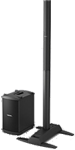

Introduced September 27, 2012
Discontinued January 2021
Documentation
- L1® Model 1S FAQs (Bose® official version)
- L1® Model 1S FAQ More official FAQs
- B2 Bass Module Owners Guide
Downloads
There are no Model 1S downloads (new model)
How to Tell the Difference Between Bose Portable PA Models
This is how to tell which L1®, S1 Pro, or F1 unit you have.
| 2023 - Present | S1 Pro+ (optional wireless transmitters), Remote Control and ToneMatch Presets with Bose App | |||
| 2020 - Present | L1 Pro8, L1 Pro16, L1 Pro32, Remote Control and ToneMatch Presets with Bose App | |||
| 2020 - Present | Sub module for L1 Pro32 | |||
| 2018 - Present | 4 channel ToneMatch Mixer (stereo) | |||
| 2018 - Present | 8 channel ToneMatch Mixer (stereo) | |||
| 2015 - Present | Flexible Array Loudspeaker and Subwoofer | |||
| 2003 - 2007 |  | Rounded front. The Output Panel has Amp1 Out, Amp2 Out, Amp3 Out | ||
| 2003 - 2020 |  | Up to two per Power Stand (above). More if using the PackLite® power amplifier model A1. 2 x 5.25" drivers, 26.6 lb | ||
| 2005 - 2020 | Allows bass expansion for L1 Classic L1 Model I L1 Model II (not L1 Compact not L1 Model 1S) | |||
| 2007 - 2012 |  | Rounded front. The Output Panel has no outputs for Amp1, Amp2, Amp3. The Output Panel and L1 Cylindrical Radiator® loudspeaker sections have orange L1® markers. |
||
| 2007 - 2020 |  | Extending legs, two Cylindrical Radiator®s, Bass Line Out, | ||
| 2007 - 2018 |  | T1 ToneMatch Audio Engine | ||
| 2009 - 2021 |  | Integrated Power Stand and Bass Unit, two Extensions | ||
| 2012 - 2020 | | Extending legs, one Cylindrical Radiator® (Top Array), Bottom Extension | ||
| 2012 - 2020 | | Up to one per Power Stand (above). More if using the PackLite® power amplifier model A1. 2 x 10" drivers 45 lb. Three position Bass Level switch. | ||
| 2018 - 2023 | Extremely Portable PA Battery powered | |||


Input/Output Panel
Overview

Power/Fault LED – Indicates power status.
Blue = system on
Red = system faultPower switch - Switches the system on and off.
Bass Module Out - Bass output signal for driving one or two B1 bass modules or one B2 bass module.
Trim - Adjusts the level of the analog input signal.
ToneMatch® port - Digital audio and power connection for the optional T1 ToneMatch audio engine.
Signal/Clip LED - Indicates status of the analog input signal.
Green = normal input
Yellow = input approaching clipping
Red = input clippingAnalog Input - A line-level analog input. Accepts a ¼" TRS phone cable. Used for an instrument or other audio source.
AC Mains - AC power input connector.
ToneMatch® Port
For connecting the T1 ToneMatch Audio Engine to the L1 Model 1S.
The port sends electrical power to the T1 and accepts digital audio from the T1.
The connecting cable has a male Ethercon connection at each end that looks like this.

For details about the cable see: T1® Cables
Analog Input

The Analog input is a ¼ inch balanced input jack.
Analog input trim (volume, or gain) control
There is a trim control for the analog input.

- Set the Trim control on the power stand to the 0 (zero) position.
- Connect the audio source to the Analog Input
- Adjust the volume of the audio source to the maximum output without distortion.
- While playing the source, increase the Trim level so that the Signal/Clip indicator glows green or yellow.
- If the Signal/Clip indicator glows red, decrease the Trim level so that it glows only green or yellow.

Can a stereo signal be used with the analog input?
A ¼ inch Tip-Ring-Sleeve connector carrying a stereo signal should not be used with the analog input on the Model 1S Model II or Compact Channel 2 ¼ inch jack Tip-Ring-Sleeve input.
Even though a ¼ inch Tip-Ring-Sleeve connector can carry a stereo signal this is not how this physical connection is used on the L1® Model 1S Power Stand.
The analog input is balanced, and will therefore subtract the Left and Right signals on a stereo cable and you will hear an L-R (Left minus Right) signal in the Model 1S, Model II or Compact Channel 2 ¼ inch jack Tip-Ring-Sleeve input.
You cannot 'get through the gig' this way if you are a DJ or if you need to run prerecorded music or have stereo inputs.


Using a Mixer


If you are using a mixer instead of a T1 ToneMatch Audio Engine use the mixer to create a mono output and send that to the Model II Power Stand Analog input.
- If there is a stereo/mono switch then use it and send the mono output to the Model II Power Stand Analog input.
- If there is a Left/mono output then use that and send it to the Model II Power Stand Analog input.
- If there is no way to create a mono output then pan all your mixer inputs all the way to one side (e.g. Left) and then take the mixer for that side (e.g. Left) output and send it to the Model II Power Stand Analog input.
Analog Input for Second T1 ToneMatch Audio Engine
The L1 Model 1S can accept two inputs.

This makes it easy for two performers to connect their own T1®s to a L1 Model 1S Power Stand.
ToneMatch® Input
The ToneMatch® connection is specifically designed for a T1 ToneMatch Audio Engine. The ToneMatch® cable is supplied with the T1 ToneMatch Audio Engine and uses a male Ethercon connector at both ends.
Analog Input

The Analog connection is a ¼ inch phone jack. You can use this for a the second T1® using the T1® Analog Master output (¼ inch phone jack).
This connection is made with a standard ¼ inch jack instrument cable. This can be Tip-Sleeve or Tip-Ring-Sleeve connectors.
Set Power Stand Analog Input Trim to 3 to have approximately the same level as you would have if you had connected with the ToneMatch® connection. You may have to adjust this, but 3 is a good place to start.
Note: A T1® connected to the the Analog input will require the optional T1 ToneMatch® Audio Engine power supply.

Analog Connection from the Second T1® to the L1 Model 1S
¼ Inch Tip-Ring-Sleeve (balanced) to ¼ Inch Tip-Ring-Sleeve (balanced)
A balanced connection is preferred and will provide better noise rejection over greater distances than the unbalanced connection.

¼ Inch Tip-Ring-Sleeve (unbalanced) to ¼ Inch Tip-Sleeve (unbalanced)
This should work fine but a balanced connection (immediately above) is preferred especially if you will have cable runs in excess of 20 feet (6 meters) or if you hear line noise, hum or hiss.

Start Up / Cycle Time
The Model 1S takes a few seconds to fully boot up and then turn the audio on. Make sure you are waiting the right amount of time.
If you do reset the system be sure to wait a full two or three seconds between turning it off and turning it back on.
Height
The fully assembled height of the L1 Model 1S is 79.4 inches. (201.93 cm)
Clearance required to assemble is approximately 84 inches. (213.36 cm)
Height Comparison
Fully assembled heights:
| Model | Height Inches | Height mm |
|---|---|---|
| Compact (collapsed) | 16.5" | 418 mm |
| F1 Model 812 | 26.5" | 665 mm |
| F1 Subwoofer | 27.0" | 688 mm |
| F1 system stack | 73.5" | 1868 mm |
| Compact | 78.5" | 1995 mm |
| Model 1S | 79.4" | 2018 mm |
| Model I / Classic | 82.75" | 2074 mm |
| Model II | 84.0" | 2134 mm |
Input Panel

- Analog input, trim control and signal/clip LED
- Line-level analog input accepts 1/4" TRS phone cable. Can be used for instruments or other audio sources like DJ mixers, MP3 players, computers or DVD systems. Trim control lets you adjust the level of analog input signal. Signal/clip LED indicates status of analog input signal.
- Bass module out
- Delivers amplified bass output signal to one or two B1 Bass Module bass modules or one B2 Bass Module. L1 system automatically adjusts equalization appropriately when bass modules are connected.
- ToneMatch™ port
- Digital audio and power connection for ToneMatch audio engine. Use with included ToneMatch cable.
No Speakers Attached
If you want to record using USB without using the L1 Cylindrical Radiator® loudspeaker or B1 Bass Module or B2 Bass Module ...
You can certainly run the L1 with all, some, or none of the speakers connected. With no speakers connected it will happily serve as a big power supply for the T1. You are in no way risking damage to the unit by doing this.[1]
Identifying this Model
- Retractable legs
- Provide stability for streamlined L1 Model 1S power stand and loudspeaker. Four retractable legs fold out of power stand simultaneously for quick setup and compact transport. Small footprint also frees up room on tight stages.
- Light weight (23.7 lbs (10.7 kg)
Rubber Feet
If you need to replace the rubber feet.

Mark (Le5) on the Bose® Pro Portable PA Community provided this helpful research about replacement rubber feet for the L1 s.
Diameter 1-3/16" X height 3/8" (30mm X 9.6mm)
The maximum height of 3/8" (9.6mm) for the feet is important for stability; it is not recommended to use thicker feet because the ends of the fold out legs would be raised off of the floor
The recesses where the feet are installed will not accept a larger diameter than the original feet but 1" (25.4mm) should work fine.
I did a bit of research for you for some possible replacement feet: This type of feet are commonly used under guitar amp cabinets, it's a matter of finding some of the correct height and of a diameter that will fit. These need to have a steel washer for the mounting screw.
This should help you find suitable replacement feet.
Mark
Source: Le5 Rubber Feet for L1®
Compatibility with Other Members of the L1® Family of Products
Cylindrical Radiator®s
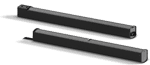
Cylindrical Radiator®s are not interchangeable across models
Specifically (and without exception)
- The Cylindrical Radiator speaker sections of the L1 Classic, the L1 Model I and L1 Model 1S and the L1 Model II are not compatible with each other.
- The Cylindrical Radiator speaker sections of the L1 Classic can only be used with the Classic PS1 power stand (no orange markings on the input/output panel).
- The Cylindrical Radiator speaker sections of the L1 Model I (orange markings on the back of both sections) can only be used with the Model I PS1 power stand (orange markings on the input/output panel).
- The Cylindrical Radiator speaker sections of the L1 Model II can only be used with the L1 Model II power stand.
- The Cylindrical Radiator speaker sections of the L1 Model 1S can only be used with the L1 Model 1S power stand.
T1 ToneMatch® Audio Engine, T4S/T8S ToneMatch® Mixers
- The ToneMatch mixers can be used with the
PackLite® power amplifier Model A1
- The PackLite® power amplifier model A1 can be used with
B1 Bass Module
- The B1 Bass Module can be used with the
B2 Bass Module
- The B2 Bass Module can be used with the
- L1 Classic Normal Mode only
- L1 Model I Normal Mode only
- L1 Model 1S all modes
- L1 Model II all modes but L1® Model II Power Stand Firmware version 1.4 or later required
Related Documents
- L1® Model 1S FAQs (Bose® official version)
- L1® Model 1S FAQ More official FAQs
- B2 Bass Module Owners Guide
Mechanical Specifications
L1 Model 1S
Component Dimensions Weight Power stand 5”H x 10”W x 27”D 23.7 lb (10.7kg) (12.8 cm x 26.2 cm x69.2 cm)
Top array 39.63” H x 4.15” W x 4.13” D 16.3 lb (7.4 kg) (100.6 cm x 10.6 cm x 10.5 cm)
Bottom extension 39.63” H x 4.15” W x 4.13” D 8.5 lb (3.8 kg) (100.6 cm x 10.6 cm x 10.5 cm)
Source [2]
Bass modules
B1 bass module 15”H x 10 ¼”W x 17 ¾”D 25.1 lb (11.4 kg) (38.0 cm x 26.0 cm x 45.0 cm)
B2 bass module 23.4”H x 13.31”W x 18.9”D 45 lb (20.41 kg) (59.4 cm x 33.8 cm x 48 cm)
Source [3]
Total System Weight
The total assembled system weight with the B1 bass module 76 lb (34.4 kg).
The total assembled system weight with the B2 bass module 94 lb (42.6 kg).
T1 ToneMatch™ audio engine
- 2 2/3H x 6 1/2W x 8 1/4D (6.76 cm x 16.6 cm x 20.9 cm)
- 2.1 lbs (1.0 kg)
Electrical Specifications
- AC power rating:
- 100-120V 50/60Hz 500W (USA/Canada)
- 220-240V 50/60Hz 500W (Europe)
- Peak inrush current:
- 32A @ 120V 60Hz (USA/Canada)
- 61A @ 230V 50Hz (Europe)
| Component | Impedance |
|---|---|
| L1® model 1S loudspeaker | 4 ohms |
| B1 bass module | 8 ohms |
| B2 bass module | 4 ohms |
- Power stand inputs/outputs
- ToneMatch port for T1 ToneMatch audio engine
- 1/4" analog input
- Neutrik NL4 bass module out
What's in the Box
- L1 Model 1S Cylindrical Radiator® loudspeaker box ===
- Loudspeaker top array and bottom extension
- Carrying bag (1)
- Power stand box
- Power stand
- Power cord
- Protective plug
- Carrying bag (1)
FAQs
What is the L1 Model 1S system and what makes it different from other L1 portable line array systems?
The L1 Model 1S portable line array system is a combination of performance and portability incorporating key elements of L1 Compact and Model II technologies into a flexible system designed for audiences up to 300. The L1 Model 1S features a 12-speaker articulated line array, offering 180 degrees of horizontal coverage while maintaining consistent level, smooth tonal balance and clarity throughout the venue. The system consists of only four lightweight pieces that set up and break down in minutes. These durable components easily connect without the need for stands or wires, and are readily transported in three protective carry bags. The materials and construction are specifically designed to meet the travel and performance demands of solo performers, mobile DJs and bands. The L1 Model 1S system can be configured to your individual needs with the B1 bass module for greater portability, or with the B2 bass module for greater output. Combine the system with the ToneMatch® audio engine to maintain the sound and tone of specific instruments and microphones.
How does the articulated line array work?
The proprietary arrangement of speakers in the loudspeaker array enables the system to fill an entire room with clear, powerful, tonally balanced sound from a single loudspeaker system. Sound remains consistent even at the extreme sides of the system.
Where can the L1 Model 1S system be used?
The L1 Model 1S system is suitable for audiences up to 300 people. Typically, this translates to maximum listener distances of about 75 feet (22.86 meters). Thus, the system will fill auditoriums, houses of worship, gymnasiums, ballrooms, dance clubs, coffeehouses and more.
What kinds of musical performers (singers, bands, DJs, etc.) can use the new technology?
There are no restrictions in this regard. Any single voice, instrument and group size will benefit from the advantages of hearing themselves better, of being in complete control of their performance, of having audiences hear them better and of being able to set up and perform in just minutes.
We’re interested in using the product for our band. Does every musician in the band need his or her own L1 Model 1S system?
There are many ways that an L1 system can be used with a band. One per player is ideal; however, members can share as few as two being used as a pair behind the performers. With all L1 system approaches, this eliminates conventional PA and monitors and results in a PA that you can put behind you.
Can one musician use an L1 Model 1S system while the rest of the band plays through a conventional system?
Yes. An L1 Model 1S system can be used as an amplification system for keyboards, acoustic guitars and other instruments as part of a traditional back line.
Can DJs use this system?
Yes. The L1 Model 1S system has important advantages over conventional systems. One problem with portable PA systems is the use of stand-mounted speakers, which are very loud close to the speaker and not loud enough away from the speaker. The L1 Model 1S loudspeaker is unusual in that you can adjust for the desired level on the dance floor and in the audience, and then walk closely up to the speaker without it getting excessively loud. This translates into much greater comfort with the guests. The L1 Model 1S also offers DJs the flexibility to choose between two bass modules to fit their individual needs.
Can acoustic instruments be amplified with the L1 Model 1S system?
Yes. When a T1 ToneMatch® audio engine is not connected, an acoustic instrument equipped with a pickup system may connect directly into the L1 Model 1S power stand. In cases where pickups are not present, a microphone can be used. When a T1 is not being used, you can connect directly into the L1 Model 1S system's analog input. However, in this instance, a microphone cable must be used in conjunction with a direct box or a transformer to adapt to the power stand’s ¼" analog input connector.
Can L1 systems be used as a traditional PA system?
Yes. L1 Model 1S systems can be used to replace PA speakers. Their unique radiation properties help them deliver more even sound coverage and a larger stereo field—a benefit that has been confirmed in listening tests. The benefits of compactness for transportation and rapid assembly will also be enjoyed.
How can I take advantage of instruments or devices that deliver stereo output?
When stereo reproduction is desired, two L1 Model 1S systems can be used to deliver stereo sound in a left and right position. A single L1 Model 1S system can combine the two channels with one speaker.
Can the L1 Model 1S system be used outdoors?
Yes. The system can be used inside or outside, but must never be exposed to precipitation or extended periods of direct sunlight. In cases of light rain, take precautions to cover the back panel of the power stand. Water must not get into the air inlet slits inside the back I/O panel and handle recess, on the loudspeaker drivers or inside the L1 system cavity on the power stand. The system has been tested to operate in temperatures from 0° to 50° C (32° to 122° F), and be stored in temperatures from -30° to 70° C (-22° to 158° F).
Does the system ship with carrying bags/covers?
Yes. The L1 Model 1S top array and bottom extension ship with their own protective carry bag, and the power stand has a separate bag. The B1 and B2 bass modules also come with slip covers.
Are hard shell cases available for the products?
Bose does not offer any hard shell cases, but there are some available through third-party companies.
What is included in the L1 Model 1S system box?
- L1 Model 1S top array and bottom extension
- L1 Model 1S power stand
- B1 or B2 bass module (depending on the package purchased)
- Padded carrying bags for the L1 components and bass module
- 4 conductor NL4 bass module cable
- AC power cord
- L1 Model 1S owner's guide, bass module owner’s guide, quick setup guide and warranty statement
Can the L1 Model 1S be used with the L1 Compact or Model II system?
Yes. All L1 systems can be used together. However, each system has its own unique performance difference in respect to the size of the line array.
What are some of the details of the electronics in the L1 Model 1S power stand?
The power stand features integrated power amplifiers and DSP which provide power and processing for the loudspeaker array and bass module.
Why does the L1 Model 1S power stand contain only a single analog input?
This enables the layout of the power stand to be less cluttered with connectors that ultimately may not be used for many applications. The end result is a clean and compact design. Musicians who require more inputs can purchase the T1 ToneMatch® audio engine, which is specifically designed to work with the L1 Model 1S system.
What is the T1 ToneMatch® audio engine?
The T1 is a powerful multichannel audio device designed for musicians to use with the Model 1S system. It includes our largest library of ToneMatch presets, proprietary zEQ, a complete suite of studio-class effects and processing, and five channel inputs.
How prone is the system to feedback?
The L1 Model 1S system is resistant to, but not immune from, feedback. In the vast majority of cases, its performance in this critical dimension has been shown to be significantly better than the traditional triple system amplification approach of backline instrument amplifiers, monitor system and PA system.
Can I connect a passive sub woofer to the bass module output?
We do not recommend that you connect anything except the Bose B1 or B2 bass modules to this output, as the internal amplifier and bass modules are designed to properly equalize the system when connected.
Can I use this 120-volt system in another country?
The unit does not have a universal power supply. You should use the 120V version only in 120V countries. You can use the 240V version in countries with 220V, 230V or 240V systems at 50 Hz. We do not have a 100V system.
What accessories are available?
The following accessories are available for the L1 Model 1S system:
B1 bass module
- B1 bass module with slip cover and NL4 cable (PC 351964-0010)
- B1 cable 5.5" (1.7m) (PC 035404)
- Standard B1 carrying bag (PC 351517-0010)
B2 bass module
- B2 bass module with slip cover and NL4 cable (PC 353927-0110)
- B1/B2 cable 5.5" (1.7m) (PC 035404)
- Standard B2 carrying cover (PC 354529-0110)
A1 amplifier
- PackLite® power amplifier Model A1 (PC 351971-0010)
- Model A1 amplifier carry pouch (PC 351513-0010)
- Model A1 ¼" TRS cable 18-in (0.5m) (PC 039861)
T1 ToneMatch® audio engine
- T1 ToneMatch audio engine (PC 351971-0010)
- T1 ToneMatch audio engine power supply (PC 042533)
- ToneMatch audio engine microphone stand bracket (PC 042535)
- T1 cable (PC 042536)
- T1 carrying bag (PC 351509-0010)
What is the B1 bass module?
The B1 bass module is a portable, lightweight bass module designed to provide deep, balanced bass for Model 1S and Model II systems. It features two 5.25" high-excursion drivers built into a rugged enclosure. Interlocking end caps allow up to four B1 modules to be stacked together. The module includes a slip cover and NL4 cable.
What is the B2 bass module?
The B2 bass module is our high-performance flexible bass module designed to provide deep, impactful bass for higher SPL live music and DJ applications. It features two 10" high-excursion woofers mounted in a rugged enclosure. The B2 bass module includes a three-position sensing switch, allowing bass output to be adjusted for different applications. Interlocking end caps allow up to two B2 modules to be stacked together. The module also includes a slip cover and NL4 cable.
How many B1 and B2 bass modules can you connect to a L1 Model 1S system?
Each L1 Model 1S power stand can power up to two B1 bass modules or a single B2 bass module.
Can I use 2-wire NL2 SpeakON® cables for the bass modules?
Only 4-wire SpeakON NL4 cables should be used with the power stand. The additional two wires (+2 and -2) in the connector are used for sensing purposes. Upon connection, the power stand is able to sense and adjust (EQ and level) for number of bass modules connected to the bass module-out SpeakON connector. The cable should be labeled with "NL4" on the outside sleeve.
Are the L1 Model I and Classic systems compatible with the B2 bass module?
Yes. When using the B2 bass module with the L1 Model I or L1 Classic system, please note that the rear panel switch must be in the "Normal" position. If set to the + or - switch positions, it will not work, resulting in muted audio.
What is the warranty period on the L1 Model 1S system?
The L1 Model 1S power stand has a two-year limited warranty. The L1 Model 1S line array loudspeaker has a five-year limited warranty.
— source
- ↑ MikeZ-at-Bose talks about Using the L1™ Model II Power Stand without any speakers attached
- ↑ Top array and bottom extension sizes L1® Model 1S System Owner's Guide modified based on physical inspection. Both top and bottom are the same length: 39.63"
- ↑ B1 bass module weight 26.6 L1® Model 1S System Owner's Guide
Bose L1® Model 1S
URL http://worldwide.bose.com/pro/en_us/web/l1_model1s/page.html
Release Date: 2012-09-27
Height: 79.4 inches
Weight: 76 pounds (includes B1)
Power Stand Depth:27.2 inches
Power Stand Width:26 inches
Description: FAQ, documentation, hints and tips for owners of the L1® Model 1S
Description:
Key Features
High-performing, powered, portable two-way loudspeaker system with a 195° H x 10° V nominal dispersion designed for the production and reproduction of live music, music playback, speeches and A/V sound reproduction
12-driver articulated line array loudspeaker technology produces wide, uniform sound coverage throughout the entire listening area—even off to the extreme sides
Consistent front-to-back coverage, 12 drivers mounted in a vertical line array produce little drop in sound pressure level per doubling in distance than a conventional point source
Retractable folding leg mechanism for easy transport
Lightweight, interlocking components
Expandable bass design supports the use of multiple B1 bass modules or a single B2 bass module
Digital Ethercon port provides single-wire connectivity for the T1 ToneMatch audio engine
Physical
Enclosure
Power Stand: Polypropylene cover with cast aluminum legs and steel chassis base
Cylindrical Radiator: Aluminum enclosuure with ABS baffle
Dimensions
Assembled height: 79.4" (2018 mm)
Net Weight
Power Stand: 23.7 lb (10.7 kg)
Cylindrical Radiators (pair): 25 lb (10.7 kg)
B1 bass module: 26.6 lb (12.1 kg)
B2 bass module: 45 lb (20.41 kg)
Color
Black
Package Contents
1 system