In Ear Monitors for an L1 User: Difference between revisions
mNo edit summary |
mNo edit summary |
||
| (10 intermediate revisions by the same user not shown) | |||
| Line 1: | Line 1: | ||
{{DivToc | {{DivToc | ||
|RightHead = In-Ear Monitors for an L1 User? | |RightHead = In-Ear Monitors for an L1 User? | ||
| Line 36: | Line 33: | ||
===So why get In-Ear Monitors?=== | ===So why get In-Ear Monitors?=== | ||
;The L1 Pro16 (118 dB SPL) and the L1 Pro32 (122 dB SPL) are both louder than the {{Model II}} (115 dB SPL). | ;The L1 Pro16 (118 dB SPL) and the L1 Pro32 (122 dB SPL) are both louder than the {{Model II}} (115 dB SPL).<br>Even the L1 Pro8 (112 dB SPL) can be loud at close range | ||
:I rarely played the {{Model II}} at the maximum volume, but when I did, I wore ear protection. On those occasions, I thought about in-ear monitors. It's going to be tempting to go all out with the L1 Pro systems from time to time and I don't want to be standing in front of them when I do. I'll set them up at the front of the stage and use the in-ear monitors to hear myself. I'll be able to do this at a lower volume and avoid damaging my hearing. | :I rarely played the {{Model II}} at the maximum volume, but when I did, I wore ear protection. On those occasions, I thought about in-ear monitors. It's going to be tempting to go all out with the L1 Pro systems from time to time and I don't want to be standing in front of them when I do. I'll set them up at the front of the stage and use the in-ear monitors to hear myself. I'll be able to do this at a lower volume and avoid damaging my hearing. | ||
| Line 62: | Line 59: | ||
* L1 Compact (1/4 inch (6.3 mm) Tip-Ring-Sleeve) | * L1 Compact (1/4 inch (6.3 mm) Tip-Ring-Sleeve) | ||
* ToneMatch mixers (all have analog Main or Master Outputs in addition to the ToneMatch Port) | * ToneMatch mixers (all have analog Main or Master Outputs in addition to the ToneMatch Port) | ||
* The T4S/T8S have headphone jacks | * The T4S/T8S have headphone jacks you can use for IEMs | ||
The L1 Classic, L1 Model 1, L1 Model II, and L1 Model 1S do not have Line Out connections | You may need some adapters depending on the input connection(s) to your IEM system. | ||
;The L1 Classic, L1 Model 1, L1 Model II, and L1 Model 1S do not have Line Out connections | |||
===Disadvantages of the Main Mix for IEMs=== | ===Disadvantages of the Main Mix for IEMs=== | ||
* This is not as flexible or adaptable as using a separate monitor mix. If you adjust the sound for the room, the sound in the IEMs changes too. | * This is not as flexible or adaptable as using a separate monitor mix. If you adjust the sound for the room, the sound in the IEMs changes, too. | ||
| Line 90: | Line 88: | ||
* Setting up a monitor mix is more complex and may require some additional cables and adapters | * Setting up a monitor mix is more complex and may require some additional cables and adapters | ||
==Specific Example == | |||
;The rest of the article will deal with specific equipment listed at the top of the page | ;The rest of the article will deal with specific equipment listed at the top of the page | ||
=== First Time Setup === | |||
== First Time Setup == | |||
The Sennheiser system worked out of the box. I connected the headphone output of my [[T4S/T8S_ToneMatch®_Mixer|T8S ToneMatch Mixer]] to the inputs of the transmitter to try things out quickly. I took time to get to learn the details after several hours of spontaneous fun. | The Sennheiser system worked out of the box. I connected the headphone output of my [[T4S/T8S_ToneMatch®_Mixer|T8S ToneMatch Mixer]] to the inputs of the transmitter to try things out quickly. I took time to get to learn the details after several hours of spontaneous fun. | ||
== First Impressions == | === First Impressions === | ||
;The Gear | ;The Gear | ||
| Line 110: | Line 109: | ||
I'll need to rehearse with the in-ear-monitors to get used to hearing myself that way. Don't get in-ear monitors and experience them for the first time at a gig. Get to know them first. | I'll need to rehearse with the in-ear-monitors to get used to hearing myself that way. Don't get in-ear monitors and experience them for the first time at a gig. Get to know them first. | ||
== Later Impressions == | === Later Impressions === | ||
Several hours later. | Several hours later. | ||
| Line 125: | Line 124: | ||
I have lots of wireless gear but this stands out from the rest. The belt-pack receiver has a clear, easy-to-read display. The construction feels solid (all metal) compared to all my other plastic belt packs. | I have lots of wireless gear but this stands out from the rest. The belt-pack receiver has a clear, easy-to-read display. The construction feels solid (all metal) compared to all my other plastic belt packs. | ||
== Why UHF instead of 2.4 | === Why UHF instead of 2.4 GHz Digital? === | ||
If you're wondering why I went with a UHF system instead of one of the less expensive 2.4 | If you're wondering why I went with a UHF system instead of one of the less expensive 2.4 GHz systems, it's because the 2.4 GHz range is crowded. I don't want to get to a gig and find that the ubiquitous wireless guitar and microphone systems occupy all the available channels. I may be wrong, but I predict there will be problems when all those players who got 2.4 GHz wireless systems while we were locked down show up on stage together for the first time. | ||
== Why the Twin System == | === Why the Twin System === | ||
I got the package deal with two receivers for two reasons. | I got the package deal with two receivers for two reasons. | ||
* The system is stereo, but you can split the signals and have two monitor mixes - one for each receiver. If necessary, I can use the system for two people. | * The system is stereo, but you can split the signals and have two monitor mixes - one for each receiver. If necessary, I can use the system for two people. | ||
| Line 136: | Line 135: | ||
[https://www.youtube.com/watch?v=YLTuue44xhM Mixing Live Sound - IEMS & Monitors] | [https://www.youtube.com/watch?v=YLTuue44xhM Mixing Live Sound - IEMS & Monitors] | ||
== The In-Ear Monitors == | === The In-Ear Monitors === | ||
The [https://sennheiser.com/earphones-headphone-stereo-passive-noise-reduction-ie-4 IE 4 Earphones] that came with the [https://en-us.sennheiser.com/double-wireless-in-ear-monitor-system-live-sound-ew-iem-g4-twin Sennheiser IEM G4 Twin transmitter/receiver] are perfectly functional, but I was curious about higher-end products to put in my ears. | The [https://sennheiser.com/earphones-headphone-stereo-passive-noise-reduction-ie-4 IE 4 Earphones] that came with the [https://en-us.sennheiser.com/double-wireless-in-ear-monitor-system-live-sound-ew-iem-g4-twin Sennheiser IEM G4 Twin transmitter/receiver] are perfectly functional, but I was curious about higher-end products to put in my ears. | ||
I got three: | I got three: | ||
| Line 146: | Line 145: | ||
All three models in the Pro series share the same shape, fit, silicon and foam earpieces, and connectors to cables and the Bluetooth accessory. I found I could get a good seal for passive isolation, and they were comfortable for hours. | All three models in the Pro series share the same shape, fit, silicon and foam earpieces, and connectors to cables and the Bluetooth accessory. I found I could get a good seal for passive isolation, and they were comfortable for hours. | ||
=== Differences === | ==== Differences ==== | ||
Initially, I got the IE 400 Pro and IE 500 Pro, intending to keep just one. It turns out, I liked them both immensely for different reasons. I'm more inclined to use the IE 500 Pro on stage and the IE 400 Pro when I'm working on my tone or mixing. Mixing with in-ears? That's the subject of another article about [https://www.dear-reality.com/products/dearvr-mix dearVR Mix]. | Initially, I got the IE 400 Pro and IE 500 Pro, intending to keep just one. It turns out, I liked them both immensely for different reasons. I'm more inclined to use the IE 500 Pro on stage and the IE 400 Pro when I'm working on my tone or mixing. Mixing with in-ears? That's the subject of another article about [https://www.dear-reality.com/products/dearvr-mix dearVR Mix]. | ||
| Line 165: | Line 164: | ||
[https://www.soundguys.com/sennheiser-ie-100-pro-wireless-review-58526/ IE 100 Pro Bluetooth soundguys.com] | [https://www.soundguys.com/sennheiser-ie-100-pro-wireless-review-58526/ IE 100 Pro Bluetooth soundguys.com] | ||
== More Information About IEMs== | |||
=== Never Wear Just One IEM === | |||
:Whether on stage or listening to your music or films, you should never wear only one in-ear monitor. Also called earphones, in-ear monitors sit within the ear canal and provide the highest caliber isolation of personal audio equipment. Wearing a single earphone increases the risk of ear fatigue and potentially poses a risk to your hearing. This is largely due to a phenomenon called Binaural Loudness Summation, which is a result of how your brain processes sound. When wearing a single in-ear monitor, you’re going to have to turn up your volume to account for the loss of apparent volume and the increase in sound pressure levels can result in unhealthy exposure. | |||
====Binaural Loudness Summation==== | |||
:Binaural Loudness Summation (BLS) is a psycho-physical effect where your brain perceives sounds heard by both ears to be louder. This effect is greater with louder sounds, resulting in up to 9dB of apparent loudness at around 90dB of source volume. Anything over 85dB carries the risk of hearing loss if sustained for long enough, so the difference in apparent volume can take you from a safe listening environment to a dangerous one -- especially if you use your in-ear monitors for multiple hours a day. Musicians on stage, engineers and audiophiles alike need to be aware of the potential dangers of taking out an earphone. | |||
:Musicians are probably at the greatest risk from wearing a single in-ear monitor. In-ear monitors were designed to prevent hearing loss and give performers a higher quality reference while on stage. Used correctly, our monitors excel at this, but used incorrectly, the benefits can all but disappear. However, with all the isolation that in-ear monitors deliver many musicians feel the urge to remove one of their in-ear monitors because they feel disconnected from the audience. This is understandable; performing music is an emotionally driven experience and without the connection to the audience you can find yourself missing half of the feedback necessary to achieve a truly great performance. However, this sensation of being disconnected can be easily circumvented. Place a mic on the audience and add the feed to your mix; not only do you now have control over the volume of the audience, but you’re not going to be disconnected from them. To avoid feeling isolated from your fellow bandmates, your mix is stereo and that you’re panning your bandmates to their relative positions on stage. This will deliver the spacial awareness necessary for the sense of realism, making the band members feel like they’re performing on an amplified stage instead of a silent one. Using these tricks, you can deliver all the information needed for a band to excel while also providing unrivaled control and sound quality. | |||
:For audiophiles and music enthusiasts the solution to this problem is to simply be aware that, if wearing a single in-ear monitor, you mustn’t adjust your volume to dangerous levels. If you want the perceived boost from BLS, wear both of your earphones, but otherwise you need to exercise awareness that with a single in-ear monitor in you will not be getting those bonus dBs. The extra loudness from BLS exists only in the mind, but to compensate for not experiencing it, you would need to run your source material louder which can pose a risk to your hearing health. | |||
[https://empireears.com/blogs/news/why-you-should-never-wear-only-one-in-ear-monitor Source: Why You Should Never Wear Only One In Ear Monitor] | |||
=== EQ Settings for IEMs === | |||
Thinking about mixing for In-Ear Monitors (IEMs)? I found this video interesting. | |||
Pondering how to create a separate EQ for an IEM mix with the T8S, I'm thinking of creating the vocal mix in Aux1 and sending Aux1 to a separate channel (e.g., channel 8) to use ParaEQ to apply the curve shown in the video below. Then, sending channel 8 to Aux2 to the IEMs (one channel), and a full band mix without the EQ curve to the IEMs (second channel) with Aux3. | |||
<HTML> | |||
<iframe width="560" height="315" src="https://www.youtube.com/embed/HxKp5Jn-EaA?si=kzW-ezG5RCvvS6Cr" title="YouTube video player" frameborder="0" allow="accelerometer; autoplay; clipboard-write; encrypted-media; gyroscope; picture-in-picture; web-share" referrerpolicy="strict-origin-when-cross-origin" allowfullscreen></iframe> | |||
<br> | |||
<iframe width="560" height="315" src="https://www.youtube.com/embed/qlLw5Hf2Vlg?si=D7EaIFglCqUDZaQC" title="YouTube video player" frameborder="0" allow="accelerometer; autoplay; clipboard-write; encrypted-media; gyroscope; picture-in-picture; web-share" referrerpolicy="strict-origin-when-cross-origin" allowfullscreen></iframe> | |||
</html> | |||
<!-- | <!-- | ||
== Articles and Discussions == | == Articles and Discussions == | ||
| Line 170: | Line 207: | ||
--> | --> | ||
{{Editorial ST | |||
|Author = [[User:ST|ST]] | |||
|discussion page = to [https://twitter.com/ST_Muso/status/1400664447228784642 Twitter @ST_Muso] or [https://www.linkedin.com/posts/stpro_in-ear-monitors-for-an-l1-user-bose-portable-activity-6806430137706524672-LvW- LinkedIn @STPro] | |||
}} | |||
---- | |||
[[Category:IEM]] | |||
[[Category:Sennheiser]] | |||
[[Category:ST]] | |||
[[Category:Editorial ST]] | |||
Latest revision as of 18:24, 30 November 2025
In-Ear Monitors for an L1 User?
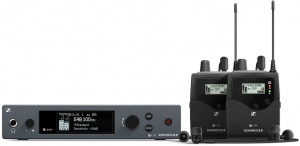
Having played in front of my L1 systems for years, I never expected to get stage monitors or in-ears. One of the key aspects of the L1 Approach was no monitors. But the L1 Pro models are considerably louder than the legacy L1 systems.
I just got my In-Ear-Monitors — EW IEM G4 Twin
Related article: Sennheiser EW IEM G4
Here are my first impressions of the wireless system.
Update, I have now upgraded from the stock earphones to
See The In Ear Monitors (below) for more details.
Why In-Ear Monitors?
I don't use monitors
I've been playing in front of my L1 systems since June 2004. On extremely shallow stages, I have had to stand beside my L1, but in all this time, I can't recall setting up a monitor for me. I have enjoyed the sound of the L1 behind me, and the sense of being in the same sound field as my audiences. I felt it was the responsible thing to do - being downstream from my output before subjecting my audiences to it.
So why get In-Ear Monitors?
- The L1 Pro16 (118 dB SPL) and the L1 Pro32 (122 dB SPL) are both louder than the L1 Model II (115 dB SPL).
Even the L1 Pro8 (112 dB SPL) can be loud at close range - I rarely played the L1 Model II at the maximum volume, but when I did, I wore ear protection. On those occasions, I thought about in-ear monitors. It's going to be tempting to go all out with the L1 Pro systems from time to time and I don't want to be standing in front of them when I do. I'll set them up at the front of the stage and use the in-ear monitors to hear myself. I'll be able to do this at a lower volume and avoid damaging my hearing.
- Convenience for Rehearsal
- If it isn't convenient to set up the L1 for practice or rehearsal (e.g., playing at home or anywhere you might disturb others), in-ear monitors can give you the auditory experience of playing at gig volume.
- Getting Your Tone
- To hear the tone of your voice and instrument as your audience will hear it, you have to rehearse at gig volume. With in-ear monitors, you can do that and have a consistent experience as you move from rehearsal to performance
- Remote Loudspeakers
- Sometimes I have to set up remote loudspeakers. I can use the in-ear monitor system to do that.
Where Do I Connect the In-Ear Monitors?
You'll likely have two options: Main Mix or Monitor Mix (if you have a mixer). There are advantages and disadvantages to both.
Main Mix
Sending the Main Mix to your In-Ear Monitors (IEMs) is easy and has the advantage that what you hear in the IEMs is (roughly) the same as what your audience hears coming out of your main system (L1 Pro, S1 Pro, ToneMatch mixer, etc.). That means that any adjustments to volume, tone, or reverb will not only be heard in the room but also in the IEMs.
Advantages of the Main Mix for IEMs
- Simple to connect
- You hear (approximately) what the audience hears
It is simple to connect to the Main Mix if you have a Line Out from your system. All of these Bose models do, and they are balanced connections.
- All L1 Pro (XLR)
- S1 Pro (1/4 inch (6.3 mm) Tip-Ring-Sleeve) and S1 Pro+ (XLR)
- L1 Compact (1/4 inch (6.3 mm) Tip-Ring-Sleeve)
- ToneMatch mixers (all have analog Main or Master Outputs in addition to the ToneMatch Port)
- The T4S/T8S have headphone jacks you can use for IEMs
You may need some adapters depending on the input connection(s) to your IEM system.
- The L1 Classic, L1 Model 1, L1 Model II, and L1 Model 1S do not have Line Out connections
Disadvantages of the Main Mix for IEMs
- This is not as flexible or adaptable as using a separate monitor mix. If you adjust the sound for the room, the sound in the IEMs changes, too.
Monitor Mix
All the ToneMatch mixers have Aux outputs. These can be used to create a separate monitor mix. You can read about that here
- T1 Aux (one Aux output)
- T4S Aux Outputs (two Aux outputs)
- T8S Aux Outputs (four Aux outputs)
Advantages of a Separate Monitor Mix
For each output on your mixer, you can
- Have a different mix of vocals vs. instruments
- Example: for singers - "more me" in the monitors
- Different effects or reverb levels compared to the Main Mix
- Example: More or less reverb in the monitors vs. the main listening room. In an extremely reverberant room, you might not add any reverb, but your vocalists may prefer to hear reverb in the IEMs
- You can have a consistent mix for your IEMs that doesn't have to change to suit the acoustics of different venues
Disadvantages of a Monitor Mix for IEMs
- Requires a mixer with the ability to create one or more monitor mixes
- Setting up a monitor mix is more complex and may require some additional cables and adapters
Specific Example
- The rest of the article will deal with specific equipment listed at the top of the page
First Time Setup
The Sennheiser system worked out of the box. I connected the headphone output of my T8S ToneMatch Mixer to the inputs of the transmitter to try things out quickly. I took time to get to learn the details after several hours of spontaneous fun.
First Impressions
- The Gear
The equipment makes a great first impression. The screens on the base unit and belt pack are bright, high-resolution, and easy to read. Everything feels solid and road-worthy.
- Guitar
The guitar through the Kemper Profiler sounds great through the in-ear-monitors, but to put that into context, I'm used to hearing it through my L1 Pro32. It's not massively different.
- Vocals
I usually run the vocals dry in the PA (no reverb or time-related effects) because there's usually plenty of natural reverberation in the room. That means the headphone mix is dry, too - drier than what I usually hear (voice in the room sound). That's okay. I don't mind.
It will take some time to get used to the occlusion effect (try singing with your fingers in your ears). The guitar sounds fine. My voice sounds funny. When I have more time, I'll set up a proper monitor mix to control the vocal and guitar levels separately.
I'll need to rehearse with the in-ear-monitors to get used to hearing myself that way. Don't get in-ear monitors and experience them for the first time at a gig. Get to know them first.
Later Impressions
Several hours later.
Wow - I wish I had gotten wireless in-ear-monitors sooner.
The best part is the wireless. Back when I had to consider the neighbours and cohabitants, I would occasionally play with headphones. I hated it - mostly because I play standing up and I wander around. Within minutes I was a tangled mess. You find out quickly if you tend to turn in one direction when there are cables involved. I went wireless for the guitar a long time ago, which made using headphones all the more vexing.
Remember the first time you played wireless with your guitar on stage? I got to relive that all over again with wireless monitoring.
I'm still getting used to the earbuds and the occlusion effect when I'm singing. When I want to give that a rest, I can use regular headphones that plug into the wireless receiver. My Bose NC 700 headphones work fine.
The initial setup was drop-dead simple, but there are plenty of options, including a limiter so I won't blow out my ears.
I have lots of wireless gear but this stands out from the rest. The belt-pack receiver has a clear, easy-to-read display. The construction feels solid (all metal) compared to all my other plastic belt packs.
Why UHF instead of 2.4 GHz Digital?
If you're wondering why I went with a UHF system instead of one of the less expensive 2.4 GHz systems, it's because the 2.4 GHz range is crowded. I don't want to get to a gig and find that the ubiquitous wireless guitar and microphone systems occupy all the available channels. I may be wrong, but I predict there will be problems when all those players who got 2.4 GHz wireless systems while we were locked down show up on stage together for the first time.
Why the Twin System
I got the package deal with two receivers for two reasons.
- The system is stereo, but you can split the signals and have two monitor mixes - one for each receiver. If necessary, I can use the system for two people.
- You can run remote loudspeakers for larger venues in stereo or dual mono. See Sennheiser EW IEM G4 for details
Related Material
Mixing Live Sound - IEMS & Monitors
The In-Ear Monitors
The IE 4 Earphones that came with the Sennheiser IEM G4 Twin transmitter/receiver are perfectly functional, but I was curious about higher-end products to put in my ears. I got three:
- Sennheiser IE 100 Pro Wireless Bluetooth (these came later)
- Sennheiser IE 400 Pro
- Sennheiser IE 500 Pro
General Comments
All three models in the Pro series share the same shape, fit, silicon and foam earpieces, and connectors to cables and the Bluetooth accessory. I found I could get a good seal for passive isolation, and they were comfortable for hours.
Differences
Initially, I got the IE 400 Pro and IE 500 Pro, intending to keep just one. It turns out, I liked them both immensely for different reasons. I'm more inclined to use the IE 500 Pro on stage and the IE 400 Pro when I'm working on my tone or mixing. Mixing with in-ears? That's the subject of another article about dearVR Mix.
The IE 400 Pro has a flatter frequency response than the IE 500 Pro. The IE 400 Pro is great for clinical listening like when I'm working on my vocal or guitar tone. The IE 500 Pro has a more flattering frequency response that is easier to listen to for long periods. It's slightly less pronounced in the upper mids than the IE 400 Pro. This is good for me as a vocalist because it encourages me to be more articulate. My voice tends to be darker and I can be muddy if I'm not concentrating. The IE 500 Pro help me with that.
Sennheiser makes the IE Pro BT connector, a Bluetooth receiver that works with all of its Pro series In-Ear Monitors. With this, you can convert your professional In-Ear monitors into Bluetooth earbuds. It's a short cable with a bump for the controls and a bump for the battery. You plug the In-Ears into it and you have wireless earbuds that sound great. I could have purchased it separately but I got this bundled with the Sennheiser IE 100 Pro Wireless Bluetooth out of curiosity. The IE 100 Pro sounds remarkably good and I could use them on stage in a pinch.
Reviews
Sennheiser IE 500 Pro headphonecheck.com
Sennheiser IE 500 Pro head-fi.org
Sennheiser IE 400 Pro headphonecheck.com
IE 100 Pro Bluetooth soundguys.com
More Information About IEMs
Never Wear Just One IEM
- Whether on stage or listening to your music or films, you should never wear only one in-ear monitor. Also called earphones, in-ear monitors sit within the ear canal and provide the highest caliber isolation of personal audio equipment. Wearing a single earphone increases the risk of ear fatigue and potentially poses a risk to your hearing. This is largely due to a phenomenon called Binaural Loudness Summation, which is a result of how your brain processes sound. When wearing a single in-ear monitor, you’re going to have to turn up your volume to account for the loss of apparent volume and the increase in sound pressure levels can result in unhealthy exposure.
Binaural Loudness Summation
- Binaural Loudness Summation (BLS) is a psycho-physical effect where your brain perceives sounds heard by both ears to be louder. This effect is greater with louder sounds, resulting in up to 9dB of apparent loudness at around 90dB of source volume. Anything over 85dB carries the risk of hearing loss if sustained for long enough, so the difference in apparent volume can take you from a safe listening environment to a dangerous one -- especially if you use your in-ear monitors for multiple hours a day. Musicians on stage, engineers and audiophiles alike need to be aware of the potential dangers of taking out an earphone.
- Musicians are probably at the greatest risk from wearing a single in-ear monitor. In-ear monitors were designed to prevent hearing loss and give performers a higher quality reference while on stage. Used correctly, our monitors excel at this, but used incorrectly, the benefits can all but disappear. However, with all the isolation that in-ear monitors deliver many musicians feel the urge to remove one of their in-ear monitors because they feel disconnected from the audience. This is understandable; performing music is an emotionally driven experience and without the connection to the audience you can find yourself missing half of the feedback necessary to achieve a truly great performance. However, this sensation of being disconnected can be easily circumvented. Place a mic on the audience and add the feed to your mix; not only do you now have control over the volume of the audience, but you’re not going to be disconnected from them. To avoid feeling isolated from your fellow bandmates, your mix is stereo and that you’re panning your bandmates to their relative positions on stage. This will deliver the spacial awareness necessary for the sense of realism, making the band members feel like they’re performing on an amplified stage instead of a silent one. Using these tricks, you can deliver all the information needed for a band to excel while also providing unrivaled control and sound quality.
- For audiophiles and music enthusiasts the solution to this problem is to simply be aware that, if wearing a single in-ear monitor, you mustn’t adjust your volume to dangerous levels. If you want the perceived boost from BLS, wear both of your earphones, but otherwise you need to exercise awareness that with a single in-ear monitor in you will not be getting those bonus dBs. The extra loudness from BLS exists only in the mind, but to compensate for not experiencing it, you would need to run your source material louder which can pose a risk to your hearing health.
Source: Why You Should Never Wear Only One In Ear Monitor
EQ Settings for IEMs
Thinking about mixing for In-Ear Monitors (IEMs)? I found this video interesting.
Pondering how to create a separate EQ for an IEM mix with the T8S, I'm thinking of creating the vocal mix in Aux1 and sending Aux1 to a separate channel (e.g., channel 8) to use ParaEQ to apply the curve shown in the video below. Then, sending channel 8 to Aux2 to the IEMs (one channel), and a full band mix without the EQ curve to the IEMs (second channel) with Aux3.
 This article expresses my opinion and experience. Please post comments to Twitter @ST_Muso or LinkedIn @STPro. Thank you — ST. |