B1 Bass Module: Difference between revisions
m →German |
|||
| (47 intermediate revisions by the same user not shown) | |||
| Line 1: | Line 1: | ||
<table><tr> | |||
<td valign="top" width="300">__TOC__</td> | |||
<td valign="top">{{B1 Bose Link}} | |||
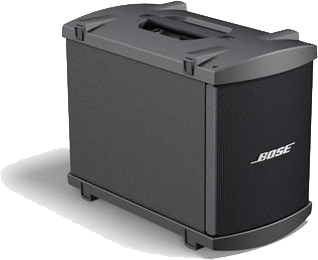
* Portable, lightweight bass module | |||
* Designed to provide deep, balanced bass for Model 1S and Model II systems | |||
* Features two 5.25" high-excursion drivers built into a rugged enclosure | |||
* Interlocking end caps allow up to four B1 modules to be stacked together | |||
* Includes a slip cover and NL4 cable | |||
Technical Specifications<ref>[http://worldwide.bose.com/pro/en_us/web/l1_model2/page.html?term=bass_modules&view=general Bass Modules]</ref> | |||
* Weight: 26.6 lb (12.1 kg) | |||
* Impedance: 8 ohms | |||
* | * Frequency Response: (-3dB) 40Hz – 200Hz | ||
* | * Frequency Range: (-10dB) 35Hz – 220Hz | ||
== | == Documentation == | ||
[[ | [[Media:B1 Bass Module Installation Guide.pdf|B1 Bass Module Installation Guide]] | ||
</td> | |||
</tr></table> | |||
== Use the B1 Cables == | |||
{{B1 Cable Warning}} | |||
== | == Two B1s == | ||
The | <section begin=TwoB1s /> | ||
{{Classic icon}}{{Model I icon}}{{Model II icon}} The Classic / Model I / Model II / Model 1S output for the B1s is | |||
*125 Watts into 8 ohms (single B1) | |||
*250 Watts into 4 ohms (two B1s) | |||
Hilmar-at-Bose tells us: | |||
If you have two sound sources that are | |||
*relatively small | |||
*not driven very hard | |||
*you look only at relatively low frequencies | |||
Then you get +6 dB more sound pressure level (SPL) from 2 as compared to one. | |||
Our B1 is a good example of that: | |||
*2 B1s give 6 dB more than one. | |||
*You gain 3 dB by simply doubling the electrical power (250 Watt for two, 125 Watt for one). | |||
*The other 3 dB is gained by doubling of acoustic volume, cone area and close coupling between the speakers. | |||
To get the same SPL (as 2 B1s) from a single B1 you would actually have to hit it with four times the power (500 Watt). | |||
Source: [http://bose.infopop.cc/eve/forums/a/tpc/f/8766055944/m/572103376?r=259107776#259107776 How much power...] discussion in the {{forum}} | |||
;System voicing | |||
:Hilmar-at-Bose | |||
<blockquote> | |||
::We have carefully voiced the system to have the "best" spectral balance. Ideally, this spectral should not change, no matter how many bass modules are attached. More bass modules simply allow you to play louder and have more headroom. Adding the second B1 will not change the spectral balance but play louder. | |||
::The Power Stand senses how many B1 bass modules are attached (0<ref>not applicable to Model II or Model 1S - both must use at least one Bass module.</ref>, 1 or 2) and adjusts the internal EQ accordingly. In the case of attaching the second B1 the Power Stand will drop the bass level by about 6 dB so that the overall acoustic output stays the same. | |||
::You can actually notice the change: When you attach (or detach) the second B1, the systems mutes for about a second, adjust its EQ and then comes back again. That's perfectly safe to do while the system is playing. | |||
:Source: [http://bose.infopop.cc/eve/forums/a/tpc/f/1506041054/m/251104076?r=406104076#406104076 Hilmar-at-Bose replies to Single or Double Bass...] discussion in the {{forum}} | |||
</blockquote> | |||
<section end=TwoB1s /> | |||
== Keep the B1s Together == | |||
If you have more than one B1 playing the same sound source (instrument), keep the B1s together. You should get as much as 3 dB more than if you have them separated. This is due to acoustic coupling. This also avoids creating [[Nulls]]. You can stack them or have them side-by-side but you want to keep them together. For more comprehensive discussion about this see [[{{PAGENAME}}#Arranging_and_Placing_the_B1s|Arranging and Placing the B1s]] (below). | |||
== Arranging and Placing the B1s == | |||
Chris-at-Bose talks about how and where to locate your B1s | |||
*[[B1 Bass Module / Positioning]] | |||
*[[Bass Outdoors]] | |||
=== Stacking (up to four high) === | |||
From page 12 of the [http://www.bose.com/pdf/musicians/120VOwnersGuide/AM263976_03_120V_OG_ENG_Viewable.pdf Owners Guide] | |||
[[Image:B1Stack4.png]] | |||
== Using More Than Two B1s with a Power Stand == | |||
{{:Using More Than Two B1s with a Power Stand}} | |||
== Rotate the Logos == | |||
{{:B1 Rotate the Logos}} | |||
== How Low does the B1 Go? == | |||
The short answer: 40 Hz. But what about instruments that go lower than that, for example a five string Bass? A much better answer comes from Hilmar-at-Bose in [[Bass Frequencies]] | |||
== Full Range of the B1 == | |||
40 Hz to ... | |||
[http://bose.infopop.cc/eve/forums/a/tpc/f/3976055944/m/6761081513?r=8631063513#8631063513 Hilmar-at-Bose tells us] | |||
:It's a relatively small woofer and it's good up to 3.5 kHz or thereabouts, which is plenty for many bass applications. It's not quite as smooth in the mid range as I would like for a "full range" speaker. | |||
;Question — Would that be because of the cabinet design or the speakers? | |||
:little of both actually but mostly it's cabinet design. The box is optimized to provide very good low bass and we just didn't want to compromise to dial in the higher resonances, since we were not planning on using the box at these frequencies. | |||
== B1 with non {{L1 nl}} loudspeaker systems<br> == | |||
{{:B1 Bass Module as Subwoofer}}<br> | |||
== Port Orientation == | |||
"Theoretically, port-side-up may give a tiny bit better aligned floor reflection but in practice, the difference is so small that it isn't worth bothering with. However, I would still advise when you stack multiple B1s keep them all in the same orientation." - Hilmar-at-Bose <ref>[http://bose.infopop.cc/eve/forums/a/tpc/f/3976055944/m/9791009151/r/9791009151#9791009151 B1 Port Orientation: Hilmar's post in the Bose® Musicians Community Message Boards]</ref> | |||
When I read this, I had to go and look very closely to find the port. It's easier to figure out that when the B1 is on it's side, port side up is same as (on the back) connection panel down. | |||
== Check the Cables == | |||
[[Image:B1Cable.gif|right|B1 Cable]] You may want to double check your Blue B1 cables. | |||
{{:B1 Cable Connections}} | |||
== Longer cables for B1s and B2s == | |||
<section begin=LongerCables /> | |||
The Bose B1/B2 requires a NL4 connector with all 4 pins connected (that's why we call it 4-wire cable). Unfortunately, the Speakon connector comes in three different flavors, NL2 (2-pins), NL4 (4 pins), and NL8 (8-pins). Most salespeople are not aware of the differences. | |||
A good source for the correct cables is | |||
[http://www.audiopile.net/NL413GA Audiopile.net NL413GA | NL4 Speakon equipped 13/4 Speaker Cable] | |||
;Note: If you have an L1 Model 1S or L1 Model II - do NOT add a 10k resistor to the cable. That's only required with an L1® Model I or L1® Classic and ONLY if you are using a B2. It is not required with B1 bass modules. | |||
Consider getting 90-degree ends like this: | |||
[[File:NL4FRX.jpg|link=http://www.audiopile.net/NL4FRX|Image=NL4 400w.jpg|200px|NL-4 speaker cable]] | |||
— Click image for details — | |||
<!-- | |||
[http://www.audiopile.net/products/Speaker_Cables/NL-4_speaker_cable/NL413_dropdown_cutsheet_2.shtml NL413GA]--> | |||
If you call Mark and tell him you want the cable for the Bose B1, you will get one that is made to our specifications. You can also any custom length cable at a very reasonable price. | |||
:Hilmar-at-Bose<ref>[http://bose.infopop.cc/eve/forums/a/tpc/f/3976055944/m/2941001112?r=8521011112#8521011112 B1 Cables]</ref> | |||
<section end=LongerCables /> | |||
=== German === | |||
German (translation provided by [http://bose.infopop.cc/eve/personal?x_myspace_page=profile&u=8801052851 BlackForestMan]) | |||
SPEAKON Kabel gibt es in 3 verschiedenen Varianten, NL2 (2-polig), NL4 (4-polig), and NL8 (8-polig). Häufig kennt das Verkaufspersonal diese Unterschiede nicht. Das Bose B1 Bassmodul benötigt aber ein NL4 bei dem alle 4 Anschlüsse verbunden sind (daher sprechen wir hier auch von einem 4-adrigen Kabel). | |||
Fertige Kabel in verschiedenen Längen gibt es z.B. hier: | |||
*[http://www.thomann.de/ Musikhaus Thomann] | |||
*[http://www.thomann.de/de/cae_1471015_lautsprecherkabel.htm CAE 14710-1,5 (NL4): hochflexibles Lautsprecherkabel, 4x2,5mm, 1,5m, Speakon --> Speakon] | |||
*[http://www.thomann.de/de/cae_147133_lautsprecherkabel.htm CAE 14713-3 (NL4): hochflexibles Lautsprecherkabel, 4x2,5mm, 3m, Speakon --> Speakon] | |||
dto. gibt es auch in 5m, 10m, 15m Länge usw. | |||
In der Regel wird auf Anfrage aber auch jedes lokale Musikgeschäft ein Speakon NL4-Kabel in passender Länge herstellen können. | |||
<br> | |||
== Straighten the B1 Cables == | |||
Here's a tip from [http://bose.infopop.cc/eve/forums?a=tpc&f=867107664&m=6391041315&r=6391041315#6391041315 Nick from New Zealand] | |||
I've seen it mentioned here a few times - those wriggly uncooperative B1 leads when they're new, and no posts about how to cure the problem. | |||
Here's 3 suggestions: | |||
1. Taking care to hold the speakon connectors, soak the rest of the cable into a bowl of very warm/hot (not boiling) water. DO NOT GET WATER INSIDE THE SPEAKON PLUGS. This will soften the cable up, lie the cable out flat and straight to dry. This will give it a "new memory" of sorts and be easier to maintain in the future. | |||
2. Wrap the cable or lie it flat and straight and leave it on the footpath or driveway in the sun. Shouldn't take long. | |||
3. Leave them wrapped in your car/van on a hot summer day. This is usually how I unintentionally fix all of my cable messes. | |||
{{:B1 Bass Module/New}} | |||
== Classic Extended Bass Package == | |||
{{#lst:Classic Extended Bass Package|section1 }} | |||
See [[Classic Extended Bass Package]] for more details. | |||
== Replacement Parts == | |||
The B1 front Grille is available as a replacement part. | |||
Part Number '''263992''' — this includes the {{Bose}} logo. | |||
The {{Bose}} logo is not available as a separate replacement part. | |||
You can order this through [[Support]]. | |||
== Mechanical Specifications == | |||
15"H x 10.25"W x 17.75"D ( 38 cm x 26 cm x 45 cm ) | |||
25.1 lbs (11.4 kg) Source: [[Media:B1 Installation Guide International 2006.pdf|B1 Installation Guide International 2006.pdf]] | |||
8 ohms | |||
== Compatibility with Other Members of the L1® Family of Products == | |||
{{L1 Compatibility}} | |||
---- | ---- | ||
<references/> | |||
[[ | <references /> | ||
[[ | |||
[[ | [[Category:Bass]] | ||
[[Category:B1_Bass_Module]] | |||
[[Category:L1® System]] | |||
Latest revision as of 01:48, 16 September 2025
Technical Specifications[1]
Documentation |
Use the B1 Cables
Warning - Use Blue B1 Cables NL4 cables with your L1 Classic / L1 Model I / L1 Model 1S L1 Model II


If you are using a B1 Bass Module with your Power Stand it is ESSENTIAL for proper operation that you use the BLUE cable supplied with the B1 Bass Module or B2 Bass Module. This is required so that the L1 Classic/L1 Model I/L1 Model 1S/L1 Model II Power Stand can correctly identify when there are bass modules connected to it and if so, how many.
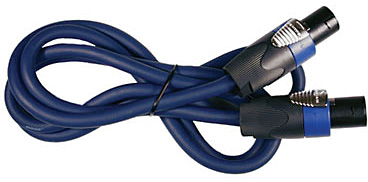
Please click the picture above for ordering information.
- Note
- The B2 Bass Level Switch will not change the sound of the B2 Bass Module if you are not using the correct cable.
See: PS1 Power Stand / Bass Line Out for details about how the Power Stand adapts to the number of bass modules are connected to it.
You may also use high quality NL4 cables (four conductor cables).
Alternate and longer cables for B1s
Two B1s
The Classic / Model I / Model II / Model 1S output for the B1s is
- 125 Watts into 8 ohms (single B1)
- 250 Watts into 4 ohms (two B1s)
Hilmar-at-Bose tells us:
If you have two sound sources that are
- relatively small
- not driven very hard
- you look only at relatively low frequencies
Then you get +6 dB more sound pressure level (SPL) from 2 as compared to one.
Our B1 is a good example of that:
- 2 B1s give 6 dB more than one.
- You gain 3 dB by simply doubling the electrical power (250 Watt for two, 125 Watt for one).
- The other 3 dB is gained by doubling of acoustic volume, cone area and close coupling between the speakers.
To get the same SPL (as 2 B1s) from a single B1 you would actually have to hit it with four times the power (500 Watt).
Source: How much power... discussion in the Bose® Pro Portable PA Community
- System voicing
- Hilmar-at-Bose
- We have carefully voiced the system to have the "best" spectral balance. Ideally, this spectral should not change, no matter how many bass modules are attached. More bass modules simply allow you to play louder and have more headroom. Adding the second B1 will not change the spectral balance but play louder.
- The Power Stand senses how many B1 bass modules are attached (0[2], 1 or 2) and adjusts the internal EQ accordingly. In the case of attaching the second B1 the Power Stand will drop the bass level by about 6 dB so that the overall acoustic output stays the same.
- You can actually notice the change: When you attach (or detach) the second B1, the systems mutes for about a second, adjust its EQ and then comes back again. That's perfectly safe to do while the system is playing.
- Source: Hilmar-at-Bose replies to Single or Double Bass... discussion in the Bose® Pro Portable PA Community
Keep the B1s Together
If you have more than one B1 playing the same sound source (instrument), keep the B1s together. You should get as much as 3 dB more than if you have them separated. This is due to acoustic coupling. This also avoids creating Nulls. You can stack them or have them side-by-side but you want to keep them together. For more comprehensive discussion about this see Arranging and Placing the B1s (below).
Arranging and Placing the B1s
Chris-at-Bose talks about how and where to locate your B1s
Stacking (up to four high)
From page 12 of the Owners Guide

Using More Than Two B1s with a Power Stand
You can have up to two B1 Bass Modules connected to an L1® Power Stand.
- You can add two more B1 Bass Modules powered by the PackLite® power amplifier Model A1
- You can purchase the Packlite® and two B1 Bass Modules as a PackLite® Extended Bass Package
- You can add as many PackLite® Extended Bass Packages as you like to a single L1®, although it is unlikely you would go beyond four B1 Bass Modules except for live music in a very large venue.
- If you have an L1 Classic you can use that to drive up to six B1 Bass Modules. For details see: Classic Extended Bass Package
Rotate the Logos
You can rotate the Bose logo so it is parallel to the floor even if you have turned the B1 on its side. Chuck-at-Bose said, "... Maybe it's my kung fu grip, but I've had good luck with carefully pinching the logo and pulling at these points, then rotating 90 degrees:"

Be very careful with the fine ends of the logo because they can be easily broken off. You may even try to pull up in the middle with your fingernails on the edge instead of near the ends.
| Go from this | to this |
 |
 |
Pull the logo straight out about ½ inch before you attempt to turn it. It is spring loaded, and the rear post is square. You have to clear the post (about ½ inch before you can turn it).

Another look.

After you rotate the logo make sure that the logo is flush with the grille so that it does not rattle when the music is playing.
How Low does the B1 Go?
The short answer: 40 Hz. But what about instruments that go lower than that, for example a five string Bass? A much better answer comes from Hilmar-at-Bose in Bass Frequencies
Full Range of the B1
40 Hz to ...
- It's a relatively small woofer and it's good up to 3.5 kHz or thereabouts, which is plenty for many bass applications. It's not quite as smooth in the mid range as I would like for a "full range" speaker.
- Question — Would that be because of the cabinet design or the speakers?
- little of both actually but mostly it's cabinet design. The box is optimized to provide very good low bass and we just didn't want to compromise to dial in the higher resonances, since we were not planning on using the box at these frequencies.
B1 with non L1® loudspeaker systems
Question - Can I use a B1 with an amplifier as a subwoofer for another (non-L1®) loudspeaker system?
- The B1 Bass Module is designed to work with the L1 system. The B1 is protected from frequencies it was not designed to handle - but only when connected to an L1 Power Stand. If you connect the B1 to another amplifier, or an PackLite® power amplifier model A1 use a Power Stand Bass Line Out as the source. If you do not, there is no protection for the B1.
Note from MikeZ-at-Bose
- Loudspeakers designed to be used with other gear (typical 2 way PA speakers, third party subs, etc.) usually have some sort of passive protection built into them. The B1, since it was designed to be used with L1's, has no protection. All of the protection is built into the L1 itself.
— Using B1-s with conventional speaker system
Notes:
On the L1 Classic there is an input "All Amps In". There is no protection for the B1s when using this input.
The PackLite® power amplifier model A1 is a full range amplifier and does not offer any protection for the B1s. The B1s will be protected if the signal source is an L1 Power Stand Bass Line Out.
- Can I use the B1s with Bose® Panaray 802 loudspeakers?
- You'll need to EQ the B1s to get them to sound at their best. The 802s go down to 60 Hz on their own. The B1s will go down to 40 Hz, but you'll need a crossover to get all the pieces working in their optimal range. Bose recommends the Controlspace SP 25 Sound Processor for all Panaray loudspeaker systems.
You can call Bose Technical support. for more details.... there are a lot of details.
Call Support
Telephone the Bose Live Music Product & Technical Support Team (877) 335-2673 (U.S. and Canada only)* Hours of operation Monday-Friday: 9:00 AM - 9:00 PM ET
Port Orientation
"Theoretically, port-side-up may give a tiny bit better aligned floor reflection but in practice, the difference is so small that it isn't worth bothering with. However, I would still advise when you stack multiple B1s keep them all in the same orientation." - Hilmar-at-Bose [3]
When I read this, I had to go and look very closely to find the port. It's easier to figure out that when the B1 is on it's side, port side up is same as (on the back) connection panel down.
Check the Cables

You may want to double check your Blue B1 cables.
B1/B2 Cable - Connections
From Kyle-at-Bose [4]
We've seen some past B1 cable quality problems which, because of input from folks like you, we've since resolved.
I'm fairly confident that the connector and wires in the cable assembly are OK. The problems we were having were related to the actual connection of the wire leads to the Speakon connector. Problems would be obvious in one case- the bass module cuts out. The second case would not be so obvious- the EQ to the B1 and L1 would be wrong and would make the system perform and sound poor.
So, if you have a moment and a screwdriver, we can fix these cables together.
Remove the rear shell of the connector by unscrewing it. (See the pic below, not the exact connector but similar). We use a 4-wire connection so what you need to do is re-attach, possibly restripping first (need to use a wire stripper), the wire to the connector terminals. There are four terminals +1, -1, +2, -2. Each wire needs to be appropriately connected to the same terminal on each end of the cable. Luckily, no soldering is needed. These Speakon connectors have screw terminals. All you need to do is unscrew the terminal using a screwdriver, reinsert the bare wire, and then tighten the terminal.

B1/B2 Conductors Broken
From Harry (dancingdogmuse)[5]
The initial symptoms were clicking followed by silence. It turned out to be a problem with broken wires inside the blue jacket of the B1 cable.


Longer cables for B1s and B2s
The Bose B1/B2 requires a NL4 connector with all 4 pins connected (that's why we call it 4-wire cable). Unfortunately, the Speakon connector comes in three different flavors, NL2 (2-pins), NL4 (4 pins), and NL8 (8-pins). Most salespeople are not aware of the differences.
A good source for the correct cables is
Audiopile.net NL413GA | NL4 Speakon equipped 13/4 Speaker Cable
- Note
- If you have an L1 Model 1S or L1 Model II - do NOT add a 10k resistor to the cable. That's only required with an L1® Model I or L1® Classic and ONLY if you are using a B2. It is not required with B1 bass modules.
Consider getting 90-degree ends like this:
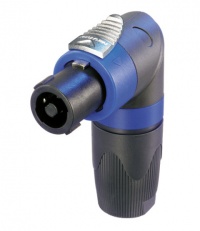
— Click image for details —
If you call Mark and tell him you want the cable for the Bose B1, you will get one that is made to our specifications. You can also any custom length cable at a very reasonable price.
- Hilmar-at-Bose[6]
German
German (translation provided by BlackForestMan)
SPEAKON Kabel gibt es in 3 verschiedenen Varianten, NL2 (2-polig), NL4 (4-polig), and NL8 (8-polig). Häufig kennt das Verkaufspersonal diese Unterschiede nicht. Das Bose B1 Bassmodul benötigt aber ein NL4 bei dem alle 4 Anschlüsse verbunden sind (daher sprechen wir hier auch von einem 4-adrigen Kabel).
Fertige Kabel in verschiedenen Längen gibt es z.B. hier:
- Musikhaus Thomann
- CAE 14710-1,5 (NL4): hochflexibles Lautsprecherkabel, 4x2,5mm, 1,5m, Speakon --> Speakon
- CAE 14713-3 (NL4): hochflexibles Lautsprecherkabel, 4x2,5mm, 3m, Speakon --> Speakon
dto. gibt es auch in 5m, 10m, 15m Länge usw.
In der Regel wird auf Anfrage aber auch jedes lokale Musikgeschäft ein Speakon NL4-Kabel in passender Länge herstellen können.
Straighten the B1 Cables
Here's a tip from Nick from New Zealand
I've seen it mentioned here a few times - those wriggly uncooperative B1 leads when they're new, and no posts about how to cure the problem.
Here's 3 suggestions:
1. Taking care to hold the speakon connectors, soak the rest of the cable into a bowl of very warm/hot (not boiling) water. DO NOT GET WATER INSIDE THE SPEAKON PLUGS. This will soften the cable up, lie the cable out flat and straight to dry. This will give it a "new memory" of sorts and be easier to maintain in the future.
2. Wrap the cable or lie it flat and straight and leave it on the footpath or driveway in the sun. Shouldn't take long.
3. Leave them wrapped in your car/van on a hot summer day. This is usually how I unintentionally fix all of my cable messes.
B1 New/Old
On March 29th 2007 Bose® announced the Model II and the T1 ToneMatch Audio Engine. At the same they changed the specifications for the B1 showing the weight as 25.1 pounds (previously 28 pounds).
The updated version started shipping in May 2007 but there may still be older inventory in the supply chain.
Differences
- The version 1 and version 2 B1 differences are minimal. They perform exactly the same, and look exactly the same from the front. The only cosmetic difference is that the handle on the 'new' B1 is reinforced plastic instead of metal, and the screws affixing the handle are slightly smaller. Only a trained eye can tell.
- The difference is small enough that theres no distinction in our internal system whether a B1 is the older version or the newer version - so your sales person will not be able to identify which version you will get (an aside - your sales representative may have been confused because other Bose products are sometimes available in an older and newer version for a short amount of time while the older version is being sold out - but this is only for major product updates). Our stage here in Framingham for all our high-profile press events and shows has a 50/50 mix of B1's old vs. new if that's any indication.
-- Source: MikeZ-at-Bose
How to Tell
The part numbers and descriptions of the revised B1 are the same as the original. Here is how you can tell the difference.
- If you call Guitar Center (GC) you can identify which B1 they have over the phone (if they can go look at the carton in back.)
- The older B1 says on the outside of the box 'Personalized Amplification System, Bass Module B1'. The box is also bigger, measuring 23"x15"x19"(LWH).
- The new style B1 says "L1 System, Bass Module B1" on the carton. The carton is also smaller, measuring 21.5"x13.5"x17"(LWH).
- There is no way to identify which B1 is which without physically looking at the box. The product # is the same
-- MikeZ-at-Bose[7]
Pictures
B1 New


B1 "Classic"


Classic Extended Bass Package
In 2003 when the Bose® Personalized Amplification System™ family of products launched, the Extended Bass Package was a "Classic" Powerstand with 6 B1 Bass Modules. That was discontinued.
In fall 2005, the PackLite® power amplifier model A1 Extended Bass Package (A1 + two B1 Bass Modules) was introduced.
This is a look back at how we connected the Classic Extended Bass Package.
See Classic Extended Bass Package for more details.
Replacement Parts
The B1 front Grille is available as a replacement part. Part Number 263992 — this includes the Bose® logo.
The Bose® logo is not available as a separate replacement part.
You can order this through Support.
Mechanical Specifications
15"H x 10.25"W x 17.75"D ( 38 cm x 26 cm x 45 cm )
25.1 lbs (11.4 kg) Source: B1 Installation Guide International 2006.pdf
8 ohms
Compatibility with Other Members of the L1® Family of Products
Cylindrical Radiator®s
Cylindrical Radiator®s are not interchangeable across models
Specifically (and without exception)
- The Cylindrical Radiator speaker sections of the L1 Classic, the L1 Model I and L1 Model 1S and the L1 Model II are not compatible with each other.
- The Cylindrical Radiator speaker sections of the L1 Classic can only be used with the Classic PS1 power stand (no orange markings on the input/output panel).
- The Cylindrical Radiator speaker sections of the L1 Model I (orange markings on the back of both sections) can only be used with the Model I PS1 power stand (orange markings on the input/output panel).
- The Cylindrical Radiator speaker sections of the L1 Model II can only be used with the L1 Model II power stand.
- The Cylindrical Radiator speaker sections of the L1 Model 1S can only be used with the L1 Model 1S power stand.
T1 ToneMatch® Audio Engine, T4S/T8S ToneMatch® Mixers


- The ToneMatch mixers can be used with the
PackLite® power amplifier Model A1

- The PackLite® power amplifier model A1 can be used with
B1 Bass Module
- The B1 Bass Module can be used with the
B2 Bass Module
- The B2 Bass Module can be used with the
- L1 Classic Normal Mode only
- L1 Model I Normal Mode only
- L1 Model 1S all modes
- L1 Model II all modes but L1® Model II Power Stand Firmware version 1.4 or later required
- ↑ Bass Modules
- ↑ not applicable to Model II or Model 1S - both must use at least one Bass module.
- ↑ B1 Port Orientation: Hilmar's post in the Bose® Musicians Community Message Boards
- ↑ B1 Cable Connections
- ↑ L1 Classic Failure
- ↑ B1 Cables
- ↑ MikeZ-at-Bose talks about identifying B1s (old/new) New B1 vs. Old