Presets / ToneMatch® / Downloads: Difference between revisions
mNo edit summary |
mNo edit summary |
||
| (8 intermediate revisions by the same user not shown) | |||
| Line 1: | Line 1: | ||
{{Bose Reviewed}} | |||
'''T4S/T8S only''' | |||
;First make sure you have the latest firmware for your ToneMatch Mixer. | |||
{{ToneMatch Mixer Firmware Fast track 123}} | |||
;When your firmware is up to date, you can download and install additional ToneMatch Presets | |||
=== {{ToneMatch}} Presets === | === {{ToneMatch}} Presets === | ||
| Line 45: | Line 12: | ||
--> | --> | ||
<table> | <table> | ||
<tr><th>File</th><th>Date Released</th></tr> | <tr><th>File</th><th>Date Released</th></tr> | ||
<!-- | |||
<tr><td valign="top"> {{L1 Updater}} </td><td> 2019</td></tr> | <tr><td valign="top"> {{L1 Updater}} </td><td> 2019</td></tr> | ||
<tr><td> [http://bose.infopop.cc/eve/forums/a/ga/ul/7811002525/L1_Updater_Instructions_1.0.pdf Instructions Only]</td><td> 2007/06/29 </td></tr> | <tr><td> [http://bose.infopop.cc/eve/forums/a/ga/ul/7811002525/L1_Updater_Instructions_1.0.pdf Instructions Only]</td><td> 2007/06/29 </td></tr> | ||
--> | |||
<tr><td valign="top">[[Media:ToneMatch_Banks_All.pdf|Detailed list of the new ToneMatch™ presets]]</td><td> 2008/01/28 </td> | <tr><td valign="top">[[Media:ToneMatch_Banks_All.pdf|Detailed list of the new ToneMatch™ presets]]</td><td> 2008/01/28 </td> | ||
<td valign="top" rowspan="15"> | <td valign="top" rowspan="15"> | ||
Latest revision as of 05:18, 19 December 2024
T4S/T8S only
- First make sure you have the latest firmware for your ToneMatch Mixer.
Update for Firmware version 1.2.3 released August 2024
Download the file that is appropriate to your operating system. If you download these, you have all the files you need to do the update process: ToneMatch Updater software, instructions, and the Firmware file (*.bos)
- Windows
ToneMatch Updater for Windows with firmware version 1.2.3
Contains updater and firmware *.bos files for both T4S and T8S
OR
- Mac
ToneMatch Updater for Mac with firmware version 1.2.3
Contains updater and firmware *.bos files for both T4S and T8S
If you have trouble with the file above on your Mac,
- Download the ToneMatch Updater Program first.
- Download T4ST8S123.zip - the firmware only (*.bos) files for the T4S and T8S. Extract these to the same folder as you have the ToneMatch Updater program.
- Run the ToneMatch Updater Program.
- Note
- Performing the firmware update will reset the USB A playback level all the way down (Mute)
- When your firmware is up to date, you can download and install additional ToneMatch Presets
ToneMatch® Presets
| File | Date Released | |
|---|---|---|
| Detailed list of the new ToneMatch™ presets | 2008/01/28 |
 |
| Audix Corporation | 2007/07/06 | |
| Breedlove
Breedlove superceded | 2008/01/28 2007/07/06 | |
| Composite Acoustics | 2007/07/06 | |
| David Gage / TheRealist® | 2007/07/06 | |
| DeMars Guitars | 2008/08/04 | |
| Duncan/Turner | 2007/07/06 | |
| Gibson | 2009/01/17 | |
| Lakland | 2007/07/06 | |
| LR Baggs | 2007/07/06 | |
| NS Design | 2007/07/06 | |
| Ovation | 2008/01/28 | |
| Renaissance | 2007/07/06 | |
| Rickenbacker | 2007/07/06 | |
| Takamine | 2008/01/28 | |
| Taylor | 2007/07/06 | |
| All of the above | 2008/08/04 |

Original Factory Settings
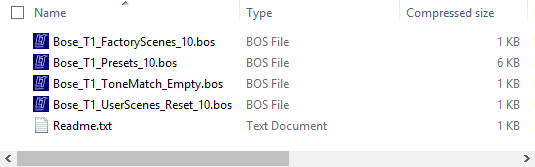
- T1® Original Factory Presets and documents ← Download link.
Use this file to restore the T1 ToneMatch® Audio Engine to its original factory configuration. It contains: Original T1 Factory Scenes, Presets and User Scenes. Use these files for backup purposes or for resetting your T1 back to it's original state.
- Original T1 Factory Scenes.
- Original T1 Presets. (link goes to a list of the original presets)
- Original T1 Users Scenes. Note this is a blank bank.
- Empty ToneMatch® A, B or C Bank. Use this if you want to remove any of your ToneMatch® A, B or C banks.
L1® Updater Application
In order to use the files described below you need to install the L1® Updater Application.
|
|
ToneMatch® Updater Software application. (two versions available)
If you have questions please see ToneMatch Updater discussion .
macOS Issues[Filename] can't be opened because the identity of the developer cannot be confirmedIf you see "[Filename] can't be opened because the identity of the developer cannot be confirmed" message displayed Mac OSX users may see this message when trying to install a Bose app. If this message appears, try the following: Mac users may need to hold the Control key (Ctrl) when opening the file. Various versions of the Mac OS cannot identify Bose as a developer. The Mountain Lion version of OS X (10.8) includes a feature called Gatekeeper to protect users from installing applications of non-Apple identified developers. The Mavericks version of OS X (10.9.5) temporarily cannot identify Bose as a developer as well. To open the application, follow these steps: How to open the app anyway
This bypasses Gatekeeper only for this one app, not globally. More information on Gatekeeper can be found at http://support.apple.com/kb/HT5290
|

Original ToneMatch® Presets
T1® Original Factory Presets and documents
Load the Bose_T1_Presets_10.bos file in the second bank.

Original Factory Scenes
Load the Bose_T1_FactoryScenes_10.bos file in the sixth bank.

Original User Scenes (5 blank scenes)
T1® Bank of 5 Blank User Scenes Load the Bose_T1_UserScenes_Reset_10.bos file in the seventh bank.

Misprint
The T1® Original Factory Presets and documents shows an item
Acoustic Guitars - Taylor w/Fishman
This preset is not included in the Presets.

Version 2.0 Presets for L1 Classic and L1 Model I
Presets 2 Upgrade instructions