S1 Pro+ USB Charging Port: Difference between revisions
mNo edit summary |
mNo edit summary |
||
| (5 intermediate revisions by the same user not shown) | |||
| Line 1: | Line 1: | ||
{{S1 Pro+ icon}} | |||
{{DivToc | {{DivToc | ||
|RightHead = Overview | |RightHead = Overview | ||
|RightBody = The S1 Pro+ USB Charging Port can charge your mobile device, as described in the [[Media:S1 Pro+ Owners Guide.pdf|S1 Pro+ Owners Guide]]. For most people, this means a phone or tablet. The port | |RightBody = The S1 Pro+ USB Charging Port can charge your mobile device, as described in the [[Media:S1 Pro+ Owners Guide.pdf|S1 Pro+ Owners Guide]]. For most people, this means a phone or tablet. The port supplies: 5V 1.5A | ||
[[File:S1 Pro+ USB Charging Port.jpg|400px]] | [[File:S1 Pro+ USB Charging Port.jpg|400px]] | ||
| Line 16: | Line 17: | ||
[[File:S1 Pro+ Sennheiser AVX USB power.jpg|600px]] | [[File:S1 Pro+ Sennheiser AVX USB power.jpg|600px]] | ||
In case you're wondering why I would use a third-party wireless system, the Sennheiser AVX system shown here operates in the 1.9 GHz band—away from TV and Wi-Fi interference. The range is two to three times that of the Bose transmitter. | |||
[File:Sennheiser XSD-D XLR Base Set.jpg|link=https://www.sennheiser.com/en-us/catalog/products/wireless-systems/xsw-d-xlr-base-set/xsw-d-xlr-base-set-508491| | |||
The USB Charging port works equally well with the Sennheiser XSW-D systems with a USB A to USB C cable. | |||
[[File:Sennheiser XSD-D XLR Base Set.jpg|link=https://www.sennheiser.com/en-us/catalog/products/wireless-systems/xsw-d-xlr-base-set/xsw-d-xlr-base-set-508491|300px]] | |||
===Power a Guitar Processor=== | ===Power a Guitar Processor=== | ||
| Line 24: | Line 28: | ||
[[File:USB Power Port - 1.jpg|600px]] | [[File:USB Power Port - 1.jpg|600px]] | ||
--> | --> | ||
[[File:USB Power Port - 2.jpg|600px]] | [[File:USB Power Port - 2.jpg|600px]] | ||
This documents the other connections shown in the photo above. For more information about using the Insert Mode, see [[S1 Pro+ Wireless Insert Mode With Modeler]] | This documents the other connections shown in the photo above. For more information about using the Insert Mode, see | ||
[[S1 Pro+ Wireless Insert Mode With Modeler]] | |||
[[File:S1 Pro+ Wireless Insert Mode Modeler 9.jpg|600px]] | [[File:S1 Pro+ Wireless Insert Mode Modeler 9.jpg|600px]] | ||
Latest revision as of 02:38, 31 July 2024

Overview
The S1 Pro+ USB Charging Port can charge your mobile device, as described in the S1 Pro+ Owners Guide. For most people, this means a phone or tablet. The port supplies: 5V 1.5A

Here are some other uses for it.
Power a Wireless Receiver
The Sennheiser AVX Wireless System operating range is 100 feet (30 meters). While the transmitter battery life is rated at greater than 10 hours, the receiver (shown in the picture) is rated at greater than 4 hours. You can extend this time by connecting to the S1 Pro+ USB Power port as shown below.

In case you're wondering why I would use a third-party wireless system, the Sennheiser AVX system shown here operates in the 1.9 GHz band—away from TV and Wi-Fi interference. The range is two to three times that of the Bose transmitter.
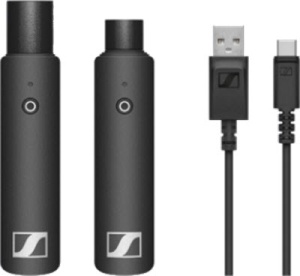
The USB Charging port works equally well with the Sennheiser XSW-D systems with a USB A to USB C cable.
Power a Guitar Processor
The BOSS GT-1 Guitar Effects Processor shown below operates on batteries or an external power supply. In the picture below, we're using a USB A to 9-volt power adapter to connect the S1 Pro+ USB Power port to the Boss 9-volt input jack.

This documents the other connections shown in the photo above. For more information about using the Insert Mode, see
S1 Pro+ Wireless Insert Mode With Modeler
