S1 Pro Microphone vs Guitar Volume: Difference between revisions
| (One intermediate revision by the same user not shown) | |||
| Line 42: | Line 42: | ||
If you connect a microphone or a guitar to a ToneMatch (or other) mixer, turn the output volume down, connect it to the S1 Pro through a 1/4 inch input, you can get the same behavior as connecting a microphone to the XLR input - very little response until you turn up the volume. The point at which you hear sound will be directly related to the output volume on the mixer. That point is may not be 12:00 o'clock. It will depend on the output of the mixer. | If you connect a microphone or a guitar to a ToneMatch (or other) mixer, turn the output volume down, connect it to the S1 Pro through a 1/4 inch input, you can get the same behavior as connecting a microphone to the XLR input - very little response until you turn up the volume. The point at which you hear sound will be directly related to the output volume on the mixer. That point is may not be 12:00 o'clock. It will depend on the output of the mixer. | ||
==== Suggestions ==== | |||
If you've got the microphone channel volume all the way up, you may be able to get a bit more by turning up the bass and treble. | |||
When the channel LED light goes solid red, you have reached the maximum volume available for the channel. Adding a mixer between the microphone and the S1 Pro will not give you a louder, cleaner signal if it is already solid red. All you'll get is distortion. | |||
If you have a microphone with relatively low sensitivity (e.g., Shure SM58), consider getting a microphone with a higher sensitivity. See [[Dynamic Microphones]] for a list. | |||
Make sure you have the ToneMatch Preset switch set to MIC for the microphone and GUITAR for the guitar. | |||
If you've maxed out your options with the microphone channel, try turning down the guitar to get a better mix. | |||
====Impedance Matching Transformer ==== | ====Impedance Matching Transformer ==== | ||
Latest revision as of 20:39, 28 July 2024
Different Volume Control Levels
- Question
- Why do I have to turn up the microphone higher than guitar?
- Answer
- The output level of the guitar is louder than the output level of the microphone. That's why we have to turn up the microphone higher.
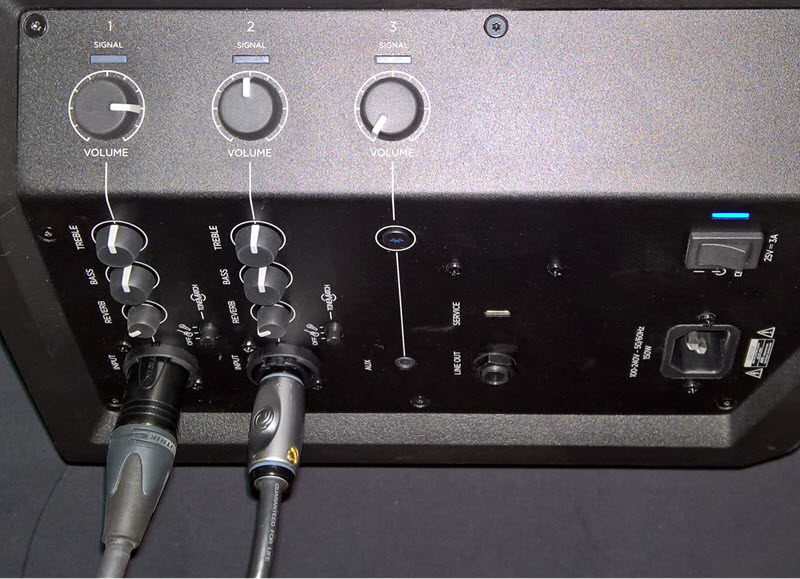
In the picture above the
- Microphone is connected to channel 1
- Guitar is connected to channel 2
The volume on channel 1 (microphone) is higher than on channel 2 (guitar) because the signal from the microphone is lower than from the guitar.
Background Information
- The power amps are running at full volume
- The volume controls are trim controls:
- Note how quiet the S1 Pro is when there’s no input source and the volume, is all the way up – The volume controls are trim not preamp/gain controls
- The center detent is a convenient point of reference, especially when you can't see the controls well at a gig
It is not an indication of a specific amount of gain - When you turn the volume controls all the way up, you have reached the maximum volume the S1 Pro is capable of producing for that source
- Note the clip lights. If you see red, turn down to avoid distortion. You have reached the maximum usable volume just below clipping
The maximum usable volume for an input is just before the clip lights come on. With a guitar with a preamp, that might be at 12:00 o’clock compared to a microphone at 3:00-4:00 o’clock. There’s no dysfunction here. It’s a reflection that the output level of the guitar is higher than the microphone.
We want you to enjoy your S1 Pro system without having to be concerned about the inner workings. Just plug in your microphone and instrument, turn up the volume and perform.
Please use the volume controls to get the loudness you need for your show. It's not necessary to have the volume controls at the same level. And unless you have similar input sources it's unlikely the controls will be at the same level.
Maximum Usable Volume
When the channel is clipping (red light), or you hear audible distortion, you have reached the maximum usable volume the S1 Pro can provide. This can happen lower or higher on the volume control depending on the signal strength of your source.
Unless you have an input source that is lower than a typical microphone or guitar with a passive pickup, you should not need to add another device between your source and the S1 Pro. You can add preamps, processors, pedals, or transformers if you like, but it's unlikely that any of these will change the maximum volume the S1 Pro system can provide.
Volume below and above 12:00 o'clock on volume controls
There is no special processing or split in the way we handle the signals below and above 12:00 o'clock on the volume control.
What you are experiencing is directly related to the input signal. If you have a very low input signal (e.g., microphone or bare piezo pickup), you will need to turn up volume control to hear that signal, compared to a higher input signal (e.g., microphone through a mixer or wireless receiver or a guitar with a built-in preamp).
If you connect a microphone or a guitar to a ToneMatch (or other) mixer, turn the output volume down, connect it to the S1 Pro through a 1/4 inch input, you can get the same behavior as connecting a microphone to the XLR input - very little response until you turn up the volume. The point at which you hear sound will be directly related to the output volume on the mixer. That point is may not be 12:00 o'clock. It will depend on the output of the mixer.
Suggestions
If you've got the microphone channel volume all the way up, you may be able to get a bit more by turning up the bass and treble.
When the channel LED light goes solid red, you have reached the maximum volume available for the channel. Adding a mixer between the microphone and the S1 Pro will not give you a louder, cleaner signal if it is already solid red. All you'll get is distortion.
If you have a microphone with relatively low sensitivity (e.g., Shure SM58), consider getting a microphone with a higher sensitivity. See Dynamic Microphones for a list.
Make sure you have the ToneMatch Preset switch set to MIC for the microphone and GUITAR for the guitar.
If you've maxed out your options with the microphone channel, try turning down the guitar to get a better mix.
Impedance Matching Transformer
There's nothing gained by using an impedance matching transformer. To match the performance you get with the impedance matching transformer, without one, turn up the volume control. Either way, you have reached maximum usable volume when the input clips and you hear distortion. You may get to that point at a lower setting on the volume control with the impedance matching transformer, but with or without it, the maximum output available is the same.
You may feel better if the volume controls are closer to the same setting (using an impedance matching transformer) however, this adds another device to your signal chain. It's another potential point of failure, and a relatively large device to plug directly into the S1 Pro. You don't want to damage the input if you knock over the S1 Pro and it hits the impedance matching transformer.
Wireless Microphone Receiver
Some wireless microphone receivers have output level controls or different outputs with different signal levels.
If there is a line-level output and you use that, then the signal level will be higher than a wired microphone. You will reach the maximum usable volume at a lower setting on the volume control.