S1 Pro Firmware Update: Difference between revisions
mNo edit summary |
mNo edit summary |
||
| (5 intermediate revisions by the same user not shown) | |||
| Line 1: | Line 1: | ||
{{S1 icon}} | {{S1 icon}} {{Bose Reviewed}} | ||
;This process works only with computers running Windows or iOS. | ;This process works only with computers running Windows or iOS. | ||
If you want to update the firmware for the {{S1}} without using the [[S1 Pro System with Bose Connect App|Bose Connect]] app: | If you want to update the firmware for the {{S1}} without using the [[S1 Pro System with Bose Connect App|Bose Connect]] app: | ||
# Navigate to [http://btu.bose.com the Bose Updater Site] | |||
You will need a USB cable like this. USB A to USB B Micro | |||
[[File:USB A to Micro USB.jpg|400px|USB A to USB B Micro]] | |||
# Navigate to [http://btu.bose.com the Bose Updater Site] | |||
# Follow the prompts on the screen | # Follow the prompts on the screen | ||
# When the screen looks like this connect the {{S1}} to your computer<br> [[File:S1 Pro Firmware Update 1.jpg|400px]] | # When the screen looks like this connect the {{S1}} to your computer<br> [[File:S1 Pro Firmware Update 1.jpg|400px]] | ||
| Line 9: | Line 14: | ||
# Click Install Update and follow the prompts on the screen | # Click Install Update and follow the prompts on the screen | ||
If you have difficulty doing the steps above please | If you have difficulty doing the steps above or updating the firmware does not resolve your issue, please contact [[Support|Bose Support]]. | ||
=== S1 Pro Firmware History === | |||
{{S1 Pro Firmware History}} | |||
== iOS or iPadOS Bose Connect Can't Connect to S1 Pro == | |||
{{iOS iPadOS Bose Connect Can't Connect to S1 Pro}} | |||
---- | ---- | ||
[[Category:S1]] | [[Category:S1 Pro]] | ||
[[Category:Downloads]] | [[Category:Downloads]] | ||
[[Category:Firmware]] | [[Category:Firmware]] | ||
Latest revision as of 20:41, 7 March 2020

- This process works only with computers running Windows or iOS.
If you want to update the firmware for the S1 Pro System without using the Bose Connect app:
You will need a USB cable like this. USB A to USB B Micro

- Navigate to the Bose Updater Site
- Follow the prompts on the screen
- When the screen looks like this connect the S1 Pro System to your computer
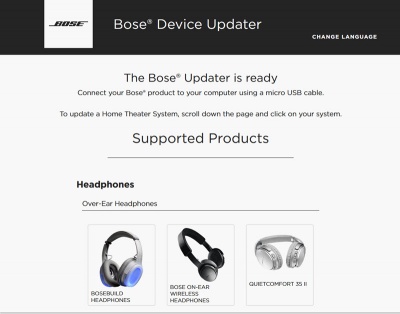
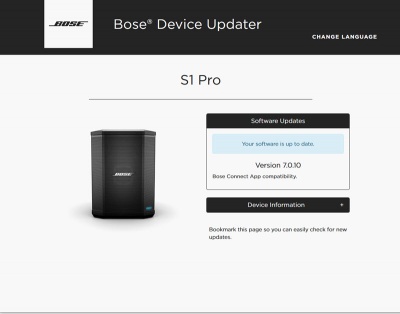
- If the screen says your system is up to date, you don't have to do anything more.
- If Bose Support has told you to reload the latest firmware
Type adv followed by the up-arrow, down-arrow
The screen will look like this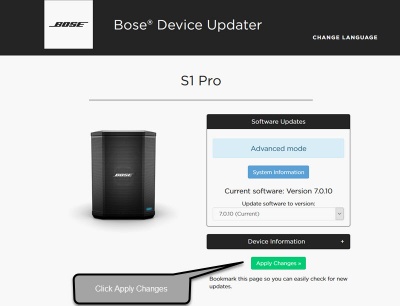
- Click Install Update and follow the prompts on the screen


If you have difficulty doing the steps above or updating the firmware does not resolve your issue, please contact Bose Support.
S1 Pro Firmware History
| Firmware version | Date | Notes |
|---|---|---|
| 7.1.8 | April 13, 2020 |
|
| 7.1.7 | March 12, 2020 |
|
| 7.1.5 | January 6, 2020 |
|
| 7.1.1 | 2019 | Minor updates for compatibility with the Bose Connect App Version 9.x |
| 7.1.0 | June 3, 2018 |
New features of v7.0.10 and Bose Connect App Version 6.1.0
|
| 6.x.x | January 2018 | Factory installed |
If you have difficulty updating your firmware, please contact Bose Support.
iOS or iPadOS Bose Connect Can't Connect to S1 Pro
If you cannot connect the Bose Connect app to your Bose Bluetooth enabled devices
- Turn off or disable Bluetooth on all devices in the vicinity except the one running the Bose Connect app and the S1 Pro.
- Check your iOS Bluetooth permissions
Please check your device
- Settings
- Privacy
- Bluetooth
- Ensure the Bose Connect app has permission to use Bluetooth
- Bluetooth
- Privacy
If you don't see the option to give the Bose Connect app permission to use Bluetooth, please Uninstall Bose Connect and then Install it again.
- If you have given the Bose Connect app permission to use Bluetooth and the Bose Connect still cannot connect your Bose Bluetooth devices please
- Turn off or disable Bluetooth on all devices in the vicinity except the one running the Bose Connect app and the S1 Pro.
- Uninstall Bose Connect and then Install it again
- On your iOS or iPadOS device go to
- Settings
- Bluetooth
- Select your Bose Bluetooth device (e.g. S1 Pro) and Forget Device
- Bluetooth
- Settings
Put Bose device (e.g., S1 Pro) into pairing mode (press the Bluetooth button until the Bluetooth light flashes)
- On your iOS or iPadOS device go to
- Settings
- Bluetooth
- Select your Bose Bluetooth device (e.g. S1 Pro) and pair it
- Bluetooth
- Settings
Open the Bose Connect app and follow any instructions it displays to find your device