T8S to L1 Compact: Difference between revisions
Jump to navigation
Jump to search
Created page with "{{Compact icon}} {{T8S icon}} <p>Here's a quick overview of how you can connect a {{T8S}} to an {{Compact}}</p> *Leave the {{T8S}} and {{Compact}} turned off until you have..." |
|||
| (3 intermediate revisions by the same user not shown) | |||
| Line 1: | Line 1: | ||
{{Compact icon}} {{T8S icon}} | {{Compact icon}} {{T8S icon}} | ||
<div class="tocdiv"> | |||
<div>__TOC__</div> | |||
<div><h2>Introduction</h2> | |||
Here's a quick overview of how you can connect a {{T8S}} to an {{Compact}} | |||
</div> | |||
</div> | |||
=== Connections === | |||
*Leave the {{T8S}} and {{Compact}} turned off until you have things connected | *Leave the {{T8S}} and {{Compact}} turned off until you have things connected | ||
*Connect the [[ToneMatch Power Supply]] to the {{T8S}} <!-- (T4S power supply sold separately) --> | *Connect the [[ToneMatch Power Supply]] to the {{T8S}} <!-- (T4S power supply sold separately) --> | ||
<br>[[File:L1 tonematch powersupply acc bl lg.jpg|link=https://www.bose.com/en_us/products/speakers/speaker_accessories/l1_tonematch_powersupply_acc.html#v=l1_tonematch_powersupply_acc_black|100px|T1 ToneMatch® Audio Engine power supply]] | <br>[[File:L1 tonematch powersupply acc bl lg.jpg|link=https://www.bose.com/en_us/products/speakers/speaker_accessories/l1_tonematch_powersupply_acc.html#v=l1_tonematch_powersupply_acc_black|100px|T1 ToneMatch® Audio Engine power supply]] | ||
*Connect the {{T8S}} Right Output <br>[[File:T8S Main14 right.jpg|400px|T8S Main Right Output 1/4"]]<br>to [[Compact]] channel 2<br />[[File: | *Connect the {{T8S}} Right Output <br>[[File:T8S Main14 right.jpg|400px|T8S Main Right Output 1/4"]]<br>to [[Compact]] channel 2<br />[[File:T4S to L1 Compact IO Closeup.jpg|400px]] | ||
:Use a 1/4 inch Tip-Ring-Sleeve cable for best results<br /> | :Use a 1/4 inch Tip-Ring-Sleeve cable for best results<br /> | ||
[[File:14trstotrs.jpg|200px]] | [[File:14trstotrs.jpg|200px]] | ||
=== Settings === | |||
On the {{Compact}}: | On the {{Compact}}: | ||
*Set the channel volume off for channel 1 | *Set the channel volume off for channel 1 | ||
| Line 23: | Line 30: | ||
*Connect all your sound sources to the {{T8S}} | *Connect all your sound sources to the {{T8S}} | ||
*Turn on the {{Compact}} | *Turn on the {{Compact}} | ||
*Bring up the channel volume on the {{Compact}} to | *Bring up the channel volume on the {{Compact}} to 10:00 o'clock position. | ||
Control the overall volume with the {{T8S}} master volume. | |||
If you see the {{Compact}} clipping (red light) or you hear audible distortion, turn down the Master Volume on the T8S. If you still see clipping on the {{Compact}} turn down the volume on {{Compact}} channel 2. | |||
If you have questions, please join the conversation in the [https://www.bosepro.community/g/portable/topic/can-the-compact-connect-to-a-t4s-at-all Bose Portable PA Community]. | If you have questions, please join the conversation in the [https://www.bosepro.community/g/portable/topic/can-the-compact-connect-to-a-t4s-at-all Bose Portable PA Community]. | ||
Latest revision as of 18:13, 9 November 2019


Introduction
Here's a quick overview of how you can connect a T8S ToneMatch mixer to an L1 Compact
Connections
- Leave the T8S ToneMatch mixer and L1 Compact turned off until you have things connected
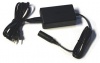
- Connect the ToneMatch Power Supply to the T8S ToneMatch mixer
- Connect the T8S ToneMatch mixer Right Output
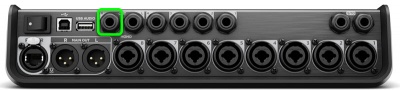
to Compact channel 2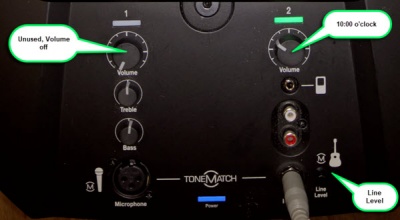


- Use a 1/4 inch Tip-Ring-Sleeve cable for best results

Settings
On the L1 Compact:
- Set the channel volume off for channel 1
- Set the channel volume off for channel 2
- Turn on the T8S ToneMatch mixer
- Set the Rotary Selector to PAN/AUX
- Press the CH EDIT button for each channel you are using and pan the input hard RIGHT
- Note: Steps 1 and 2 above are one-time-only. You don't have to change this unless you get another L1 Compact and want to run in stereo
- Connect all your sound sources to the T8S ToneMatch mixer
- Turn on the L1 Compact
- Bring up the channel volume on the L1 Compact to 10:00 o'clock position.
Control the overall volume with the T8S ToneMatch mixer master volume.
If you see the L1 Compact clipping (red light) or you hear audible distortion, turn down the Master Volume on the T8S. If you still see clipping on the L1 Compact turn down the volume on L1 Compact channel 2.
If you have questions, please join the conversation in the Bose Portable PA Community.