T8S ToneMatch Mixer to T8S ToneMatch Mixer: Difference between revisions
Jump to navigation
Jump to search
mNo edit summary |
mNo edit summary |
||
| (2 intermediate revisions by the same user not shown) | |||
| Line 12: | Line 12: | ||
Second T8S | Second T8S | ||
* On Aux Input 9/10, set the pan (9) left, (10) right. | * On Aux Input 9/10, set the pan (9) left, (10) right.<br>[[File:T8S Aux 910 Pan LR.jpg|400px]] | ||
* On Aux Input 9/10 set | |||
* On Aux Input 9/10 set levels to 100%<br>[[File:T8S Aux 910 Level 100.jpg|400px]] | |||
Connect the left and right outputs of the second T8S to your existing powered loudspeakers. | Connect the left and right outputs of the second T8S to your existing powered loudspeakers. | ||
| Line 19: | Line 20: | ||
---- | ---- | ||
[[Category:T8S]] | [[Category:T8S]] | ||
[[Category:Daisy]] | [[Category:Daisy Chain]] | ||
Latest revision as of 07:41, 23 August 2019
First T8S
Connect the left and right outputs of the first T8S to the Aux Inputs 9/10 of the second T8S.
- Use balanced cables
- 1/4 inch (6.3 mm) Tip-Ring-Sleeve
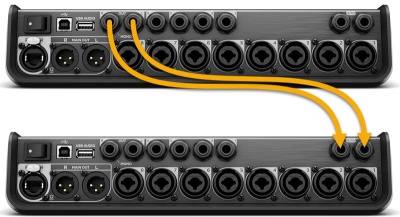

- OR
- XLR to 1/4 inch (6.3 mm) Tip-Ring-Sleeve
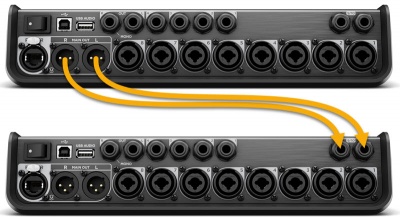

- Set the Master Output to 10:00 o'clock
Second T8S
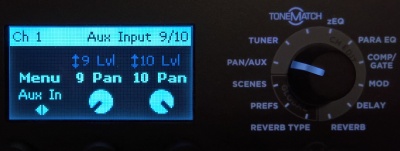
- On Aux Input 9/10, set the pan (9) left, (10) right.

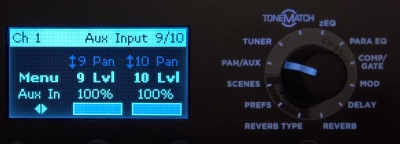
- On Aux Input 9/10 set levels to 100%

Connect the left and right outputs of the second T8S to your existing powered loudspeakers.