T1 to T8S to L1 Model II: Difference between revisions
mNo edit summary |
mNo edit summary |
||
| (11 intermediate revisions by the same user not shown) | |||
| Line 1: | Line 1: | ||
{{Model II icon}}{{T8S icon}}{{T1 icon}} | |||
< | <div class="tocdiv"> | ||
< | <div>__TOC__</div> | ||
<div>This is an example of how you can connect a {{T1}} to a {{T8S}} to a single {{Model II}} systems. You can connect the {{T1}} to | |||
* T8S Channel 1 through 8 | * T8S Channel 1 through 8 | ||
** Connecting the the T1 to T8S channel 1 through 8 allows you to change the volume of the T1 using one of the T8S channel volume controls<br>OR | ** Connecting the the T1 to T8S channel 1 through 8 allows you to change the volume of the T1 using one of the T8S channel volume controls<br>OR | ||
* T8S Channel 9 or 10 | * T8S Channel 9 or 10 | ||
** Connecting to Aux Input Channel 9 leaves all eight full featured channels available for other inputs. You will need to control T1 Pan and Level using the T8S PAN/AUX settings. | ** Connecting to Aux Input Channel 9 leaves all eight full featured channels available for other inputs. You will need to control T1 Pan and Level using the T8S PAN/AUX settings. | ||
</ | </div> | ||
</ | </div> | ||
== Connect the {{T1}} Master Output to {{T8S}} Channel 8== | == Connect the {{T1}} Master Output to {{T8S}} Channel 8== | ||
Connecting | Connecting the T1 to T8S channel 1 through 8 allows you to change the volume of the T1 using one of the T8S channel volume controls | ||
[[File:T1 to T8S to L1 Model II x 1 Channel 8.png]] | [[File:T1 to T8S to L1 Model II x 1 Channel 8.png]] | ||
| Line 29: | Line 23: | ||
[[File:T1 to T8S to L1 Model II x 1 Channel 9.png]] | [[File:T1 to T8S to L1 Model II x 1 Channel 9.png]] | ||
=== {{T8S}} PAN/AUX Input Settings === | === {{T8S}} PAN/AUX Input Settings === | ||
| Line 38: | Line 32: | ||
== L1 Model II | == T1 == | ||
This assumes that you will run the {{T1}} output as mono. | |||
You will need a [[T1 ToneMatch® Audio Engine power supply]]. You won't be connecting the T1 to a power stand. | |||
{{T1 ToneMatch® Audio Engine power supply}} | |||
== L1 Model II == | |||
=== Connection === | |||
{{Balanced TRS from T1 to T8S}} | |||
===Gain Staging === | |||
{{L1 Model II Analog Input Gain Staging}} | {{L1 Model II Analog Input Gain Staging|Device={{T8S}}}} | ||
---- | ---- | ||
Latest revision as of 15:04, 8 April 2019


- T8S Channel 1 through 8
- Connecting the the T1 to T8S channel 1 through 8 allows you to change the volume of the T1 using one of the T8S channel volume controls
OR
- Connecting the the T1 to T8S channel 1 through 8 allows you to change the volume of the T1 using one of the T8S channel volume controls
- T8S Channel 9 or 10
- Connecting to Aux Input Channel 9 leaves all eight full featured channels available for other inputs. You will need to control T1 Pan and Level using the T8S PAN/AUX settings.
Connect the T1 ToneMatch Audio Engine Master Output to T8S ToneMatch mixer Channel 8
Connecting the T1 to T8S channel 1 through 8 allows you to change the volume of the T1 using one of the T8S channel volume controls

Connect the T1 ToneMatch Audio Engine Master Output to T8S ToneMatch mixer Aux Input Channel 9
Connecting to Aux Input Channel 9 leaves all eight full featured channels available for other inputs. You will need to control T1 Pan and Level using the T8S PAN/AUX settings.

T8S ToneMatch mixer PAN/AUX Input Settings
Bose engineered the T4S/T8S ToneMatch mixers to have four (T4s) / eight (T8S) full-function channels and two Auxiliary inputs. The Aux inputs 5/6 (T4S) or 9/10 (T8S) are routed directly to the Main Output.
You can use the Pan and Level adjustments accessible through the PAN/AUX menu. There are no changes to routing, or signal processing available. Only T4S/T8S channels one through four (T4S) / channels one through eight (T8S) can be routed to the Aux Outputs.
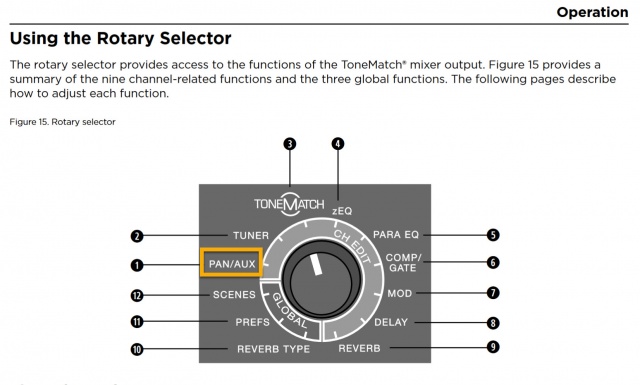
The Aux inputs are useful for sources that have their own volume and signal processing (e.g. EQ or effects). They are similar to an effects return channel on other mixers. Use the Master Volume to raise and lower the volume of the Aux inputs in sync with the other channels. To change the volume of the Aux inputs relative to the other inputs you can use the AUX/PAN Level (soft menu), or on the source device.
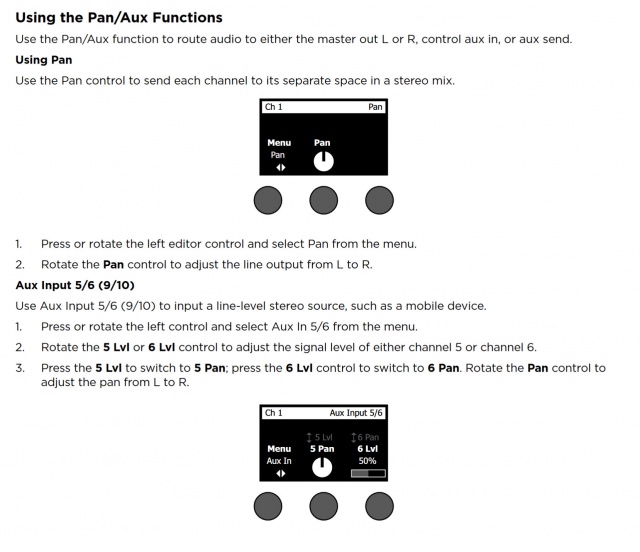
Related discussions: n/a
On the T8S ToneMatch mixer on the PAN/AUX setting for Aux Input (Channel 9) set the Pan to Left, Right, or Center as required. Right will send the T1 ToneMatch Audio Engine output to the L1 Model II connected to the Right output.
T1
This assumes that you will run the T1 ToneMatch Audio Engine output as mono.
You will need a T1 ToneMatch® Audio Engine power supply. You won't be connecting the T1 to a power stand.
This is the power supply for the ToneMatch mixers (T1 ToneMatch Audio Engine and T4S/T8S ToneMatch® Mixers).
The T8S ships with a ToneMatch power supply because the T8S cannot draw power from an L1 Model 1S or L1 Model II Power Stand.
You will need the ToneMatch power supply to power your T1 or T4S mixer when running with an L1 Classic, L1 Model I, L1 Compact, S1 Pro System or non-Bose equipment. You will need a one of these if you have two ToneMatch mixers running into a single L1® Model II or L1® Model 1S. — details below the picture.
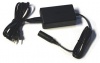
If you connect your T1 ToneMatch Audio Engine or T4S mixer to a L1 Model II or L1 Model 1S then the T1 ToneMatch® Audio Engine or T4S draws its power through the ToneMatch cable.
If you connect your ToneMatch mixer to an an L1 Classic, L1 Model I, L1 Compact or S1 Pro System or non-Bose equipment then you will need the ToneMatch power supply
If you are attaching two ToneMatch mixers to a single L1® Model II or L1 Model 1S then you will need this power supply to support the second ToneMatch mixer - the one connected to the Power Stand Analog Input.
See: Connecting Two T1®s to a Model II for details.
L1 Model II
Connection
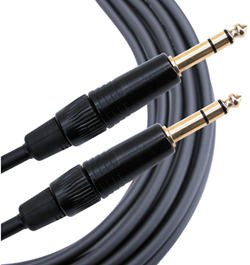
The output from the T1 ToneMatch Audio Engine is a balanced mono 1/4 inch (6.3 mm) Tip-Ring-Sleeve and the input on the T8S ToneMatch mixer is a balanced mono 1/4 inch (6.3 mm) Tip-Ring-Sleeve so use a cable like this.
 .
.
1/4" TRS Balanced Patch Cable (audiopile.net)
Gain Staging
L1 Model II Analog Input
The Analog input is a 1/4 inch (6.3 mm) Tip-Ring-Sleeve balanced input jack.

Analog input trim (volume, or gain) control
Setting the trim level on the Model II Power Stand is a one-time step. Once you have matched the output of the ToneMatch mixer to the input of the L1 you don't need to adjust it again.

T4S/T8S ToneMatch Mixers
- Connect the T8S ToneMatch mixer Main Output to the L1 Model II Analog Input
- Set the Analog Input trim to 9:00 o'clock. Control the volume with the Master Volume on the ToneMatch mixer.
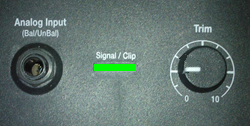
If you set the input trim higher, you will have excessive line noise. - If the Signal/Clip indicator glows red, decrease the Trim level so that it glows only green or yellow.

For third-party mixers
- Set the Trim control on the power stand to the 0 (zero) position.
- Connect the third-party mixer Main Output to the L1 Model II Analog Input
- Adjust the volume of the third-party Main Output to the reference or nominal output level.
- If the Signal/Clip indicator glows red, decrease the Trim level so that it glows only green or yellow.
