Template:Compact Channel 2: Difference between revisions
mNo edit summary |
m #click |
||
| (One intermediate revision by the same user not shown) | |||
| Line 1: | Line 1: | ||
The Compact is different from the Model 1S and Model II because it can accept stereo inputs on the Channel 2 1/8" and RCA inputs. | The Compact is different from the Model 1S and Model II because it can accept stereo inputs on the Channel 2 1/8" and RCA inputs. | ||
=== Stereo Inputs on Compact Channel 2 === | |||
If have RCA outputs from your mixer you can connect to the Compact Channel 2 RCA inputs. It's likely that the RCA outputs on the mixer are recording outputs and you may have control the output level separate from the mixer master faders. Please see your manual for details. | If have RCA outputs from your mixer you can connect to the Compact Channel 2 RCA inputs. It's likely that the RCA outputs on the mixer are recording outputs and you may have control the output level separate from the mixer master faders. Please see your manual for details. | ||
| Line 15: | Line 15: | ||
{{18toRCA}} | {{18toRCA}} | ||
=== Mono Input on Compact Channel 2 === | |||
{{#Click:L1®_Compact#Channel_2|Image:Compact Channel 2 Line Level2.png|Compact Channel 2 Input}} | [[File:Compact Channel 2 Line Level2.png|link=L1®_Compact#Channel_2||Compact Channel 2 Input]] | ||
<!-- {{#Click:L1®_Compact#Channel_2|Image:Compact Channel 2 Line Level2.png|Compact Channel 2 Input}} --> | |||
Start with the Volume set straight up and adjust so that you get a solid green signal. If you see red, turn the trim down. | Start with the Volume set straight up and adjust so that you get a solid green signal. If you see red, turn the trim down. | ||
Latest revision as of 01:10, 29 August 2017
The Compact is different from the Model 1S and Model II because it can accept stereo inputs on the Channel 2 1/8" and RCA inputs.
Stereo Inputs on Compact Channel 2
If have RCA outputs from your mixer you can connect to the Compact Channel 2 RCA inputs. It's likely that the RCA outputs on the mixer are recording outputs and you may have control the output level separate from the mixer master faders. Please see your manual for details.
If you have a way to convert the mixer stereo output to 1/8" stereo jack then you can connect to Compact Channel 2 1/8" stereo input.

Use a cable like this from your backing track source (iPod, Computer, CD / DVD player)
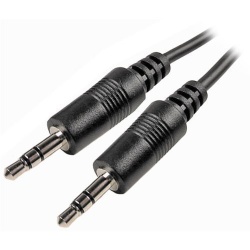
Click picture for details
or if your cable has RCA (phono) jacks you can use a cable like this.
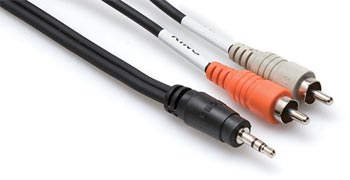
Click picture for details
Mono Input on Compact Channel 2
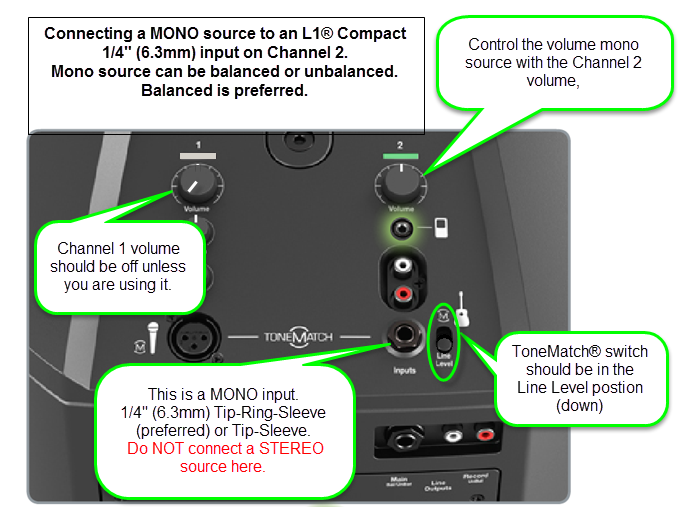
Start with the Volume set straight up and adjust so that you get a solid green signal. If you see red, turn the trim down.
The ¼ inch jack input accepts a balanced or unbalanced connection.


Can a stereo signal be used with the ¼ inch jack input?
A ¼ inch Tip-Ring-Sleeve connector carrying a stereo signal should not be used with the analog input on the L1 Compact.
Even though a ¼ inch Tip-Ring-Sleeve connector can carry a stereo signal this is not how this physical connection is used on the L1 Compact.
The ¼ inch jack input on the L1 Compact is balanced, and will therefore subtract the Left and Right signals on a stereo cable and you will hear almost no signal in the L1 Compact.


The 1/8 inch jack is STEREO not Balanced
The L1 Compact Channel 2: 1/8-inch jack is STEREO not BALANCED.
The written documentation is incorrect. It says:
- 1/8-inch stereo input - Balanced analog input for connecting audio sources such as portable mp3 players, satellite radio, laptop computers, video projectors, and smart boards.
Correction
- 1/8-inch stereo input -
BalancedStereo analog input for connecting audio sources such as portable mp3 players, satellite radio, laptop computers, video projectors, and smart boards.
Source Neil-at-Bose