Template:Sketcher: Difference between revisions
No edit summary |
m Protected "Template:Sketcher" [edit=sysop:move=sysop] |
||
| (10 intermediate revisions by 2 users not shown) | |||
| Line 1: | Line 1: | ||
== The Sketcher == | <includeonly>== The Sketcher ==</includeonly> | ||
If you would like some help planning your stage layout, or want to share something you are doing that works, please try [http://toonz.ca/ | If you would like some help planning your stage layout, or want to share something you are doing that works, please try [http://toonz.ca/sketcher/ The Sketcher]. | ||
=== Learning how it works === | |||
* [http://toonz.ca/sketcher/ | |||
* [http://toonz.ca/ | * [http://toonz.ca/sketcher/ The Sketcher] Just try it! | ||
* [http://toonz.ca/sketcher/sketcherMovie3.aspx The Sketcher Movie] See it in action: | |||
* [http://toonz.ca/sketcher/sketcherHelp.aspx Sketcher Help Notes] | * [http://toonz.ca/sketcher/sketcherHelp.aspx Sketcher Help Notes] | ||
Basic operations | ===Basic operations=== | ||
Just drag instruments from the palette of instruments onto the stage area. You can add notes (a good idea) for things that don't fit into the picture. | Just drag instruments from the palette of instruments onto the stage area. You can add notes (a good idea) for things that don't fit into the picture. | ||
When you save your changes, I will take what you have done and turn it into a regular image that is viewable on the web and post it in the [http://bose.infopop.cc/eve/forums/a/tpc/f/301107819/m/9351067312 Sketcher Discussion] with comments. When you follow this link, jump to the last page. Your Sketch will likely be there. | When you save your changes, I will take what you have done and turn it into a regular image that is viewable on the web and post it in the [http://bose.infopop.cc/eve/forums/a/tpc/f/301107819/m/9351067312 Sketcher Discussion] with comments. When you follow this link, jump to the last page. Your Sketch will likely be there. | ||
<html><a href="http://toonz.ca/sketcher/"><img src="http://toonz.ca/bose/wiki/images/ | <html><a href="http://toonz.ca/sketcher/"><img src="http://toonz.ca/bose/wiki/images/5/56/SketcherInstructions640.png" border="0" alt="click to start using the Sketcher" title="click to start using the Sketcher"></a></html> | ||
<!-- | <!-- | ||
[[Image: | [[Image:SketcherInstructions640.png]] | ||
--> | --> | ||
=== Hints === | |||
==== Notes Section ==== | ==== Notes Section ==== | ||
If you are using Sketcher to develop your own stage layouts - that's great - have fun with it. If you don't need us to do any work on your Sketch, please put a message in the Notes section so we know what you are doing. Thanks. | If you are using Sketcher to develop your own stage layouts - that's great - have fun with it. If you don't need us to do any work on your Sketch, please put a message in the Notes section so we know what you are doing. Thanks. | ||
==== Printing ==== | |||
You can print your Sketch from your computer. When you are viewing it in The Sketcher, right-click with your mouse for a menu. You will see an option to print. It's small but it works. | |||
==== Advanced Codes for the {{T1}} ==== | ==== Advanced Codes for the {{T1}} ==== | ||
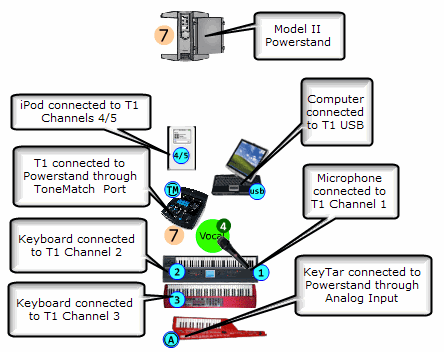
http://toonz.ca/sketcher/images/T1Connections.gif | http://toonz.ca/sketcher/images/T1Connections.gif | ||
Latest revision as of 08:04, 27 July 2011
If you would like some help planning your stage layout, or want to share something you are doing that works, please try The Sketcher.
Learning how it works
- The Sketcher Just try it!
- The Sketcher Movie See it in action:
- Sketcher Help Notes
Basic operations
Just drag instruments from the palette of instruments onto the stage area. You can add notes (a good idea) for things that don't fit into the picture.
When you save your changes, I will take what you have done and turn it into a regular image that is viewable on the web and post it in the Sketcher Discussion with comments. When you follow this link, jump to the last page. Your Sketch will likely be there.

Hints
Notes Section
If you are using Sketcher to develop your own stage layouts - that's great - have fun with it. If you don't need us to do any work on your Sketch, please put a message in the Notes section so we know what you are doing. Thanks.
Printing
You can print your Sketch from your computer. When you are viewing it in The Sketcher, right-click with your mouse for a menu. You will see an option to print. It's small but it works.